Free Microsoft MB-280 Actual Exam Questions
Dumps Box (DumpsBox) offers up-to-date practice exam questions for MB-280 certification exam which are developed and validated by Microsoft subject domain experts certified in Microsoft MB-280 . These practice questions are update regularly as we keep an eye on any recent changes in MB-280 syllabus, and when there is update our team quickly adjusts the questions. This commitment to providing the best quality exam prep material to certification aspirants is what makes DumpsBox.com the best certification exam prep website. On top of that, our strong, yet strictly moderated, community based feedback keeps the content clean and current. Each question has helpful community discussion that provides it extra perspective and introduces helpful resources for better exam preparation. This also saves students from other outdated practice questions or illicit exam dumps that can have adverse affects on career. Browse through our Microsoft MB-280 exam questions and pass your exam on first try.
You need to configure the timeline to display related Pet activities as required by Terra Flor
a. Which two actions should you perform? Each correct answer presents a complete solution. Choose
two, NOTE: Each correct selection is worth one point.
Option B cuts down to only needed activities, and C removes clutter from Posts.
It’s B and C. Removing unrelated activity types in B and hiding Posts with C fits best if Terra Flor a only wants specific Pet activities shown. Unchecking Activities entirely (D) seems too broad.
A new enterprise sales owner team must be created. The sales manager will be responsible for
adding members and removing members from the team; a developer is available to assist.
You need to create the new team.
Which two values must you configure? Each correct answer presents part of the solution. (Choose
two.)
NOTE: Each correct selection is worth one point.
Option A is a must since the team belongs to a business unit. Option E is also necessary because without a team name, you can’t create the team at all. The others don’t directly affect creation.
A E, without naming a team, you can’t create it; business unit defines where it lives.
actions should you perform? Each correct answer presents a complete solution. Choose two. NOTE:
Each correct selection is worth one point.
Maybe A and B. Adding the page from A seems necessary to actually see the business process flow in the app, since without it you might not have access to that part at all. Then B makes sense because adding columns related to the active stage to the view lets you actually see which stage is active on the record.
D sounds like extra work creating a new column that might already exist implicitly in the process flow. C seems less relevant because “All” views might not focus on the active stage specifically, which is what the question wants visible.
B/D? Adding columns from the stable to the Active view (B) could show relevant active info, and creating a dedicated "Onboarding stage" column (D) directly tracks the stage, making it visible without relying on default fields.
records.
User2 is assisting with User1’s opportunities while User1 is on vacation. User1 remains the owner of
User1’s opportunities.
User2 has reported that they CANNOT update User1’s opportunities.
You need to diagnose the issue.
What should you do?
D imo, because Owner teams let multiple users share the same ownership privileges without reassigning the record. Since User1 owns the opportunities, adding User2 to an Owner team that includes those records should let them update without changing ownership. Access teams (A) do grant rights but require configuration per record, which might not be set up here. Owner teams feel like a cleaner way to handle this for vacation cover without messing with Access team setups or reassigning records.
User2 can’t update because they don’t have explicit rights. Adding User2 to an Access team (A) would grant edit permissions without changing ownership, which fits the scenario perfectly. A.
Advisors must use one business process flow to guide them through the standard lead to invoice
process.
Each table has the following number of stages and steps:
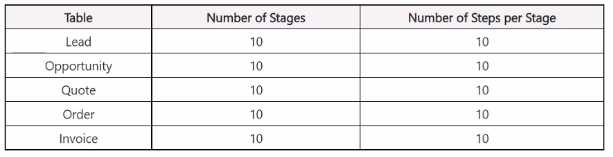
You need to modify the business process flow to make it valid. What should you reduce?
It’s A. Each stage has a max step limit, so cutting steps per stage fixes the issue without losing stages or tables. Reducing total steps or stages might be too drastic here.
Option A makes sense since each stage has a step limit, and exceeding that invalidates the flow. Reducing steps per stage is less disruptive than cutting stages or tables.
A company uses Dynamics 365 Sales with assignment rules. The assignment rules use a segment to
filter the lead records.
A sales manager wants to automatically add a series of tasks by using the same criteria as the
assignment rules.
You need to create the tasks and assign the tasks to the lead records.
In which order should you perform the actions? To answer, move all actions from the list of actions to
the answer area and arrange them in the correct order.

I’d say you gotta first confirm or create the segment since that’s the filter baseline. Then, query leads using that segment before creating and assigning tasks to those leads. Makes the flow logical.
I think starting with creating the segment makes sense since it’s the filter both for assignment and tasks. Then, you’d want to use that segment to find the leads, so that narrows down the records you’re working with. After you have the correct leads identified, creating the tasks comes next. Finally, assigning those tasks to the filtered leads wraps it up. So something like create segment > find leads > create tasks > assign tasks fits logically without extra steps.
The sales manager requires automated lead assignment rules. An administrator enables the feature.
However, you are unable to access the Assignment rules area.
You need to request access from the administrator.
Which security role should you request?
Probably A. Sales Manager usually has control over lead assignments, so asking for that role seems like the most straightforward move here. The others don’t really fit managing assignment rules directly.
B imo, Playbook Manager often manages structured sales processes and could have rights over assignment rules. The others seem more focused on broader sales or sequences, not rule configurations directly.
Which two actions should you perform? Each correct answer presents part of Ihe solution. Choose
two. NOTE: Each correct selection is worth one point.
The question talks about audit settings broadly, so focusing on table-level and system-wide access makes sense. B and F seem like the best picks here.
Makes sense that auditing the Pet table covers data changes and auditing user access is crucial—so B and F sound right to me too. These cover both data and access monitoring. B, F
You are a Dynamics 365 Sales administrator. You create a forecast by using the forecast category
layout shown in the exhibit:
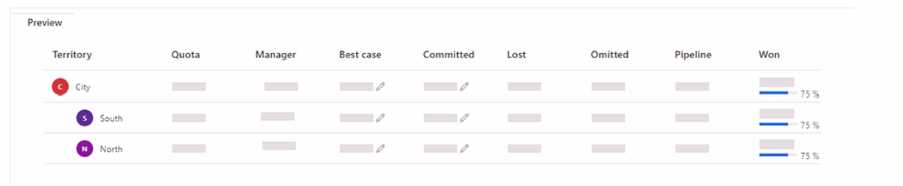
Use the drop-down menus to select the answer choice that answers each question based on the
information presented in the graphic.
NOTE: Each correct selection is worth one point.
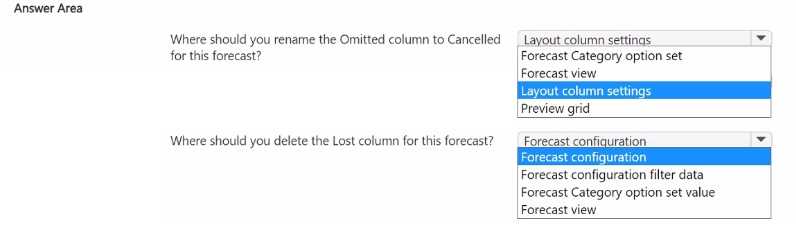
I think the key here is focusing on the actual labels in the graphic. The forecast categories clearly show “Pipeline,” “Best Case,” “Committed,” and “Won.” That rules out anything that doesn’t match exactly, so options mentioning categories like “Upside” or “Proposed” don’t fit. For pipeline stages, the image shows stages like “Qualify,” “Develop,” and “Propose,” which matches option D best. So even without version details, just matching the exact terms visible helps narrow down the choices quickly.
I’d rule out A for forecast categories because those terms don’t match the image at all. For pipeline stages, C seems off since the stages aren’t what the graphic shows. D fits best here.
the series contains a unique solution. Determine whether the solution meets the stated goals. Some
question sets might have more than one correct solution, while others might not have a correct
solution.
After you answer a question in this section, you will NOT be able to return to it. As a result, these
questions will not appear in the review screen.
You configure forecasts for a clothing manufacturer.
A salesperson updates an opportunity and wants to refresh the forecast
You need to show the salesperson how to refresh the forecast.
Solution: Update the Opportunity Forecast Category Mapping process.
Does this meet the goal?
Updating the Opportunity Forecast Category Mapping doesn’t directly refresh the forecast itself; it mainly affects how opportunities are categorized for reporting purposes. The actual refresh usually happens when the salesperson updates the opportunity record or manually refreshes the forecast in the forecast tab. So, option B makes more sense here since just updating the mapping won’t trigger a forecast refresh on its own.
B. The Opportunity Forecast Category Mapping is more about categorizing opportunities for reporting, not directly refreshing the forecast itself. To refresh a forecast, especially in Collaborative Forecasts, the user usually needs to use the refresh button or update opportunity data that triggers a recalculation. So just updating the mapping won’t really refresh what the salesperson sees immediately.
You are a Dynamics 365 Sales consultant for a food service company. The company caters meals for
client companies.
The company wants to set up a product bundle so that the sales staff does not forget items when
they create an opportunity.
The lunch bundle is created at $200.00. It will include the following.

You need to explain how the sales staff should manage the product bundle in the opportunity. What
should they do for each scenario? To answer, select the appropriate options in the answer are
a. NOTE: Each correct selection is worth one point.
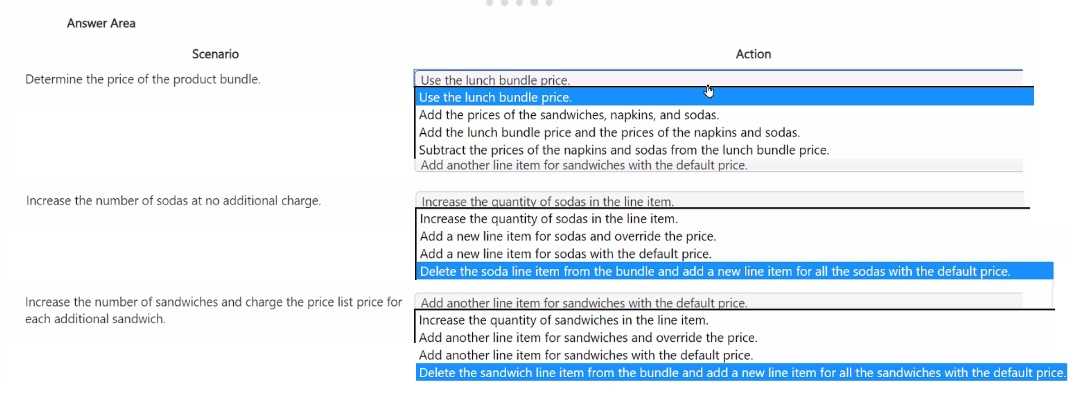
If the bundle is static, sales staff should add the whole bundle to keep the fixed $200 price and avoid missing items. Adjusting individual products after adding might break the bundle pricing or cause errors.
I’d say adding the bundle as a whole is key for the fixed $200 price. If they add items individually, they risk losing that pricing and might forget something important.
You are designing the user experience for sales users at your organization for a variety of tasks.
One of the user experience requirements is for sales users to be able to see information from custom
attributes created for originating leads for opportunities WITHOUT having to navigate to the Lead
record.
You are already signed in to the correct editing application and you now need to configure the user
experience in Dynamics 365 Sales to enable this.
Which five actions should you perform in sequence before saving and publishing your changes? To
answer, move the five appropriate actions from the list of actions to the answer are
a. Arrange the five actions in the correct order.
NOTE: More than one order of answer choices is correct. You will receive credit for any of the correct
orders you select
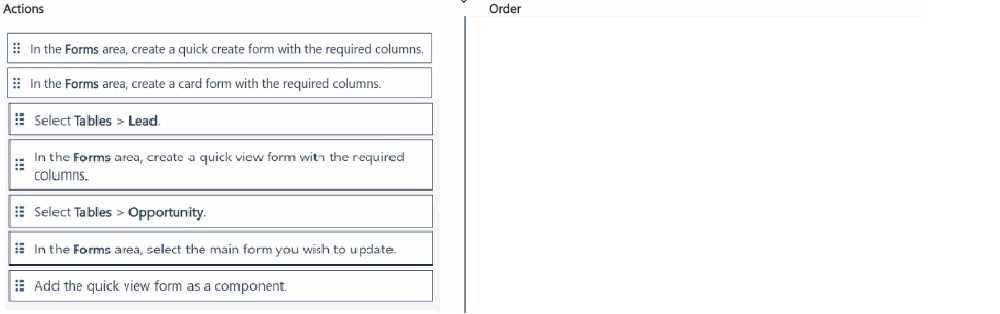
Agree, confirming field mapping first is key to avoid missing data on Opportunity.
I think another way to confirm the right sequence is to first verify that the custom attribute exists and is properly mapped from the Lead to the Opportunity entity via field mappings. Without this, the Opportunity form won’t show that data. Then you move on to customizing the Opportunity form by adding the new attribute field and arranging it in the right section. After that, save and publish to make sure the changes take effect. So basically, it’s about making sure data flows first, then adjusting the form UI to surface that data without navigating away.
application.
Your marketing team members inform you that they are NOT able to view the lead scoring insights.
You confirm the lead scoring models are published and are Live.
You need the marketing team to be able to view the lead scoring insights.
The issue isn’t republishing, so B makes the most sense here.
B/C? I agree B is the go-to since it’s about user access, but just to throw in a thought—if leads aren’t active, maybe the system isn’t generating or showing scores for them, which makes C possible. A and D don’t seem relevant since the models are already live and cleanup wouldn’t block viewing. Still, permissions are the usual suspect here.
A Company uses Exchange Online. Users require their appointments and tasks to automatically
synchronize with those available in Outlook.
You need to set up the default mailbox configuration.
What should you select for each field? To answer, select the appropriate options in the answer area.
NOTE: Each correct selection is worth one point.
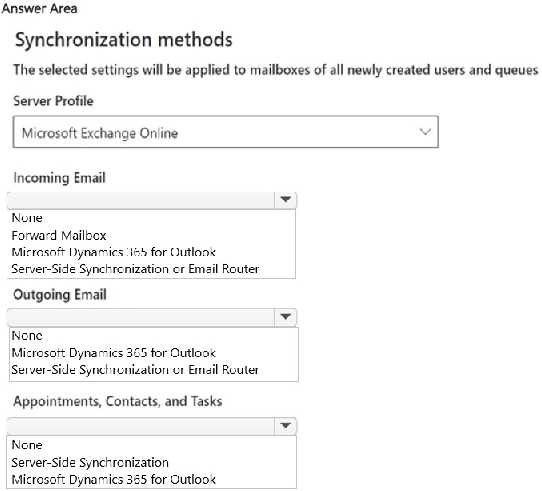
I’d pick Exchange Web Services for tasks and calendar since IMAP can’t handle tasks.
I agree with skipping IMAP since it won’t sync tasks properly. Also, Exchange Web Services supports both calendar and tasks, so that matches the requirement better than just Autodiscover alone.
contracts.
The company wants only the contracts team to have access to the documents. The contracts team
has a custom security role.
You need to restrict privileges to secure the documents.
What should you do?
Actually, managing access directly in SharePoint is the key here since the documents physically reside there. Options B and D deal with SharePoint permissions, which is what really controls who can see the contracts. Creating or updating roles in Dynamics (A or C) won’t restrict access to the documents themselves because Dynamics roles mainly secure CRM data, not SharePoint files. Between B and D, creating a group (D) is more scalable and easier to manage than updating individual users (B), especially if the contracts team changes often. So, I’d go with D for better permission management in Sh
B/D? Since the documents are stored in SharePoint, managing access through SharePoint’s user list or groups seems more direct. Dynamics roles might control CRM data but not SharePoint files.