Free Microsoft MB-280 Actual Exam Questions - Question 12 Discussion
You are designing the user experience for sales users at your organization for a variety of tasks.
One of the user experience requirements is for sales users to be able to see information from custom
attributes created for originating leads for opportunities WITHOUT having to navigate to the Lead
record.
You are already signed in to the correct editing application and you now need to configure the user
experience in Dynamics 365 Sales to enable this.
Which five actions should you perform in sequence before saving and publishing your changes? To
answer, move the five appropriate actions from the list of actions to the answer are
a. Arrange the five actions in the correct order.
NOTE: More than one order of answer choices is correct. You will receive credit for any of the correct
orders you select
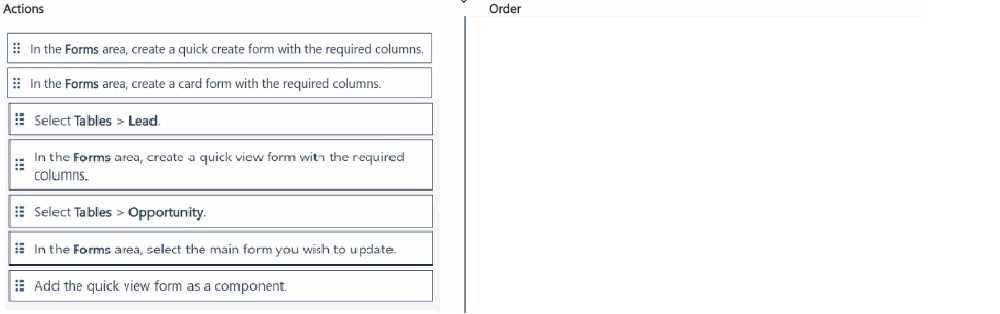
Agree, confirming field mapping first is key to avoid missing data on Opportunity.
I think another way to confirm the right sequence is to first verify that the custom attribute exists and is properly mapped from the Lead to the Opportunity entity via field mappings. Without this, the Opportunity form won’t show that data. Then you move on to customizing the Opportunity form by adding the new attribute field and arranging it in the right section. After that, save and publish to make sure the changes take effect. So basically, it’s about making sure data flows first, then adjusting the form UI to surface that data without navigating away.
I think before even touching the form, you need to confirm that the relationship between Leads and Opportunities allows for field mapping of those custom attributes. Without that, the data won’t flow over. So definitely check or set up the relationship first, then create the field mapping from Lead to Opportunity. Only after that can you safely add the mapped custom attribute to the Opportunity form so sales users can see it without clicking through. Publishing comes last, obviously. So it’s relationship setup, then field mapping, then form customization, then save and publish.
I’d say start with confirming the field mapping to ensure data flows from Lead to Opportunity, then customize the form to show the new field. Without that mapping, the info won’t display correctly on the Opportunity form.
I’d start with creating a field mapping to bring data from Leads to Opportunities, then add the custom attribute on the Opportunity form. So actions involving field mapping and form customization should be done first before arranging or publishing.
I think D makes sense early on since you need to check the existing form layout before adding new fields. Then B should come as you add the custom attribute to the form. A fits next because you need to customize the form properties or layout after adding fields. E would follow for setting field-level security or visibility. Finally, C makes sense to save and publish everything. This sequence seems logical because it flows from reviewing to adding, then configuring, securing, and finalizing changes.
A, D, B, E, C