Free Microsoft Azure AZ-104 Actual Exam Questions
Dumps Box (DumpsBox) offers up-to-date practice exam questions for AZ-104 certification exam which are developed and validated by Microsoft subject domain experts certified in Microsoft Azure AZ-104 . These practice questions are update regularly as we keep an eye on any recent changes in AZ-104 syllabus, and when there is update our team quickly adjusts the questions. This commitment to providing the best quality exam prep material to certification aspirants is what makes DumpsBox.com the best certification exam prep website. On top of that, our strong, yet strictly moderated, community based feedback keeps the content clean and current. Each question has helpful community discussion that provides it extra perspective and introduces helpful resources for better exam preparation. This also saves students from other outdated practice questions or illicit exam dumps that can have adverse affects on career. Browse through our Microsoft Azure AZ-104 exam questions and pass your exam on first try.
Web Deploy. You need to ensure that the developers of App1 can use their Azure AD
credentials to deploy content to App1. The solution must use the principle of least privilege.
What should you do?
C, since it grants deployment rights via Azure AD, fitting least privilege perfectly.
Option C makes sense since Website Contributor grants deployment rights with Azure AD and limits access. Owner is overkill, and FTP credentials don’t integrate with Azure AD for Web Deploy.
a blob container and a file share. A colleague named Jon Ross makes use of a solitary
Azure Resource Manager (ARM) template to deploy a virtual machine and an additional
Azure Storage account. You want to review the ARM template that was used by Jon Ross.
Solution: You access the Virtual Machine blade. Does the solution meet the goal?
You can’t see the ARM template from the VM blade itself since deployment details are linked to resource groups. Shouldn’t we check the deployment history in the resource group instead to find that template?
Looking at the VM blade alone won’t show the ARM template because deployment info is tied to resource group or subscription level. So this doesn’t meet the goal, so B.
CSV file that contains the names and email addresses of 500 external users. You need to
create a guest user account in contoso.com for each of the 500 external users. Solution:
You create a PowerShell script that runs the New-AzureADMSInvitation cmdlet for each
external user. Does this meet the goal?
B imo, because New-AzureADMSInvitation sends invites, not just creates accounts quietly.
Option A sounds right, but does the question expect just guest accounts or actual invitations sent? Because New-AzureADMSInvitation sends invites, not just creates accounts silently.
DRAG DROP - You have an Azure subscription that is used by four departments in your company. The subscription contains 10 resource groups. Each department uses resources in several resource groups. You need to send a report to the finance department. The report must detail the costs for each department. Which three actions should you perform in sequence? To answer, move the appropriate actions from the list of actions to the answer area and arrange them in the correct order. Select and Place: 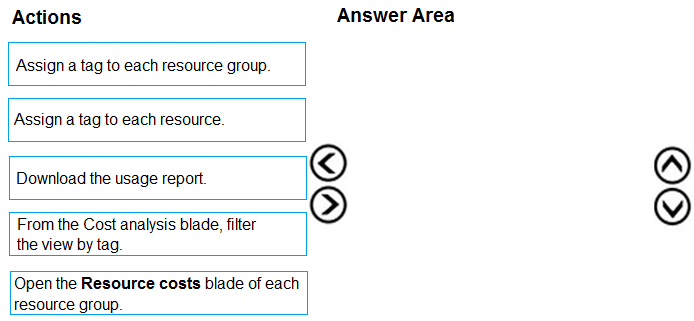
I think step one should be to create the tags for each department on the resources since the question implies we need to report by department. Without tagging, cost analysis wouldn't split properly.
Start with tagging resources for each department, then create a cost management view, finally generate the report.
cluster to support an app named App1. On-premises clients connect to App1 by using the
IP address of the pod. For the AKS cluster, you need to choose a network type that will
support App1. What should you choose?
B. Kubenet uses NAT, so pods aren’t directly reachable by on-prem IPs. Azure CNI assigns pod IPs from the VNet, making them accessible if the network is connected properly.
It’s A because kubenet uses NAT, so pod IPs aren’t directly reachable from on-prem. Since they need direct pod IP access, kubenet won’t work, leaving Azure CNI as the only fit.
Azure Resource Manager template named ARM1.json. You receive a notification that VM1
will be affected by maintenance. You need to move VM1 to a different host immediately.
Solution: From the VM1 Redeploy + reapply blade, you select Redeploy. Does this meet the
goal?
B redeploy might reset the VM but doesn’t guarantee a host switch right away.
D imo, redeploy mainly refreshes the VM but doesn’t promise a different host immediately. For guaranteed host change, you usually need to stop/start the VM or use live migration features.
administrative effort. What should you do?
D is simpler than A because peering handles routing automatically without manual routes.
If VM1 and VM4 are on different VNets, user-defined routes (A) could get complicated to manage compared to peering. Assigning a new IP (C) feels like it might not solve cross-VNet communication by itself. Could the IP ranges already overlap?
DRAG DROP - You have an on-premises file server named Server1 that runs Windows Server 2016. You have an Azure subscription that contains an Azure file share. You deploy an Azure File Sync Storage Sync Service, and you create a sync group. You need to synchronize files from Server1 to Azure. Which three actions should you perform in sequence? To answer, move the appropriate actions from the list of actions to the answer area and arrange them in the correct order. Select and Place:
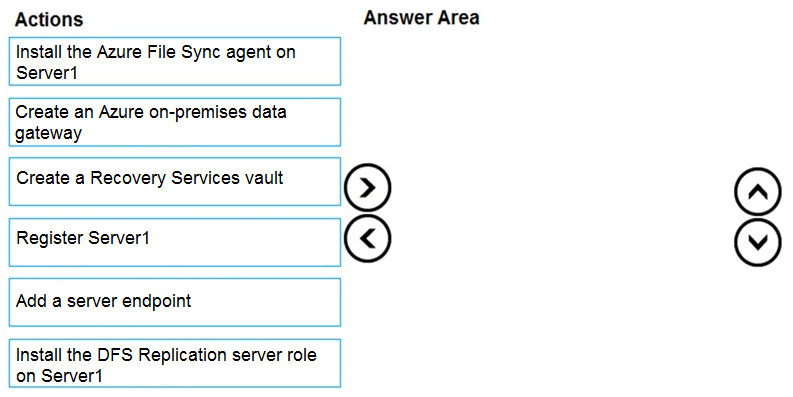
I’d say you should start by creating the Storage Sync Service because that’s the main resource managing sync. Next, install the Azure File Sync agent on Server1 so the server can communicate with Azure. Finally, register Server1 with the Storage Sync Service to link it up and begin syncing files. This order makes sense since you need the service in place before the server can register and sync properly.
I’m thinking you need to create the Storage Sync Service first. Without that, you can’t register the server or create the sync group. So after creating the Storage Sync Service, you register Server1 with it, then create the sync group that includes your Azure file share. Installing the Azure File Sync agent on Server1 happens early too, but registering is tied to having the service set up. This order makes sure everything’s linked properly before syncing starts.
to create an alert in Azure when more than two error events are logged to the System event
log on VM1 within an hour. Solution: You create an Azure storage account and configure
shared access signatures (SASs). You install the Microsoft Monitoring Agent on VM1. You
create an alert in Azure Monitor and specify the storage account as the source. Does that
meet the goal?
B. Using a storage account as the source for alerts on event logs doesn’t really work here. The Microsoft Monitoring Agent sends data to a Log Analytics workspace, not directly to a storage account. Without setting up Log Analytics, you can’t create the alert based on those system events. So this setup misses that key part.
Option B, storage accounts don’t trigger alerts from event logs directly.
You have an Azure subscription that contains an Azure Storage account named storage1
and the users shown in the following table.
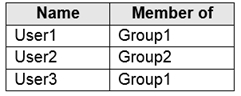
You plan to monitor storage1 and to configure email notifications for the signals shown in
the following table.

You need to identify the minimum number of alert rules and action groups required for the
planned monitoring.
How many alert rules and action groups should you identify? To answer, select the
appropriate options in the answer area.
Hot Area:
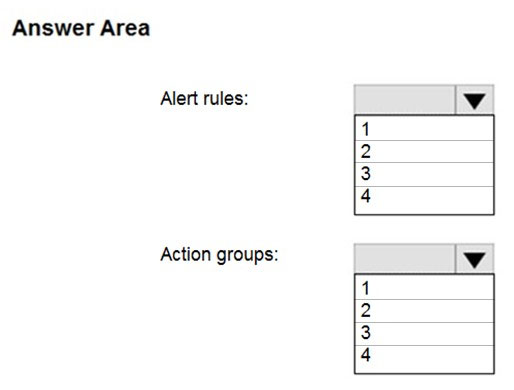
I agree on 3 alert rules for the 3 signals. Since action groups can have multiple email recipients, just one group should handle all notifications without any issue. No need to overcomplicate.
3 alert rules, 1 action group since emails can be combined in one group.
DRAG DROP - You onboard 10 Azure virtual machines to Azure Automation State Configuration. You need to use Azure Automation State Configuration to manage the ongoing consistency of the virtual machine configurations. Which three actions should you perform in sequence? To answer, move the appropriate actions from the list of actions to the answer area and arrange them in the correct order. NOTE: More than one order of answer choices is correct. You will receive credit for any of the correct orders you select. Select and Place: 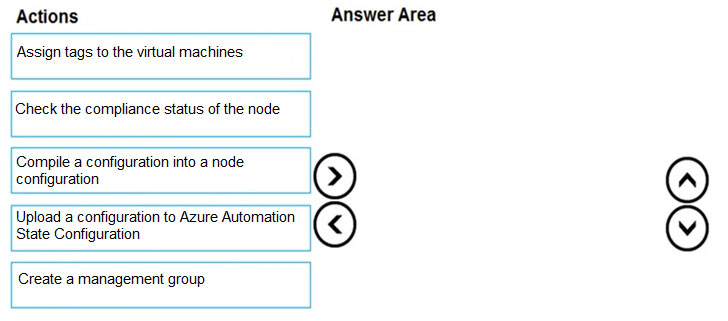
You can also think of it like preparing a recipe (import/create), cooking it up (compile), then serving it to the guests (assign). Skipping compile means the VMs won’t have a usable configuration.
Assigning the configuration comes last after compiling and importing.
following exhibit.
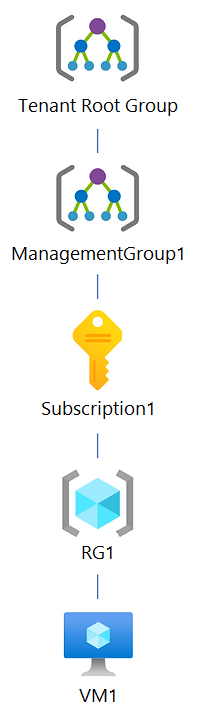
You create an Azure Policy definition named Policy1. To which Azure resources can you
assign Policy1 and which Azure resources can you specify as exclusions from Policy1? To
answer, select the appropriate options in the answer area. NOTE: Each correct selection is
worth one point. Hot Area:
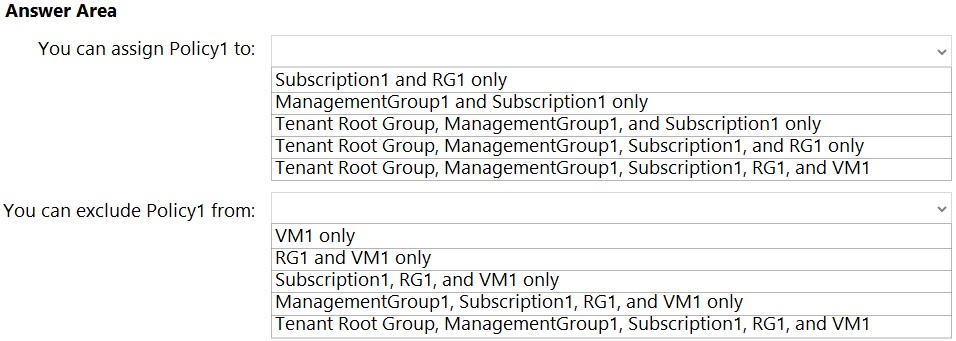
Policy1 can be assigned up to resource group level; exclusions can be at resource group or subscription level.
Policy assignments can't target individual resources, so Policy1 should be assigned at management group, subscription, or resource group levels. Exclusions, though, can be specified at the resource level within those scopes.
to ensure that the access keys for storage1 rotate automatically. What should you
configure?
Guessing D too, since none of the other options handle keys directly. Backup vaults and recovery services are for data protection, not keys, and lifecycle management is about data lifecycle, not security.
It’s D because Azure Key Vault is designed to handle secrets and key rotation, unlike lifecycle management which focuses on data retention policies, not security keys.
DRAG DROP - You have an Azure subscription that contains an Azure file share. You have an on-premises server named Server1 that runs Windows Server 2016. You plan to set up Azure File Sync between Server1 and the Azure file share. You need to prepare the subscription for the planned Azure File Sync. Which two actions should you perform in the Azure subscription? To answer, drag the appropriate actions to the correct targets. Each action may be used once, more than once, or not at all. You may need to drag the split bar between panes or scroll to view content. Select and Place: 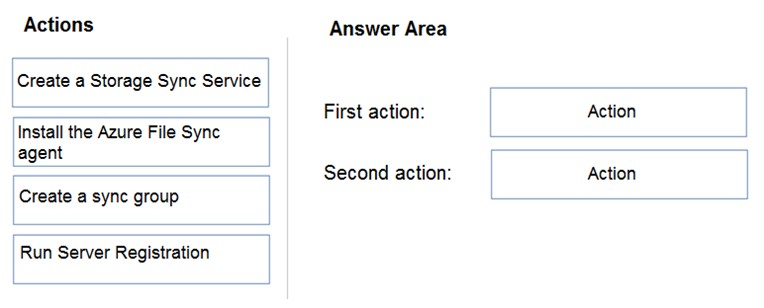
Creating the Storage Sync Service is definitely a must for subscription prep.
I think the key here is focusing on what “preparing the subscription” really means. Creating the Storage Sync Service is definitely needed because it acts as the backbone for syncing. Registering Server1 with that service also makes sense since you need to link the on-prem server. Creating a sync group feels like the next logical step, but maybe that’s more about configuring sync rather than preparing the subscription itself. So, I’d say the two main actions to prepare are creating the Storage Sync Service and registering Server1. The sync group probably comes after you’ve set those up.
DRAG DROP - You have an Azure subscription that contains the resources shown in the following table. 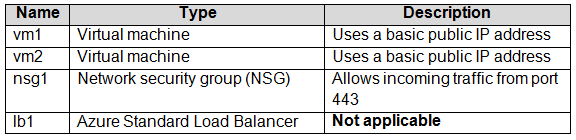 You need to load balance HTTPS connections to vm1 and vm2 by using lb1. Which three actions should you perform in sequence? To answer, move the appropriate actions from the list of actions to the answer area and arrange them in the correct order. Select and Place: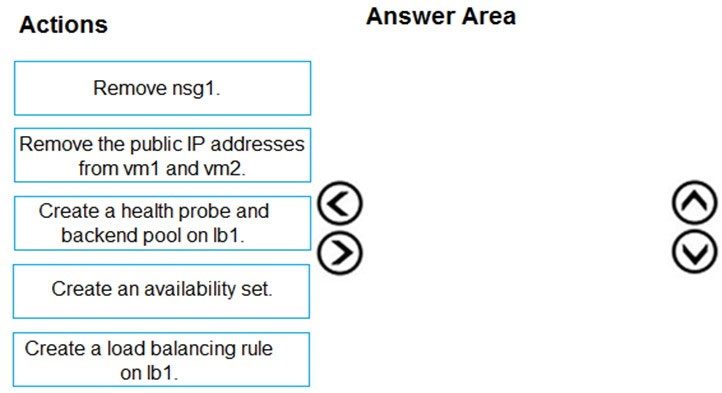
G first to set up health checks, then C for frontend IP, and finally D for load balancing rule.
I'd start with creating the health probe (G) to monitor VM health, then assign the frontend IP (C) so lb1 has an endpoint, and finally create the load balancing rule (D) to route HTTPS traffic properly.