Free Microsoft Azure AZ-104 Actual Exam Questions - Question 12 Discussion
following exhibit.
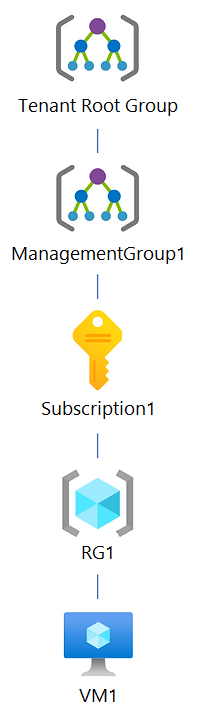
You create an Azure Policy definition named Policy1. To which Azure resources can you
assign Policy1 and which Azure resources can you specify as exclusions from Policy1? To
answer, select the appropriate options in the answer area. NOTE: Each correct selection is
worth one point. Hot Area:
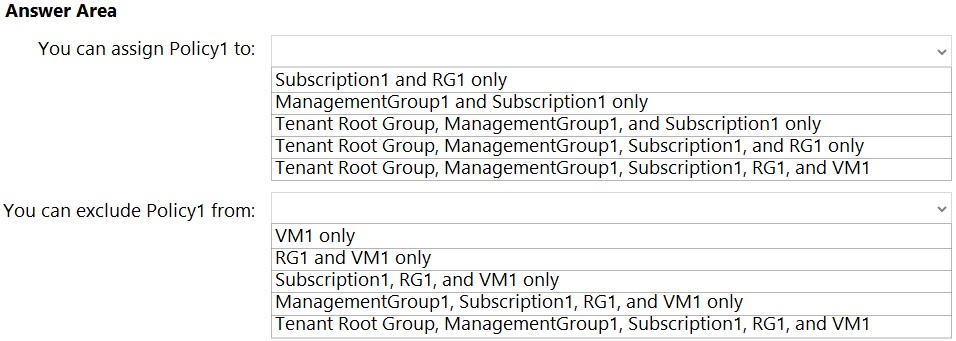
Policy1 can be assigned up to resource group level; exclusions can be at resource group or subscription level.
Policy assignments can't target individual resources, so Policy1 should be assigned at management group, subscription, or resource group levels. Exclusions, though, can be specified at the resource level within those scopes.
You can assign Policy1 at the management group, subscription, or resource group levels because those control scopes, but exclusions can be applied to specific resources or resource groups within the assignment scope.
You can assign Policy1 at management group, subscription, or resource group levels, but not directly on individual resources. Exclusions, however, can be set at the resource or resource group level within the assigned scope.
This one can get tricky with scopes. You can assign Policy1 at management group, subscription, resource group, or resource levels-which means all except individual resources under the hierarchy, right? But exclusions only work at the level where the policy is assigned or below it. So you can’t exclude something above where you assign the policy. For example, if you assign a policy at the subscription level, you can exclude resource groups or resources under that subscription, but not other subscriptions or management groups. Option D looks like a trap since you can’t exclude management groups