Free CompTIA Network+ N10-009 Actual Exam Questions
Dumps Box (DumpsBox) offers up-to-date practice exam questions for Network+ N10-009 certification exam which are developed and validated by CompTIA subject domain experts certified in CompTIA Network+ N10-009 . These practice questions are update regularly as we keep an eye on any recent changes in Network+ N10-009 syllabus, and when there is update our team quickly adjusts the questions. This commitment to providing the best quality exam prep material to certification aspirants is what makes DumpsBox.com the best certification exam prep website. On top of that, our strong, yet strictly moderated, community based feedback keeps the content clean and current. Each question has helpful community discussion that provides it extra perspective and introduces helpful resources for better exam preparation. This also saves students from other outdated practice questions or illicit exam dumps that can have adverse affects on career. Browse through our CompTIA Network+ N10-009 exam questions and pass your exam on first try.
occuring two network switches( Switch10 and Switch11). Symptoms reported included poor video
performance and slow file copying. Given the following informtion:
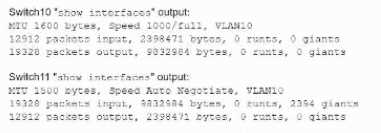
Which of the following should the technician most likely do to resolve the issue?
A Disabling auto-negotiation on Switch11 can fix duplex mismatches causing latency. Since symptoms fit that issue, it’s likely the best move without changing MTU or VLAN settings blindly.
The slow file copying and video lag usually point to a duplex mismatch, not VLAN or STP issues. So, turning off auto-negotiation on Switch11 (A) should help fix that.
administrator checks the physical connections to the workstation labeled User 3 and sees the
Ethernet is properly connected. However, the network interface’s indicator lights are not blinking on
either the computer or the switch. Which of the following Is the most likely cause?
Option C, because no lights usually mean the port is disabled, not the switch failing.
C imo, since no lights usually mean the port isn’t active at all. If the switch had failed, other ports would likely be affected too. Gateway or VLAN issues wouldn’t cause lights to stay off.
newly occupied set of offices. The patch panel is not labeled for easy jack identification. Which of the
following tools provides the easiest way to identify the appropriate patch panel port?
I get why A sounds right, but what about C? A cable tester can check continuity on each cable and might help confirm which patch panel port matches once you test each one. Could that be easier?
A imo, because a toner kit is specifically designed to trace cables by sending a tone down the line that you can pick up with a probe. This makes it way easier to figure out which patch panel port corresponds to which cable, especially when nothing is labeled. Cable testers check if cables are good but don’t help with tracing, and a laptop or visual fault locator won’t match ports to cables directly. So for quick and straightforward identification in unlabeled setups, toner’s the tool you want.
A network technician needs to resolve some issues with a customer's SOHO network. The
customer reports that some of the PCs are not connecting to the network, while others
appear to be working as intended.
INSTRUCTIONS
Troubleshoot all the network components.
Review the cable test results first, then diagnose by clicking on the appropriate PC,
server, and Layer 2 switch.
Identify any components with a problem and recommend a solution to correct each
problem.
If at any time you would like to bring back
the initial state of the simulation, please
click the Reset All button.
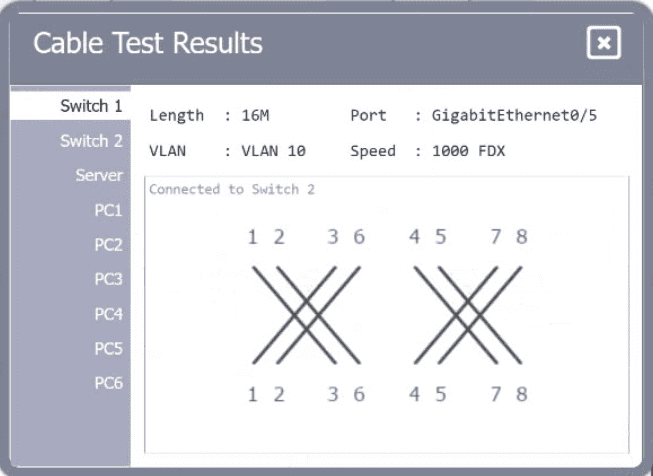
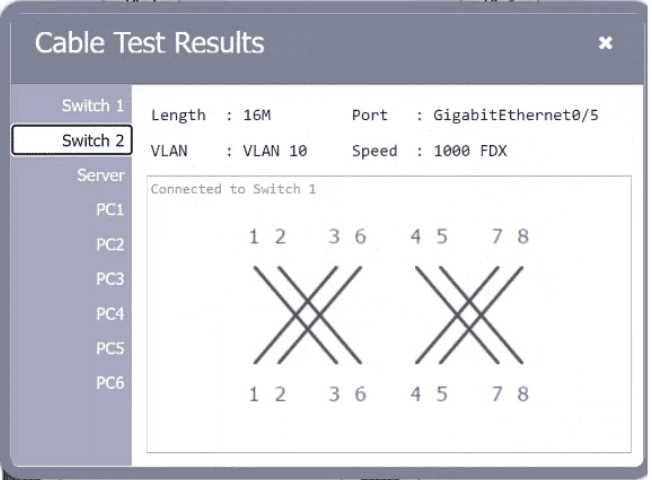
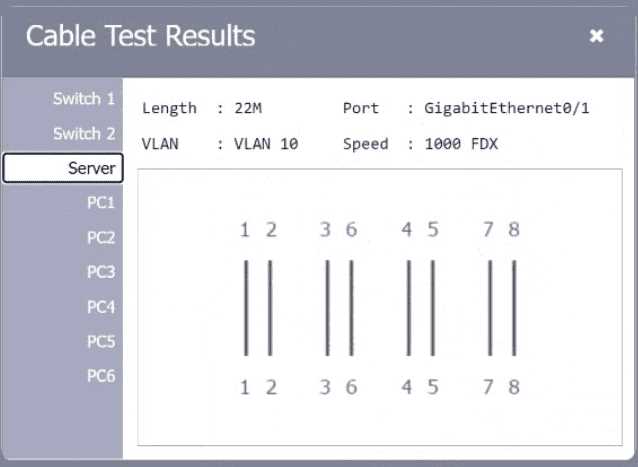
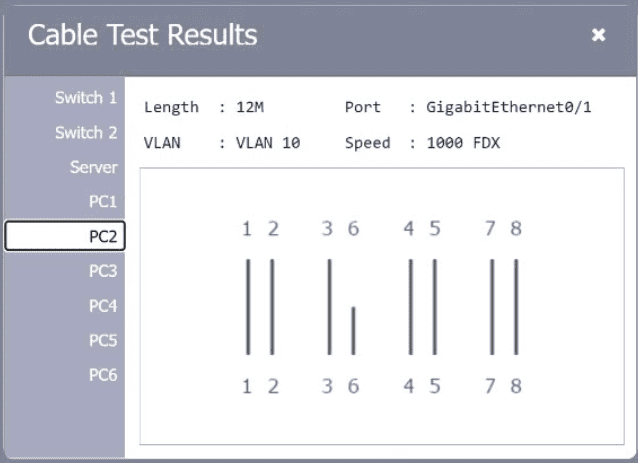
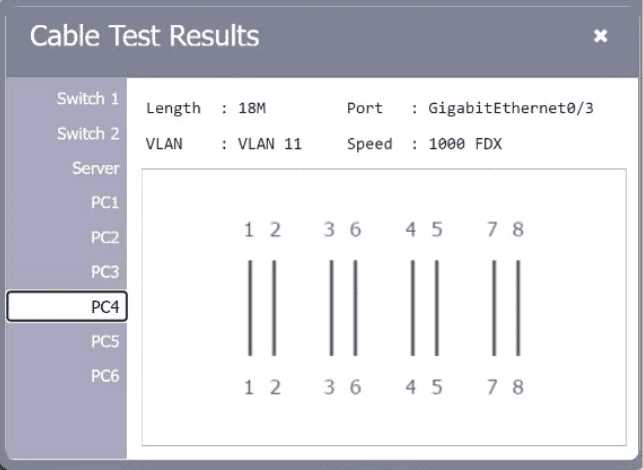
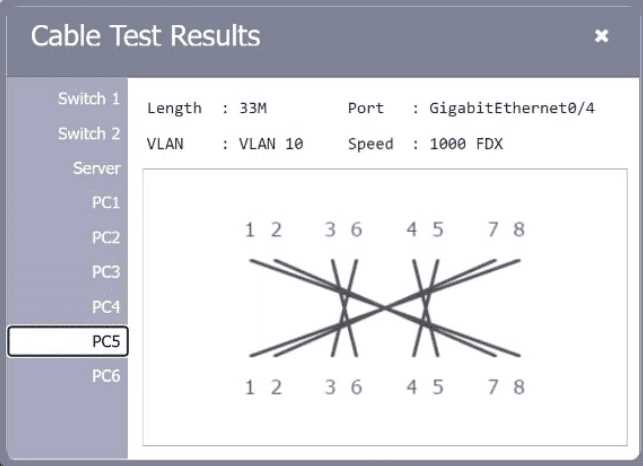
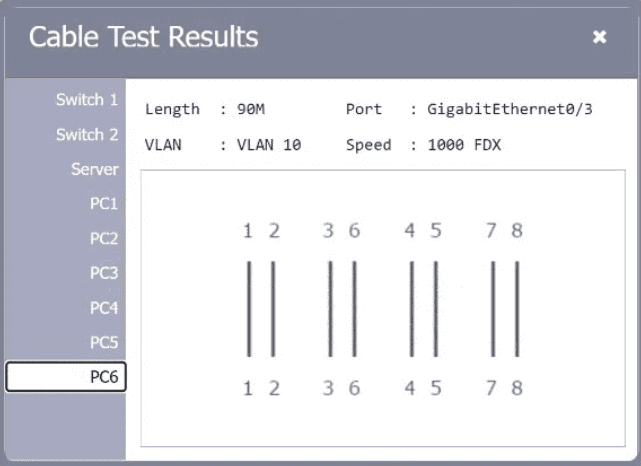
Also, I noticed the switch port configurations seem inconsistent; some ports might be disabled or set to wrong VLANs, which could prevent certain PCs from connecting even if cables are fine. Double-checking port status could help.
Could be a bad patch cable or wrong switch port config causing no link.
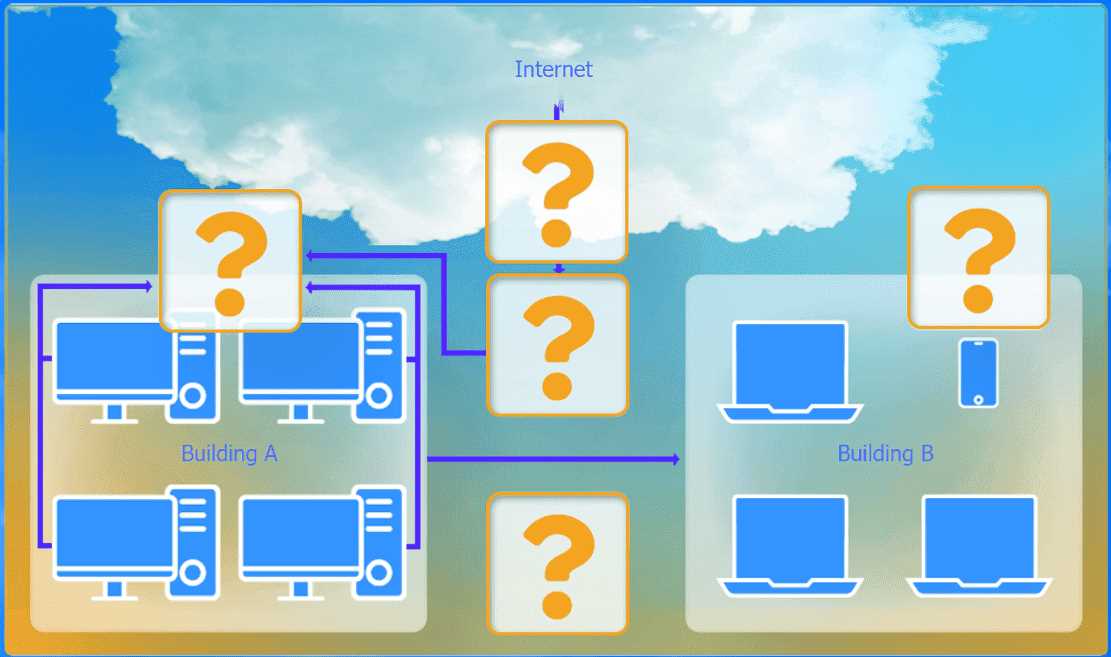
A network administrator has been tasked with configuring a network for a new corporate office. The
office consists of two buildings, separated by 50 feet with no physical connectivity. The configuration
must meet the following requirements:
. Devices in both buildings should be
able to access the Internet.
. Security insists that all Internet traffic
be inspected before entering the
network.
. Desktops should not see traffic
destined for other devices.
INSTRUCTIONS
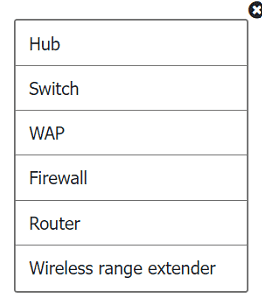
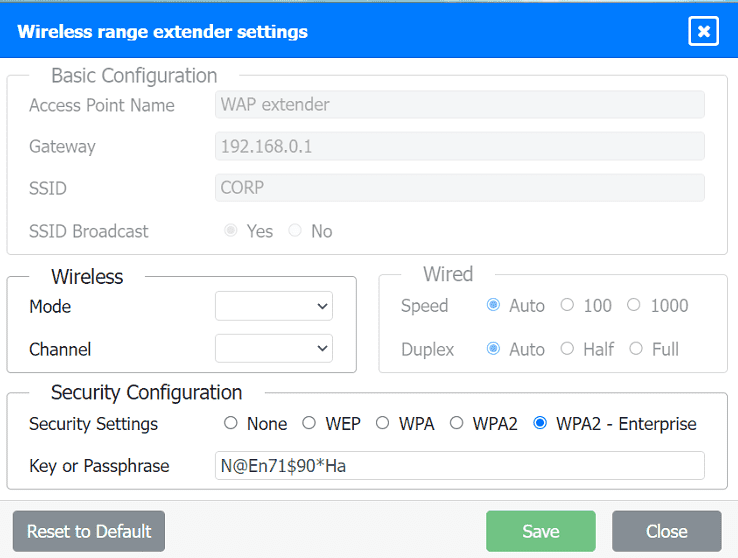
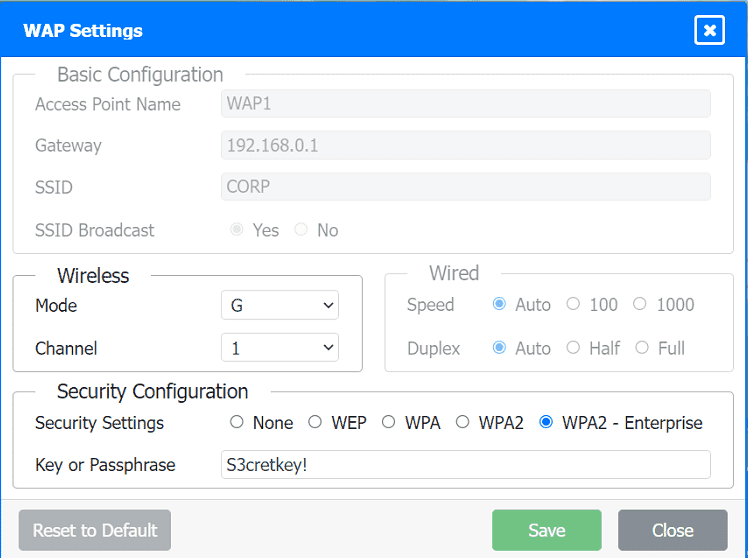
Select the appropriate network device for each location. If applicable, click on the magnifying glass
next to any device which may require configuration updates and make any necessary changes.
Not all devices will be used, but all locations should be filled.
If at any time you would like to bring back the initial state of the simulation, please
click the Reset All button.
I'd pick a firewall at the internet entry point to inspect all traffic first.
This question feels kinda vague without a clear diagram to see the devices. Anyone else confused about how to set up security inspection and isolate desktops at the same time? What did you all pick for the main firewall?
navigate to the best available frequency standard. Which of the following technologies should the
technician use?
Makes sense to rule out C and D since they don't manage frequencies automatically. B manages APs but doesn’t do the actual device steering, so A fits best here. A
A/B? Band steering (A) guides devices between 2.4GHz and 5GHz bands, but a wireless LAN controller (B) can also manage frequency assignments dynamically across multiple APs. Could be either depending on context.
local network but is now hosted as a SaaS solution. Which of the following records should be used to
accomplish the task?
A imo, TXT records can hold extra info but aren’t used to redirect or alias names like CNAMEs. Since the goal is redirection, TXT and PTR don’t really fit here.
It’s D because CNAMEs are perfect for pointing an existing hostname to a new one, like a SaaS provider’s domain. A and AAAA only map names to IPs, so they don’t handle hostname redirection.
timestamps when creating log files so that security analysts can correlate events during incident
investigations. Which of the following should be implemented?
It’s D because none of the other options deal with time synchronization. Syslog just collects logs, SMTP is for emails, and SNMP is for device management, so NTP is the only one that ensures accurate timestamps.
Maybe D since NTP is designed specifically for syncing time across network devices, which fits the need for accurate timestamps on logs. Other options don’t handle time sync.
best to implement? (Select two.)
Option A and C, since restricting access and managing policies centrally boost security quickly.
A/F? Least privilege cuts down access risks, and subnet range limits can contain breaches better by restricting network boundaries. That combo feels solid for tightening overall security after a breach.
SIMULATION You are tasked with verifying the following requirements are met in order to ensure network security. Requirements: Datacenter Ensure network is subnetted to allow all devices to communicate properly while minimizing address space usage Provide a dedicated server to resolve IP addresses and hostnames correctly and handle port 53 traffic Building A Ensure network is subnetted to allow all devices to communicate properly while minimizing address space usage Provide devices to support 5 additional different office users Add an additional mobile user Replace the Telnet server with a more secure solution Screened subnet Ensure network is subnetted to allow all devices to communicate properly while minimizing address space usage Provide a server to handle external 80/443 traffic Provide a server to handle port 20/21 traffic INSTRUCTIONS Drag and drop objects onto the appropriate locations. Objects can be used multiple times and not all placeholders need to be filled. Available objects are located in both the Servers and Devices tabs of the Drag & Drop menu. If at any time you would like to bring back the initial state of the simulation, please click the Reset All button. 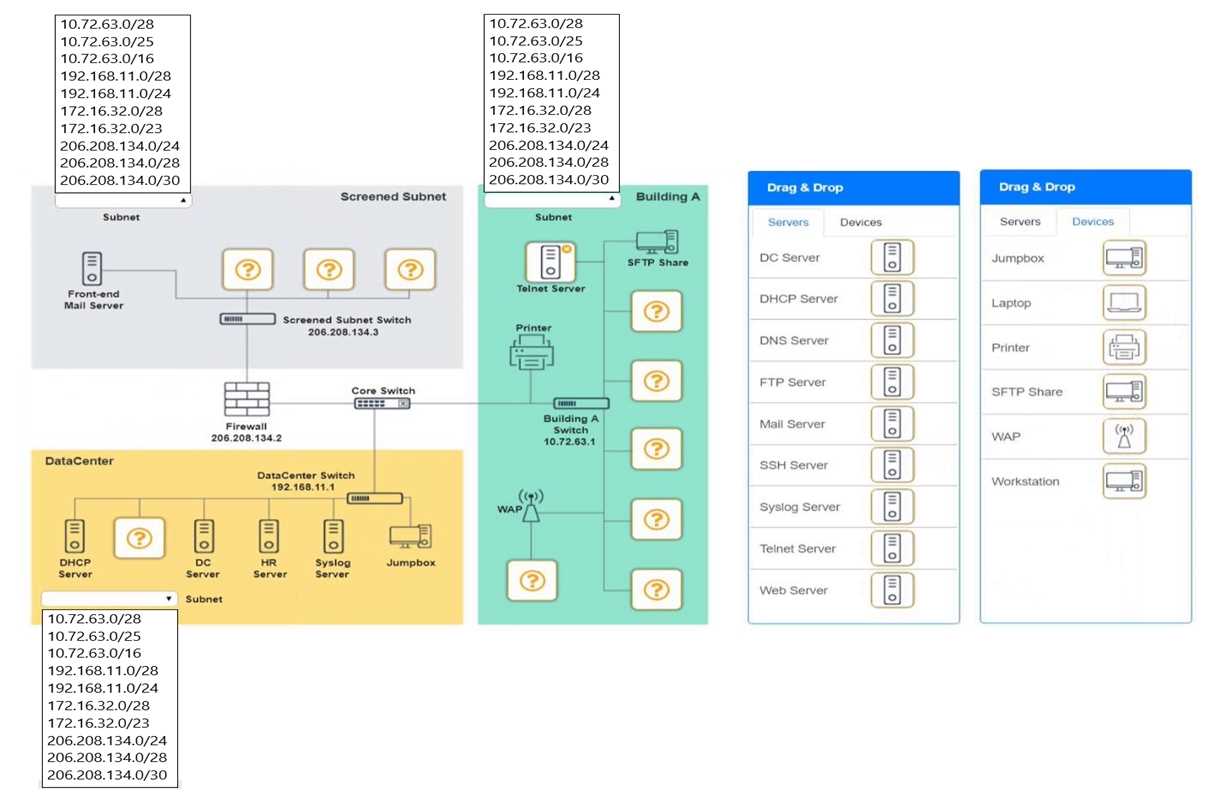
I think the datacenter should have a DNS server specifically, since port 53 is for DNS. For Building A, replacing Telnet with SSH makes sense for security, and adding devices for users likely means more DHCP support there.
Building A also needs a secure remote access server instead of Telnet, so SSH fits better.
You have been tasked with implementing an ACL on the router that will:
1. Permit the most commonly used secure remote access technologies from the management
network to all other local network segments
2. Ensure the user subnet cannot use the most commonly used remote access technologies in the
Linux and Windows Server segments.
3. Prohibit any traffic that has not been specifically allowed.
INSTRUCTIONS
Use the drop-downs to complete the ACL
If at any time you would like to bring back the initial state of the simulation, please click the Reset All
button.
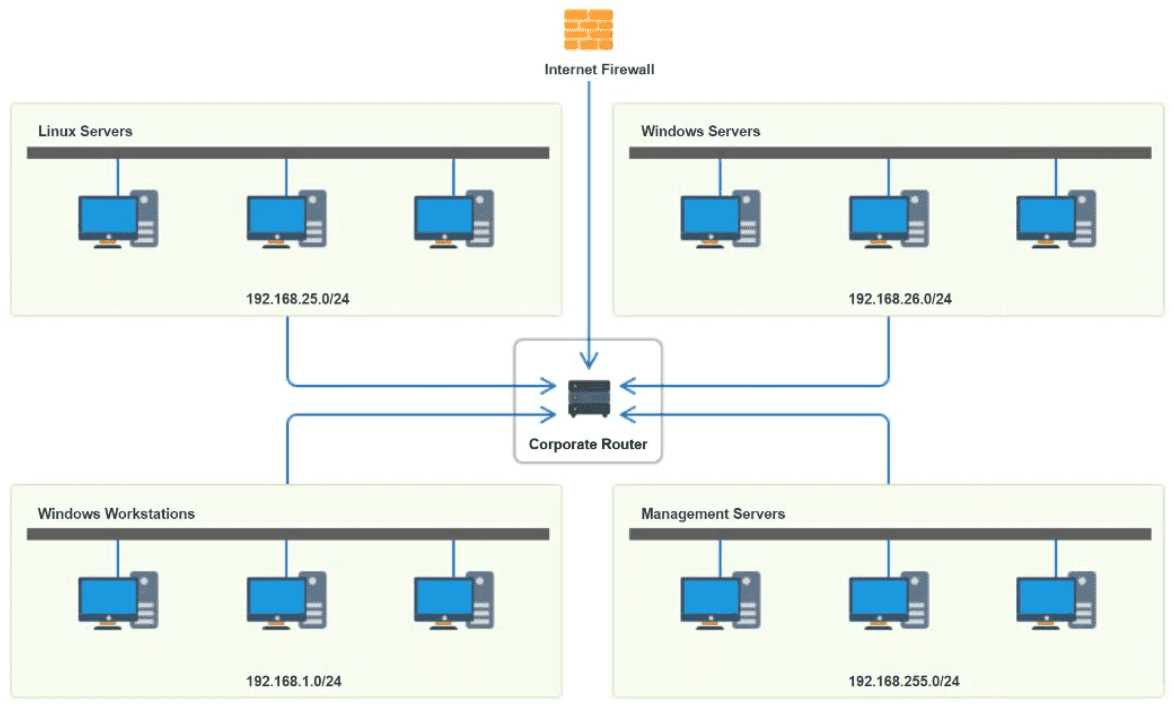
Option B seems to clearly block user subnet remote access while allowing management network traffic, which fits the requirements better than others. It also explicitly denies all else at the end.
B looks solid since it denies user subnet remote access but still permits management network.
SIMULATION SIMULATION You have been tasked with setting up a wireless network in an office. The network will consist of 3 Access Points and a single switch. The network must meet the following parameters: The SSIDs need to be configured as CorpNet with a key of S3cr3t! The wireless signals should not interfere with each other The subnet the Access Points and switch are on should only support 30 devices maximum The Access Points should be configured to only support TKIP clients at a maximum speed INSTRUCTONS Click on the wireless devices and review their information and adjust the settings of the access points to meet the given requirements. If at any time you would like to bring back the initial state of the simulation, please click the Reset All button. 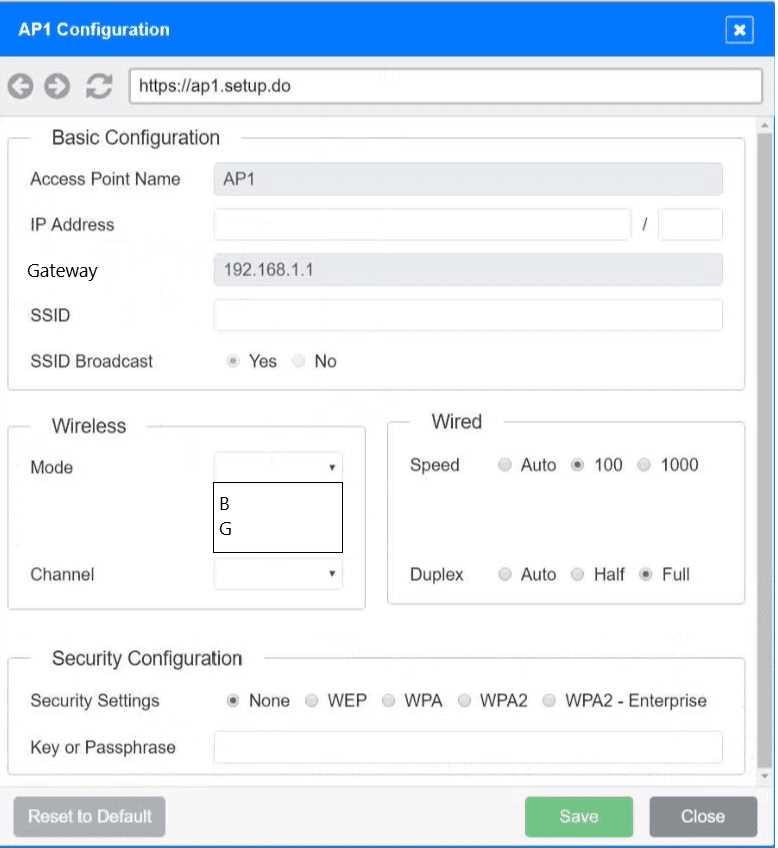
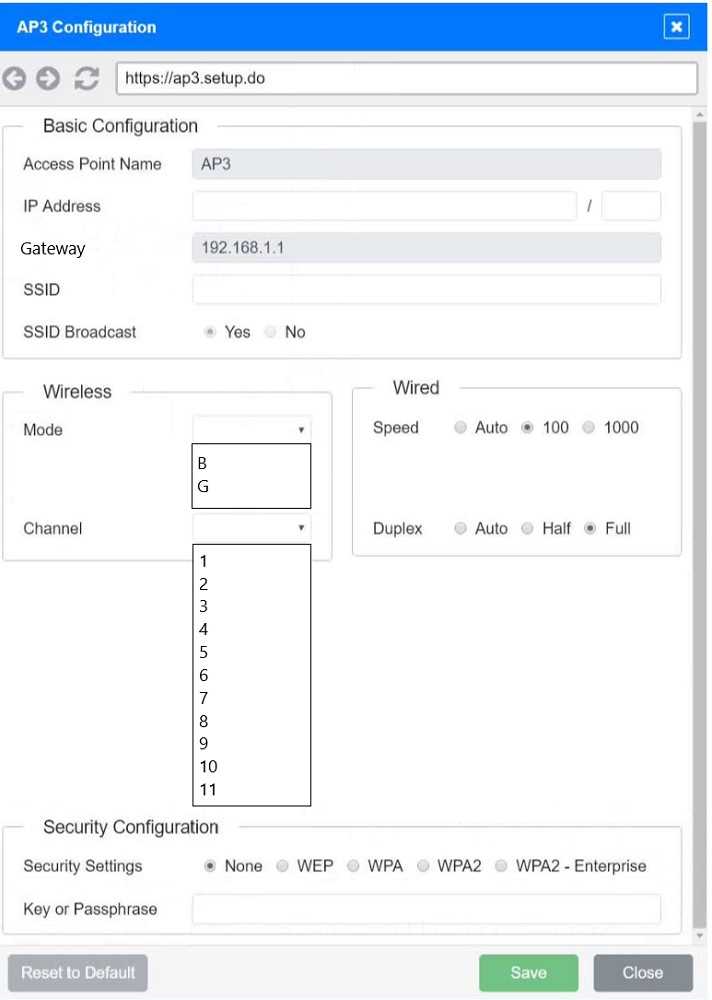
Also, make sure to set the subnet mask to something like 255.255.255.224 to cap devices at 30 or fewer; anything bigger won’t meet the requirement. For the channels, definitely pick non-overlapping ones like 1, 6, and 11 on the 2.4 GHz band to avoid interference. I’d triple-check the security settings too—some APs might allow mixed TKIP/AES by default, so forcing just TKIP is crucial here. The SSID and key need to be identical across all APs, otherwise devices won’t roam smoothly or connect reliably.
Good point on the subnet mask limiting devices. Also, double-check that the SSID and password match exactly on all APs—sometimes a typo there can cause connection issues. Channels 1, 6, and 11 definitely help avoid interference.
administrator needs to harded the web server. The following ports on the web server. The following
ports on the web server are open:

Which of the following ports should be disabled?
Port 587 is usually for email submission, which might not be needed on a web server. Disabling it could reduce attack surface without affecting HTTPS or admin access. Could that be a better choice?
Option B since HTTP on port 80 is unencrypted and contradicts the secure connections rule.
marketing department. The user reports that they cannot access the marketing department’s shared
drives but can access the internet. Which of the following is the most likely cause of this issue?
Probably B. If the gateway settings are wrong, internet might still work via a default route, but accessing specific network resources like shared drives could fail due to routing issues.
C The internet access but no shared drive access really points to VLAN issues. If the port is on the accounting VLAN, the user would still get internet since that’s usually routed out by default, but won’t see marketing resources locked to a separate VLAN. Other options like gateway or duplex wouldn’t cause this selective access problem as clearly.
of the following does the company's firewall require to access the internet? (Select TWO).
B. The default gateway is key for routing traffic out to the internet since it tells the firewall where to send packets that aren’t local. D makes sense because the firewall has to have its own IP address from the assigned static range to communicate properly. Other options like DNS or NTP servers aren’t strictly needed just to get internet access, so they can be ruled out for this question.
Option B and D. The firewall needs a default gateway to know where to send outbound traffic and a static IP from the ISP’s range to be reachable on the internet. DNS or NTP servers aren’t essential for basic connectivity.