Free Cisco CCNA 200-301 Actual Exam Questions
Dumps Box (DumpsBox) offers up-to-date practice exam questions for CCNA 200-301 certification exam which are developed and validated by Cisco subject domain experts certified in Cisco CCNA 200-301 . These practice questions are update regularly as we keep an eye on any recent changes in CCNA 200-301 syllabus, and when there is update our team quickly adjusts the questions. This commitment to providing the best quality exam prep material to certification aspirants is what makes DumpsBox.com the best certification exam prep website. On top of that, our strong, yet strictly moderated, community based feedback keeps the content clean and current. Each question has helpful community discussion that provides it extra perspective and introduces helpful resources for better exam preparation. This also saves students from other outdated practice questions or illicit exam dumps that can have adverse affects on career. Browse through our Cisco CCNA 200-301 exam questions and pass your exam on first try.
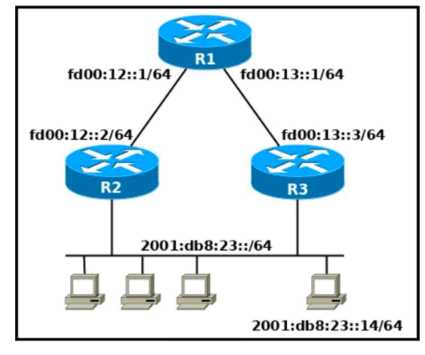
Refer to the exhibit. Which two commands, when configured on router R1. fulfill these
requirements? (Choose two.) ' Packets toward the entire network 2001:db8:23: :/64 must be
forwarded through router R2. ' Packets toward host 2001: db8:23::14 preferably must be forwarded
through R3.
E and B, because E covers the whole /64 and B targets the specific host.
This one’s pretty straightforward if you look at the prefixes. The entire /64 network 2001:db8:23::/64 needs to go to R2, so E fits perfectly for that. For the specific host 2001:db8:23::14, a /128 route makes sense to prefer R3, which is exactly what B does. The other options either use wrong masks or point to the wrong next-hop. So I’d choose E and B based on the prefix lengths and the next-hop logic.
Another angle: notice level messages are often used for normal but significant events. A certificate expiration (D) would usually trigger a warning or error, not just a notice. TCP or ICMP events (A and B) tend to be logged at lower levels unless there’s a problem. Interface line status changes (C) are commonly logged as notices since they’re important but not critical, so C still feels right here. Could the term “notice level” vary by device, or is it generally accepted to mean something like an interface status update?
I agree that interface changes usually trigger notice messages. Plus, TCP and ICMP events are typically logged at info or debug levels, so C feels like the best fit here.
If NAT isn’t mentioned, D fits best since private IPs aren’t routable externally.
Probably D again—private IPs are designed for internal use only, so any scenario involving direct external communication like A, B, or C doesn’t really fit. D is the safest choice here.
DRAG DROP Drag and drop the REST API call method for HTTP from the left onto the action they perform on the right. 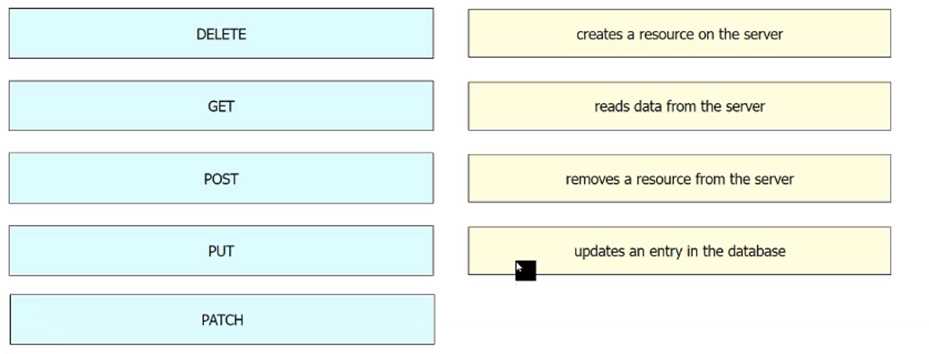
Also, PATCH is mainly for partial updates, so PUT suits general Update better here.
I think GET is definitely for Retrieve and POST for Create, since those are basics. DELETE clearly matches Delete. So the only real choice left is between PUT and PATCH for Update, but PUT is more common if not specified.
It’s definitely B and C. Servers need to run applications that respond to client requests and manage multiple users at once, which are fundamental roles, unlike the other choices that seem more niche or unrelated.
It’s B and C for sure, since servers primarily run apps and manage multiple requests simultaneously.
Makes sense to rule out B, C, and D since those deal with network hardware roles. A fits because endpoints are basically the devices users interact with directly. So, A seems like the clear choice here.
It’s A for sure. Endpoints are the actual user devices, so they’re the ones directly accessing network services, not managing traffic or security like the other options suggest.
pages when using the AireOS GUI?
B. From what I remember, 5 simultaneous users is the cap to keep the controller responsive and secure. More than that starts causing interface lag or session drops. It’s definitely not as low as 2, and 8 or 9 seems too high given typical hardware limits. The GUI isn’t designed for a big admin crowd at once.
Option B, since 5 feels like a practical cap to avoid performance hits.
Makes sense to pick B since SDN moves control out of devices for central management. B
It’s B because SDN’s main goal is to move the control plane out of individual devices and manage it centrally, which simplifies network configuration and policy enforcement.
requests and replies between client and server for DHCP?
Makes sense to go with A since DHCP server just responds, doesn’t forward. A
Actually, it has to be A because the DHCP server only responds but doesn't forward messages across networks. Relay agents handle that forwarding between different subnets.
Makes sense to go with B. Endpoints are usually the devices at the edge of a network—like your laptop or phone—that actually use the network services. A is more about networking gear like routers or switches, and D sounds like a wireless access point. C doesn’t really fit since recording data isn’t a general function of endpoints. So, B is the best fit here.
It’s B because endpoints are the actual devices like laptops or smartphones that connect to the network, not equipment that manages traffic or wireless signals. A and D describe other network components, not endpoints.
DRAG DROP Drag and drop the 802.11 wireless standards from the left onto the matching statements on the right 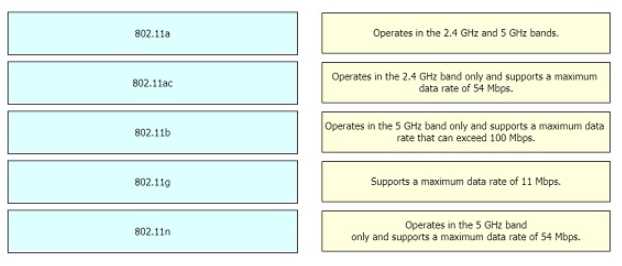
802.11n was the first with MIMO and dual-band, so it fits that statement best.
I think looking at the release timeline helps separate these more clearly. 802.11a and 802.11g came out earlier, so they match the older, slower descriptions. Then 802.11n introduced dual-band and MIMO, so it fits where those features are mentioned. 802.11ac is the newest one with the highest speeds and only works on 5 GHz, which helps put it in the last spot. Using a mix of frequency band, max speed, and MIMO support seems like a solid way to drag and drop these correctly without overcomplicating it.
DRAG DROP Drag and drop the WLAN components from the left onto the component details on the right. 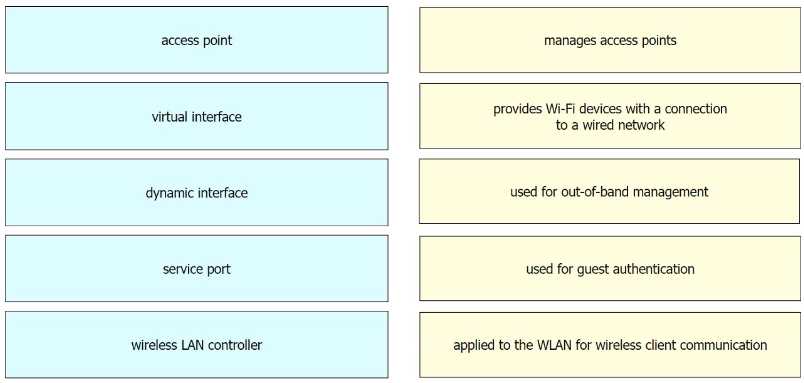
I’d say A is standalone AP because it’s focused on a single device, no extra links. C is the client since it’s separate, so that leaves B as just a regular AP, and D definitely managing the group.
I think B is the standalone AP because it’s just a single device without any links, which matches the idea of it working independently. D clearly shows connections to multiple APs, so that has to be the controller managing everything centrally. C being the client device makes sense since it’s separate from the APs and controller. That leaves A as the standalone AP label. This setup fits the connections shown and the typical roles in WLAN architecture.
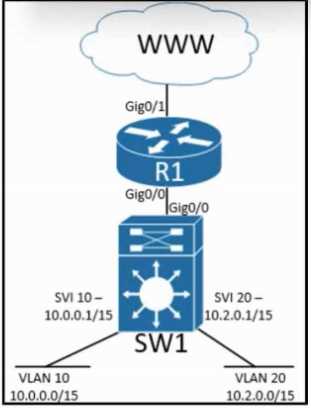
Refer to the exhibit. Inter-VLAN routing is configured on SW1. Client A is running Linux as an OS in
VLAN 10 with a default gateway IP 10.0.0.1 but cannot ping client B in VLAN 20 running Windows.
What action must be taken to verify that client A has the correct IP settings?
C. If the default gateway is wrong, client A won’t route traffic to VLAN 20 correctly. Checking it first makes sense before messing with IP or subnet mask details.
D imo, since checking the subnet mask with ifconfig can catch misconfigurations that stop proper routing. The mask has to match the VLAN's network for ping to work.
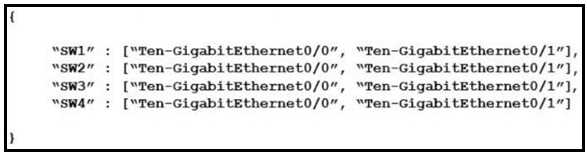
How many JSON objects are presented?
I think it’s A because the entire data is wrapped in one main object, even though it contains an array with multiple items inside. So just one top-level JSON object here.
It’s A because the whole structure is one JSON object with an array inside it. The inner items are just elements, not separate top-level objects.
DRAG DROP Drag and drop the device behaviors from the left onto the matching HSRP slate on the right. 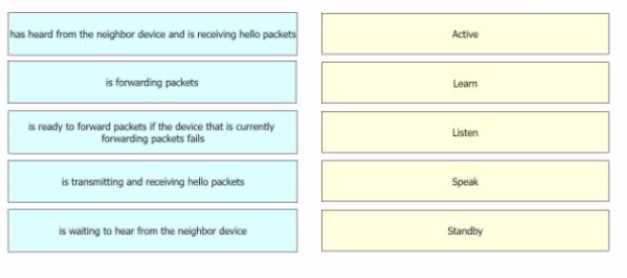
I’d say D fits learn since it’s not forwarding but still seems aware of the group state. If it were listen, it wouldn't have learned the virtual IP yet. So B active, C standby, D learn makes sense.
I’d swap B and C based on who’s actually forwarding traffic and sending hellos. Active routers forward and send hellos, standby listens but doesn’t forward. D doesn’t forward or send hellos so listen fits better there. Learn usually means it’s starting to learn the virtual MAC but not quite ready, which doesn’t align with D’s lack of activity. So B looks like active, C standby, and D listen. That matches typical HSRP behavior more cleanly without overcomplicating it.