Free VMware 2V0-32.24 Actual Exam Questions
Dumps Box (DumpsBox) offers up-to-date practice exam questions for 2V0-32.24 certification exam which are developed and validated by VMware subject domain experts certified in VMware 2V0-32.24 . These practice questions are update regularly as we keep an eye on any recent changes in 2V0-32.24 syllabus, and when there is update our team quickly adjusts the questions. This commitment to providing the best quality exam prep material to certification aspirants is what makes DumpsBox.com the best certification exam prep website. On top of that, our strong, yet strictly moderated, community based feedback keeps the content clean and current. Each question has helpful community discussion that provides it extra perspective and introduces helpful resources for better exam preparation. This also saves students from other outdated practice questions or illicit exam dumps that can have adverse affects on career. Browse through our VMware 2V0-32.24 exam questions and pass your exam on first try.
management, intelligent remediation, and integrated compliance as a subscription based service?
A imo, because vRealize Operations on its own is focused on performance and capacity management, but doesn’t inherently come as a subscription cloud service. That’s more the cloud version’s thing, so B is still a strong contender. But since the question is about a subscription-based service with integrated compliance and intelligent remediation, B fits best overall. D and C are mainly log insight tools, so they don’t cover all aspects mentioned here. So if you want to focus on the subscription aspect plus the full feature set, B makes the most sense to me.
Option B stands out since it’s the cloud version focused on subscription, covering optimization and cost management. D is more about log insight, so less likely here.
Provide monitoring and predictive analytics across enterprise database solutions
Provide monitoring and predictive analytics across enterprise networking solutions
Provide performance data for common enterprise application solutions
Provide performance data for VMware Tanzu Application Service
Present all collected data to administrators within a single portal
Provide vendor support for the deployed solution
Which solution could help the administrator complete this task?
Option C covers all bases with full vendor support, unlike the others.
It’s C because vRealize Operations combined with True Visibility Suite gives full coverage for databases, networks, apps, and Tanzu, plus it’s officially supported. The other options lack that full scope or vendor backing.
Which two methods can the administrator use to complete this task? (Choose two.)
A and D. Using the vRealize Suite Lifecycle Manager (A) is legit since it handles password rotations, and the admin UI change (D) is straightforward without downtime. SSH methods seem more complex or risky.
Option C also works since resetting the admin password via SSH on the primary node is a valid method.
development virtual machines (VMs) using vRealize Operations, as the vSphere cluster is now at
capacity.
The current state of the environment:
The VMs either have dev or prod in their name.
Production VMs reside on cluster due to historical usage.
The administrator already has permission to modify any development VMs within the cluster.
Which approach below will quickly ensure cluster compute resources are recovered from the correct
VMs?
Maybe A is better here since the goal is to quickly recover unused allocated compute, and oversized VMs are exactly those wasting resources. Excluding production VMs (B) sounds safe but doesn’t actively identify where resources can be cut. Using the Oversized VM report directly targets VMs with resource waste, so you can act fast without needing to confirm if they’re prod or dev by name.
B imo, it’s the safest way to avoid touching prod and target dev VMs right away.
(NOC) live information of their existing vSphere infrastructure for only one (1) day, which will expire
automatically. The support team does not have access to vRealize Operations.
Using vRealize Operations features and capabilities, which approach is best suited for this task?
D makes sense here since URLs can be shared instantly and revoked easily afterward.
D imo since URL/email sharing is quick and avoids permissions hassle for a day only.
D imo, E is valid too since single nodes can have integrated load balancers, multi-node always needs external.
I agree with skipping B and F since integrated load balancers don't support multi-node beyond one node. So, A, C, and E seem valid because multi-node needs external load balancers, and single-node can use the integrated one or none. E
automating day 2 operations in a private cloud environment?
C, because managing configs and credentials is key for automating ongoing ops.
Makes sense to rule out C and D since they seem more manual; B aligns best with automation hints. B
(Choose three.)
This one’s tricky but I’m going with A, D, and F. Agent type makes sense, IP is obvious, and agent status feels like a practical filter to quickly spot online or offline agents when grouping. Hostname seems less likely as a filter option for grouping since it’s more about identification than filtering. Version and protocol don’t seem like typical filters either. So for me, A, D, and F fit best here.
It’s A, D, and E for sure. Agent type, IP address, and hostname are straightforward filters to organize agents. Agent version and protocol don’t really fit as group filters in my experience.
DRAG DROP A user reports that when browsing to the vRealize Operations (vROps) user interface a 503 error is displayed. An administrator determines that the vROps cluster is offline. Drag and drop the three correct actions the administrator must complete to troubleshoot the issue from the action list on the left and place the action into the correct sequence on the right. (Choose three.) 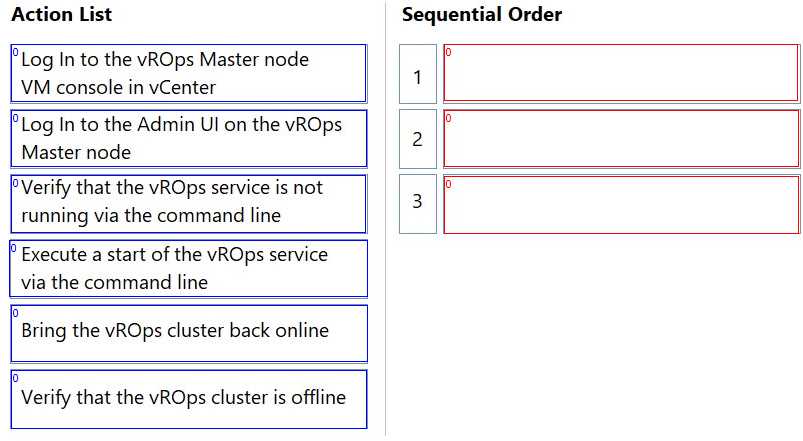
Going off the options, I’d check cluster status first to see if the cluster is really down or just reporting wrong. Then I’d move on to node health to pinpoint if a particular node is causing the issue. Restarting services should be last as it’s more of a fix than a diagnostic step, and you don’t want to restart blindly without knowing what’s wrong. This order makes it easier to isolate the problem before trying to fix it.
I’d skip restarting services right away since it’s better to confirm cluster status first for a clearer picture. If the cluster’s down, that’s the key thing to verify before anything else.
DRAG DROP An Administrator needs to create a new alert in vRealize Log Insight that will send email notifications to a distribution list based on the defined query. Drag and drop the five actions the administrator must complete in order to create the alert from the action list on the left and place the actions into the correct sequence on the right. (Choose five.) 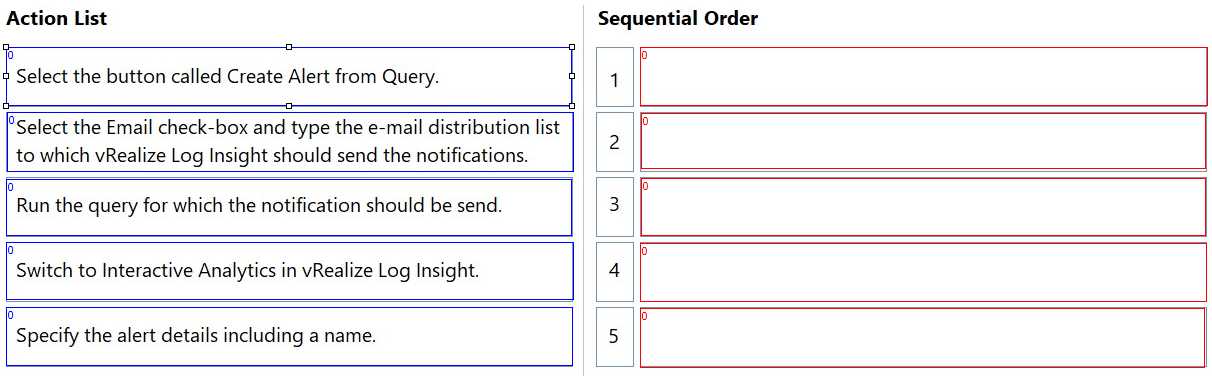
Start with creating the query, then create the alert using it.
The first step has to be creating the query since the alert depends on it. Then you create the alert using that query, add the email group, enable notifications, and finally save the alert. SMTP is usually pre-set.
DRAG DROP An administrator has been tasked with importing a new certificate for vRealize Operations using vRealize Lifecycle Manager. Drag and drop the four correct actions the administrator must complete from the action list on the left and place the actions into the correct sequence on the right. (Choose four.) 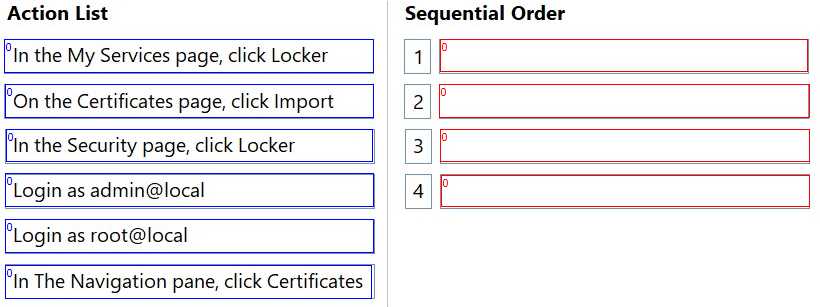
Import cert first, then assign; validation before restarting service makes sense here.
I’d put “import the certificate” first since you need it in the system before assigning anywhere. Then assigning to vROps makes sense because the cert has to be linked before validation. Restarting last is logical to apply changes.
DRAG DROP An administrator is tasked with installing vRealize Log Insight via vRealize Suite Lifecycle Manager in an environment without internet connectivity. Drag and drop the three correct actions the administrator must complete from the action list on the left and place the actions into the correct sequence on the right. (Choose three.) 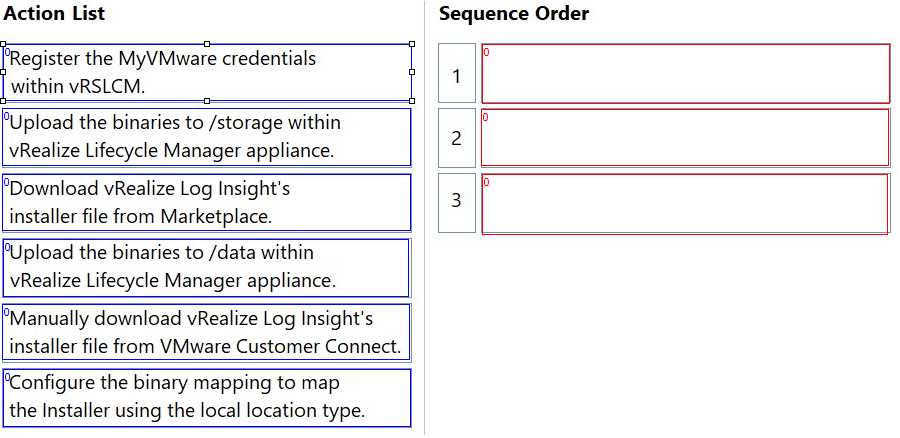
I’d go with exporting the vRealize Log Insight bundle from a connected Lifecycle Manager first, then importing it into the offline environment, and finally starting the installation. No internet means you can’t skip the export-import step.
You gotta start by exporting the content from a connected Lifecycle Manager, then import that file into the offline environment. Only after import can you proceed with the installation. Makes the sequence clear: export, import, install.
C. From what I know, Log Insight clusters usually don’t support an uneven or mixed setup like in A. B is out since forwarding between full clusters isn’t a thing here. D feels like overkill and not common because stretched clusters across datacenters can introduce latency and issues. Having two nodes in each datacenter (C) seems more balanced and practical for failover without going too extreme on node count or complexity.
Option A seems off because mixing node sizes in a cluster isn’t standard practice. Also, option B looks invalid since multi-cluster forwarding isn't supported. So those two can be ruled out quickly.
A imo, alerts are based on combined symptoms, not notifications or alerts themselves.
I agree that B, C, and D don't make much sense since notifications and alerts serve different roles. But can an alert really include multiple symptoms, or is it just one symptom triggering it?
current infrastructure is using an external storage array.
What vRealize Operations What-If Analysis should the administrator perform to get this information?
C, since workload planning fits analyzing app impact on traditional infra.
It’s C because Workload Planning targets how new apps impact existing setups, and since this is a traditional infra with external storage, that fits best for analyzing application impact.