Free VMware 2V0-32.24 Actual Exam Questions - Question 12 Discussion
DRAG DROP An administrator is tasked with installing vRealize Log Insight via vRealize Suite Lifecycle Manager in an environment without internet connectivity. Drag and drop the three correct actions the administrator must complete from the action list on the left and place the actions into the correct sequence on the right. (Choose three.) 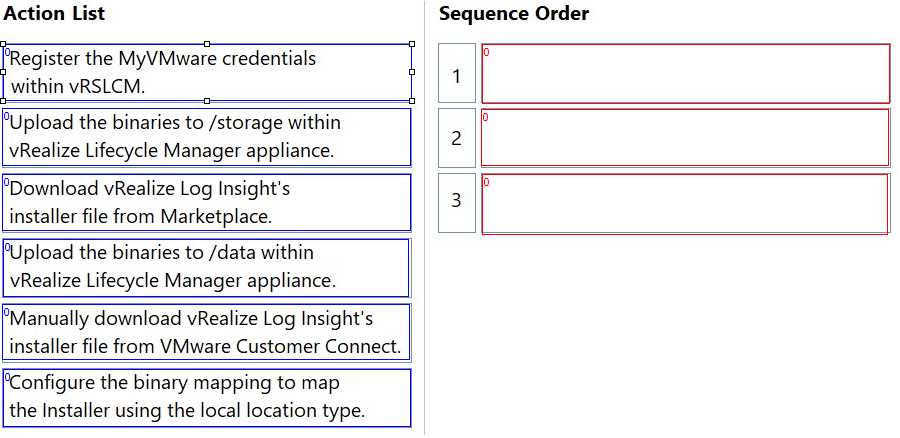
I’d go with exporting the vRealize Log Insight bundle from a connected Lifecycle Manager first, then importing it into the offline environment, and finally starting the installation. No internet means you can’t skip the export-import step.
You gotta start by exporting the content from a connected Lifecycle Manager, then import that file into the offline environment. Only after import can you proceed with the installation. Makes the sequence clear: export, import, install.
I think the key is making sure you get the content package first from a connected environment, then import that exact package into your offline Lifecycle Manager before attempting installation. Without importing, the installer wouldn’t have the required files. So exporting, importing, then installing should be the right order. The tricky part is knowing exactly where in Lifecycle Manager each action happens, but the sequence itself seems straightforward based on the context here.
I’d start with exporting the package from a connected machine, then import it into Lifecycle Manager offline, and finish with installing vRealize Log Insight. No internet means manual moving of files is key here.
First, export the vRealize Log Insight bundle from an internet-connected environment, then import it into Lifecycle Manager, and finally install the product using the imported bundle. So actions related to export, import, and install.