Free VMware 2V0-32.24 Actual Exam Questions - Question 10 Discussion
DRAG DROP An Administrator needs to create a new alert in vRealize Log Insight that will send email notifications to a distribution list based on the defined query. Drag and drop the five actions the administrator must complete in order to create the alert from the action list on the left and place the actions into the correct sequence on the right. (Choose five.) 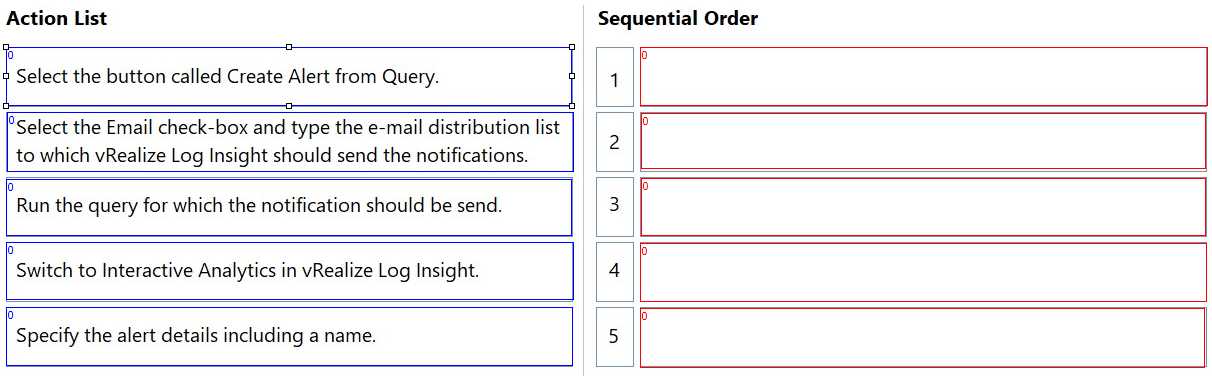
Start with creating the query, then create the alert using it.
The first step has to be creating the query since the alert depends on it. Then you create the alert using that query, add the email group, enable notifications, and finally save the alert. SMTP is usually pre-set.
Creating the query first is key, then linking it in the alert setup.
I’d say start by creating and saving the query, then create the alert using that query. Adding the email distribution list should come after so notifications go to the right place. Finally, save the alert to activate it.
First off, you definitely need to create and save the query before setting up the alert since it’s the trigger. Then enabling email notifications should come after, or at least ensuring SMTP is configured so emails can actually send. Adding the distribution list to the alert is straightforward but has to happen after the alert itself is created. Finally, testing or saving everything wraps it up. So basically: create query, configure SMTP/email settings, enable notifications, create alert with query, add distribution list. That sequence makes sense even without extra details on existing setups.
I'd say start with enabling email notifications in the system settings if not already done, then create and save your query, followed by creating the alert using that query, adding the distribution list, and finally enabling the alert. This covers all bases.
I’d start by creating the query and saving it so you have something to trigger the alert. Setting up the email before enabling notifications makes sense to avoid missing anything. So the order should reflect that flow.
First, create the query, then save it, set up the alert, configure the email settings, and finally enable notifications. So the order is: create query, save, create alert, configure email, enable alert. That matches options B, D, A, C, E.