Free VMware 2V0-32.24 Actual Exam Questions - Question 9 Discussion
DRAG DROP A user reports that when browsing to the vRealize Operations (vROps) user interface a 503 error is displayed. An administrator determines that the vROps cluster is offline. Drag and drop the three correct actions the administrator must complete to troubleshoot the issue from the action list on the left and place the action into the correct sequence on the right. (Choose three.) 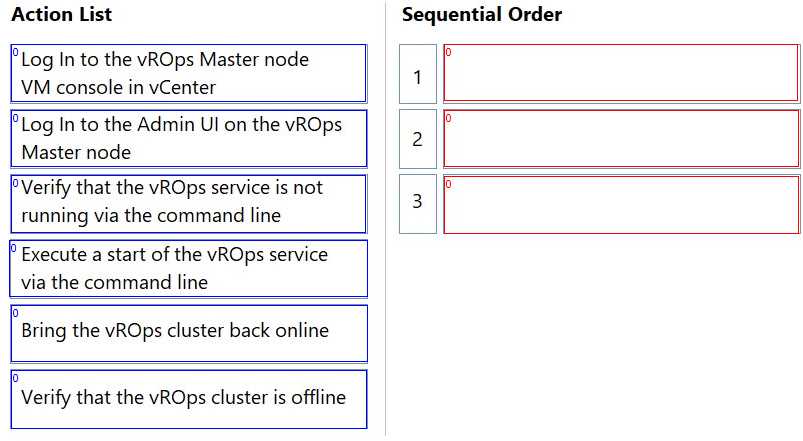
Going off the options, I’d check cluster status first to see if the cluster is really down or just reporting wrong. Then I’d move on to node health to pinpoint if a particular node is causing the issue. Restarting services should be last as it’s more of a fix than a diagnostic step, and you don’t want to restart blindly without knowing what’s wrong. This order makes it easier to isolate the problem before trying to fix it.
I’d skip restarting services right away since it’s better to confirm cluster status first for a clearer picture. If the cluster’s down, that’s the key thing to verify before anything else.
I’d actually start by restarting the services to see if that gets the cluster back online quickly. If that doesn’t work, then check the node health and confirm cluster status afterwards.
Start by confirming cluster status, then check node health, finally restart services.
Check cluster status first, then node health, finally restart services.
I’d say the first step is definitely to verify the cluster status. After that, checking the node health helps identify if any specific node is causing the issue before restarting services. Makes sense to follow that order.
I’d start by confirming the cluster status first to see if it’s really offline. Then, checking the health of each node makes sense before trying to restart any services — if a node is down or unhealthy, restarting services alone might not fix it. After that, restarting the vROps services could help bring the cluster back online. This sequence covers verifying the problem, identifying the root cause, and then applying a fix.
First, verify the cluster status, then check node health, finally restart the vROps services.
Another way to look at it is starting with checking the cluster status through command line or management interface to confirm it’s really offline. Then, since the 503 error often points to the service not running properly, restarting the vROps services on each node is a logical next step. Finally, verifying network connectivity between nodes can help rule out communication issues causing the cluster to appear offline. This sequence covers verifying state, fixing services, then ensuring cluster communication—all crucial for vROps troubleshooting.
This one feels tricky without seeing the actual action list. The 503 and cluster offline usually means resource or service issues, so I'd check node health and restart services first. Still, the exact steps might differ depending on what's offered.