Free Microsoft Dynamics MB-800 Actual Exam Questions
Dumps Box (DumpsBox) offers up-to-date practice exam questions for MB-800 certification exam which are developed and validated by Microsoft subject domain experts certified in Microsoft Dynamics MB-800 . These practice questions are update regularly as we keep an eye on any recent changes in MB-800 syllabus, and when there is update our team quickly adjusts the questions. This commitment to providing the best quality exam prep material to certification aspirants is what makes DumpsBox.com the best certification exam prep website. On top of that, our strong, yet strictly moderated, community based feedback keeps the content clean and current. Each question has helpful community discussion that provides it extra perspective and introduces helpful resources for better exam preparation. This also saves students from other outdated practice questions or illicit exam dumps that can have adverse affects on career. Browse through our Microsoft Dynamics MB-800 exam questions and pass your exam on first try.
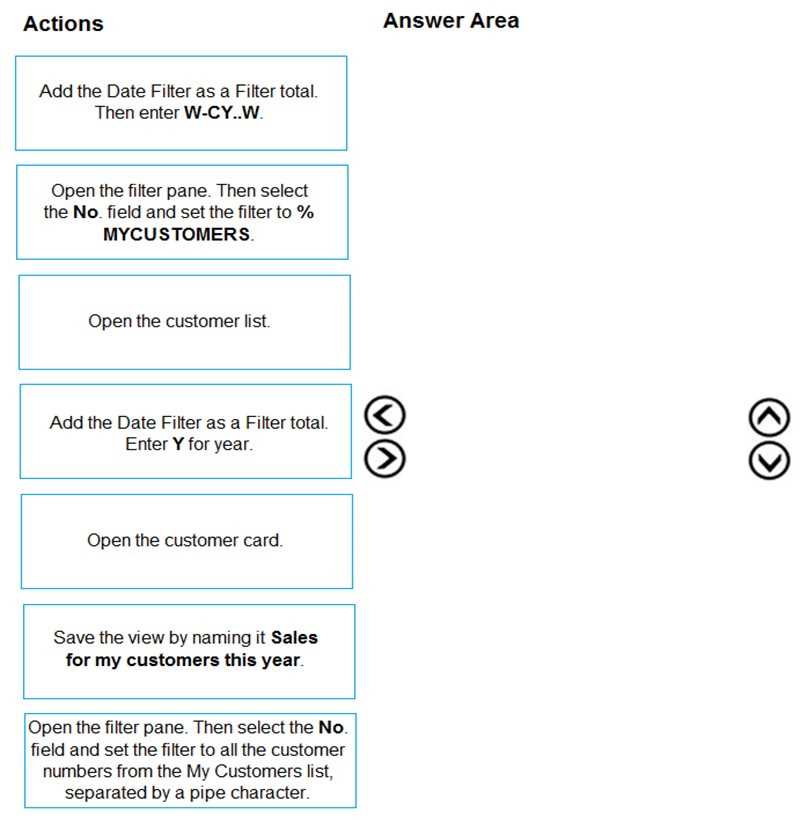
You are setting up a new company for a customer.
The customer wants you to filter the view to show all customers in the My Customers list and
calculate the year-to-date sales.
You need to apply the filter.
Which four actions should you perform in sequence? To answer, move the appropriate entities from
the list of actions to the answer area and arrange them in the correct order.
NOTE: More than one order of answer choices is correct. You will receive credit for any of the correct
orders you select.
I think the key is to first apply the filter that narrows down to "My Customers" so you’re not dealing with unnecessary data. Then you should set the date filter for year-to-date sales to target the right timeframe, which lets your calculation be accurate. After both filters are set, you can safely add the calculated column or measure for YTD sales. Doing it in this order makes sure your calculation doesn’t include extra data or dates outside the range. So, filter customers first, then filter dates, then calculate.
I’d start by adding the filter for “My Customers” to make sure you’re only looking at that group right away. Next, set the date filter specifically for this year to get the year-to-date data before doing any calculations. Once those filters are in place, add the total sales field and then apply the sum aggregation so you get the YTD sales total. That way, you’re working with the right subset and timeframe before pulling numbers. It seems cleaner than trying to calculate before filtering properly.
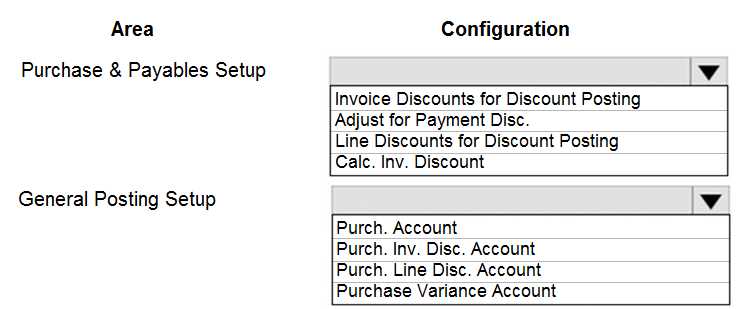
A company is implementing Dynamics 365 Business Central.
The accountant must be able to report discounts received on purchased items separately from costs.
You need to configure the system to meet the requirement.
How should you configure the system? To answer, select the appropriate configurations in the
answer area.
NOTE: Each correct selection is worth one point.
I think option B makes sense, since posting the discounts to a separate purchase line could help isolate the discount amounts from item costs. That way, discounts aren’t mixed into the standard item cost.
I’d rule out option A because standard item costing usually includes discounts, so it won’t separate them cleanly. Choosing the right G/L account (C) to track discounts separately makes more sense here.
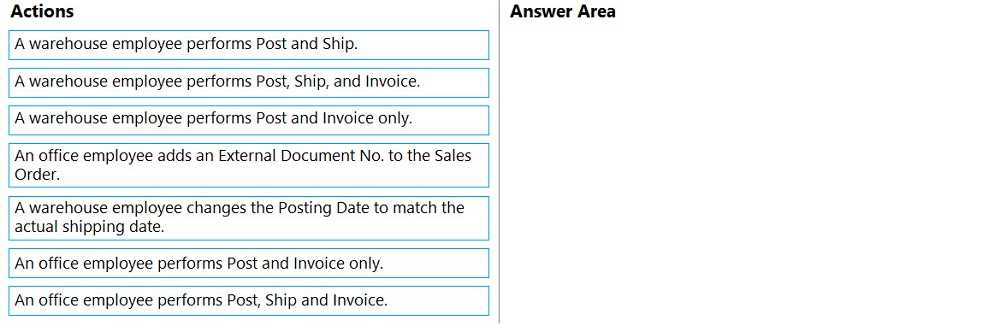
You need to advise the company on how to process existing sales orders.
Which three actions should you recommend be performed in sequence? To answer, move the
appropriate actions from the list of actions to the answer area and arrange them in the correct order.
I’d go with starting by validating the sales orders to make sure all info is correct and complete. Next, updating the order status is key so the system reflects the current state of each order. Wrapping up by generating reports makes sense to keep track of what’s been processed and spot any trends or issues. This sequence covers accuracy, process tracking, and review, which are all important steps.
I’d start by reviewing each sales order for accuracy, then process them to update inventory and billing, and finish by generating invoices to complete the transaction. This flow keeps things in order and covers all bases.
What should you do?
B. Enabling Direct Posting on the G/L Account Card allows AR users to post transactions directly, which might fix posting issues without blocking customers or accounts. It addresses the problem from the G/L side instead.
It’s A, blocking the customer card stops bad AR entries without affecting G/L accounts.
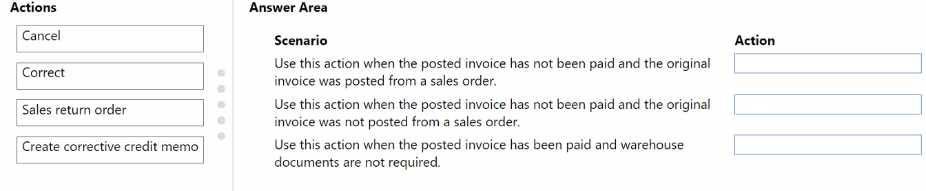
You need to train the sales department how to correct posted sales invoices.
Which action should you use for each scenario? To answer, drag the appropriate actions to the
correct scenarios. Each action may be used once, more than once, or not at all. You may need to drag
the split bar between panes or scroll to view content.
NOTE: Each correct selection is worth one point.
I think for scenarios involving wrong amounts or products, credit notes plus new invoices fit best since you can’t change a posted invoice directly. For address errors, just correcting the invoice should work fine without extra docs.
For wrong amounts, credit note plus new invoice is safest.
should you use? Each correct answer presents part of the solution. NOTE; Each correct selection is
worth one point.
D imo, bank account posting groups usually handle cash flow, not revenue posting. So, focusing on customer (B) and product (C) groups makes more sense for invoicing revenue setup.
Option A could be crucial too since general business posting groups help define overall revenue accounts. Without them, the system might not know where to post the revenue at a company level.
What should you select?
I get why people are picking D, but I’d go with A here. Payment Service sounds like it covers the actual processing of payments at the point of sale, which is crucial for cash and carry desks. Setting terms to zero days (D) ensures no delay, but it doesn’t handle the payment itself. So, for sales setup that includes payment handling, A feels like the better fit.
Not B, since Direct Debit usually means pulling funds later, which isn’t ideal for cash and carry where payment should be immediate. A or C seem more direct for instant payments.
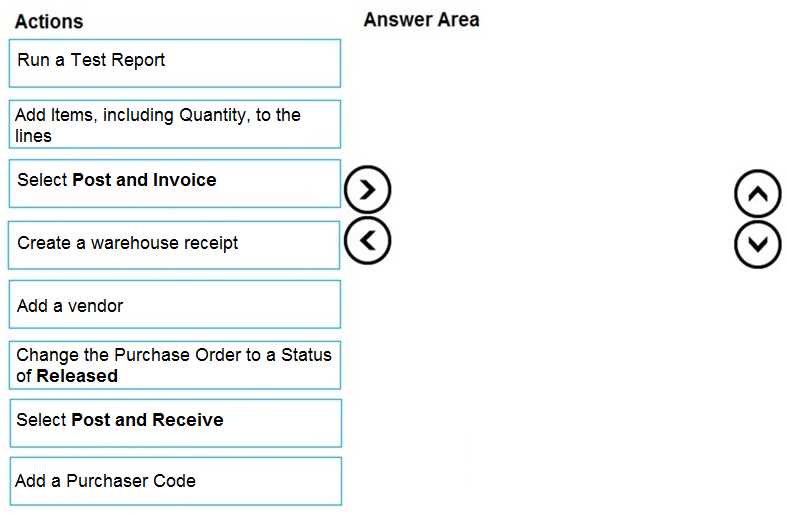
You need to configure the purchase order process to meet the auditor’s requirements.
Which four actions should you perform in sequence? To answer, move the appropriate actions from
the list of actions to the answer area and arrange them in the correct order.
I think setting up the budget control first makes sense to catch issues early, then define approval workflows before creating the order. That way, all approvals happen with budget checks in place.
I’d switch it up by starting with setting policies, then doing the budget check early to avoid wasting time on approvals if funds aren’t there. After that, assign approvals and finally create the order.
two configurations should you use? Each correct answer presents part of the solution. NOTE; Each
correct selection Is worth one point.
Option B makes sense since you need to classify customers as wholesale, and E ties those groups to accounts, which is key for posting to the right receivables account. Without these two, you can’t control where the transactions post.
B, E. The customer posting groups (B) let you classify customers like wholesale vs retail, while the general business posting groups (E) link those classifications to specific accounts. Together, they control how transactions post to receivables accounts. The actual account numbers (A and D) are assigned within the posting groups, so picking those alone isn’t enough without setting up the groups. General Posting Setup (C) is more about overall ledger integration but doesn’t handle customer-specific posting rules directly.
HOTSPOT A company uses Dynamics 365 Business Central. The company plans to implement a cash receipt journal batch based on the following requirements:
• The cash receipt journal batch must use a bank account by default.
• The cash receipt customer payments must be archived automatically in the posted journals.
The company uses the accrual basis for accounting. You need to configure the cash receipt journal batch. Which options should you use? To answer, select the appropriate options in the answer area. 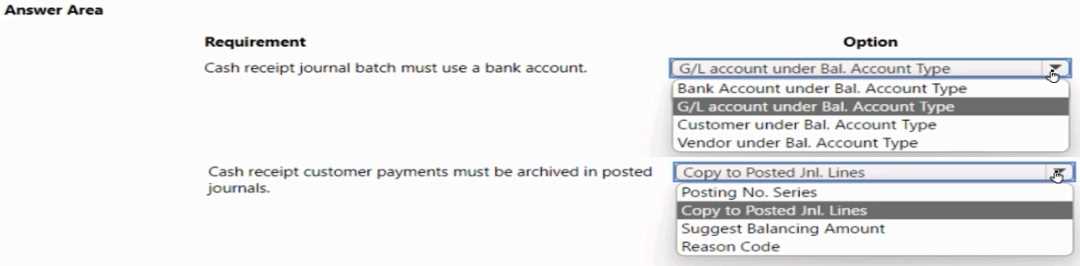 NOTE: Each correct selection is worth one point.
B sets the default bank account, D clearly covers automatic archiving, fits best.
B locks in the default bank account, and D handles archiving post-payment automatically.
DRAG DROP A company uses Dynamics 365 Business Central. You need to configure the system to meet the following requirements for a purchasing agent:
• Create and post purchase documents including purchase receipt lines.
• Do not allow agents to read general ledger (G/L) or bank balances.
• Restrict access to view G/L amounts.
• Ensure that purchasing agents can select G/L codes on purchase documents.
You need to restrict access to view G/L amounts. Which three actions should you perform in sequence? To answer, move the appropriate actions from the list of actions to the answer area and arrange them in the correct order. NOTE: More than one order of answer choices is correct. You will receive credit for any of the correct orders you select. 
I think the key is to first create that permission set that explicitly denies reading G/L info, so the agents can’t see balances but still pick G/L codes when posting. Then you assign this new deny-read permission set to the purchasing agents, which restricts their access properly. Lastly, verifying or testing confirms everything works as intended with those restrictions. This approach ensures they keep posting capabilities without viewing sensitive G/L data. Skipping the deny-read permission set step wouldn't restrict access properly, so that’s a must-do first.
Agree with creating a new deny read G/L permission set first, then assign and verify.
DRAG DROP A company implements Dynamics 365 Business Central. The company must import the following opening balances into Dynamics 365 Business Central:
• Item
• Bank
• Customer
You need to implement tools to import opening balances. Which components should you use? To answer, drag the appropriate components to the correct opening balances. Each component may be used once, more than once, or not at all. You may need to drag the split bar between panes or scroll to view content. NOTE: Each correct selection is worth one point. 
I think General Journal suits Bank balances since it’s more about financial entries, while RapidStart works better for Items and Customers as it handles master data imports cleanly. The other options seem off for these.
I’d pick RapidStart for Item and Customer since it handles master data well, but for Bank, General Journal seems more fitting because it deals with ledger entries directly. The other tools don’t fit as nicely here.
DRAG DROP A company is implementing Business Central. The company is evaluating Microsoft Power Platform integration benefits. The company has the following business requirements:
• Provide financial reporting in real-time.
• Automate customer onboarding in Business Central.
• Create a workflow that automates invoice approvals.
• Integrate item scanning capabilities in the warehouse.
You need to evaluate the specified business requirements and align them with Microsoft solutions that can meet each need effectively. Which Microsoft Power Platform tools should you recommend? To answer, move the appropriate business Microsoft Power Platform tools to the correct requirements. You may use each Microsoft Power Platform tool once, more than once, or not at all. You may need to move the split bar between panes or scroll to view content. NOTE: Each correct selection is worth one point. 
D for reports, B for automation tasks, and C for scanning fits best here.
I think Power BI fits financial reporting best since it’s built for real-time dashboards. Power Automate feels right for both onboarding and invoice workflows since it handles processes well. Scanning definitely needs Power Apps for device support.
DRAG DROP A manufacturer uses Dynamics 365 Business Central. The company has the following item types:
• Raw Materials
• Work-in-progress (WIP)
• Finished Goods
Different prefixes are used for item numbers to identify these item types. The company requires the following system setup:
• Use a unique number series for each item type.
• No. Series must be selectable when creating manual items.
• Implement automatic number assignment
You need to configure the system. In which order should you perform the actions? To answer, move all actions from the list of actions to the answer area and arrange them in the correct order. NOTE: More than one order of answer choices is correct. You will receive credit for any of the correct orders you select. 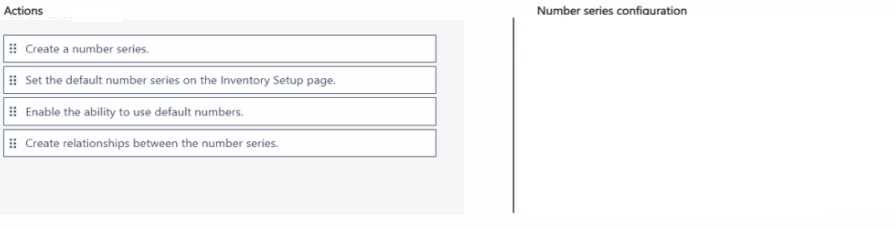
Start by creating number series, then assign them to item categories, finally enable auto numbering.
Start by creating number series, then assign to item categories, finally enable auto numbering.
You use infinite items such as water, electricity, and natural gas.
You need to set up the items.
Which item type should you use for infinite items?
A/D? Resource items (A) seem made for ongoing use stuff like utilities, while Non-Inventory (D) is more for things you charge or bill but don’t track as inventory. Since these are infinite items like water and electricity, you probably want something that handles consumption and cost tracking better, which points more toward Resource. But if the goal is just to bill without detailed usage records, Non-Inventory might also work. The question isn’t crystal clear on usage tracking needs, so either could fit depending on what’s prioritized.
C/D? I’m thinking Service (C) could also make sense since utilities like water or electricity might be treated as a service you consume, not a physical inventory. Non-Inventory (D) feels too generic and might not capture the ongoing usage nature properly, but it’s definitely better than Inventory (B). Resource (A) is good for labor or machine time, but utilities feel more like services you’re consuming continuously rather than a resource you schedule or allocate.