Free Microsoft Dynamics MB-800 Actual Exam Questions - Question 14 Discussion
DRAG DROP A manufacturer uses Dynamics 365 Business Central. The company has the following item types:
• Raw Materials
• Work-in-progress (WIP)
• Finished Goods
Different prefixes are used for item numbers to identify these item types. The company requires the following system setup:
• Use a unique number series for each item type.
• No. Series must be selectable when creating manual items.
• Implement automatic number assignment
You need to configure the system. In which order should you perform the actions? To answer, move all actions from the list of actions to the answer area and arrange them in the correct order. NOTE: More than one order of answer choices is correct. You will receive credit for any of the correct orders you select. 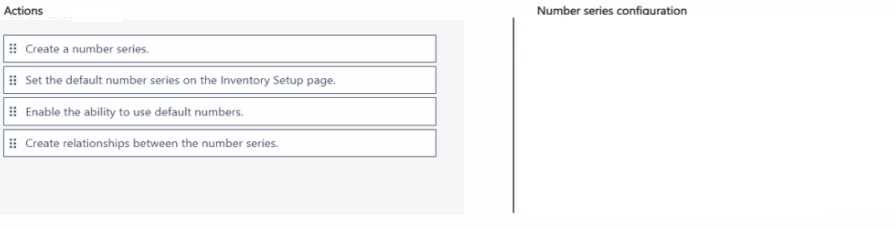
Start by creating number series, then assign them to item categories, finally enable auto numbering.
Start by creating number series, then assign to item categories, finally enable auto numbering.
I think you should first create all the number series with the right prefixes, so you have them ready. Then set up the item categories and assign each category the appropriate number series, since Business Central usually links number series to categories, not directly to item types. Finally, enable automatic numbering for items so it picks up the correct series when items are created. This way, manual creation can still select the series, but new items get numbered automatically without confusion.
Starting with number series creation avoids errors later on.
Agree, start with number series creation, then assign to item types, and finish by enabling auto numbering.
I’d start by creating the number series for each prefix, then assign those series to the item types, and finally set up automatic numbering so it applies when items are created manually. This way, the system knows which series to pick right away.
I think you want to create the number series first with the prefixes for each item type (raw materials, WIP, finished goods). Then set up the item types to use those series. After that, enable automatic numbering so when you create an item manually, it picks the right series automatically but still lets you choose if needed. That order seems to cover all requirements without skipping steps.
I'd say start by setting up the number series with the prefixes, then assign those series to the item types, and finally enable automatic numbering so it kicks in during manual creation.
Start by creating unique number series for each item type, then assign them.
This one seems pretty straightforward. First set up number series for each type, then link those series to the item types, and finally enable automatic numbering. I’d say start with creating unique No. Series for Raw Materials, WIP, and Finished Goods.