Free Microsoft Dynamics MB-800 Actual Exam Questions - Question 2 Discussion
A company is implementing Dynamics 365 Business Central.
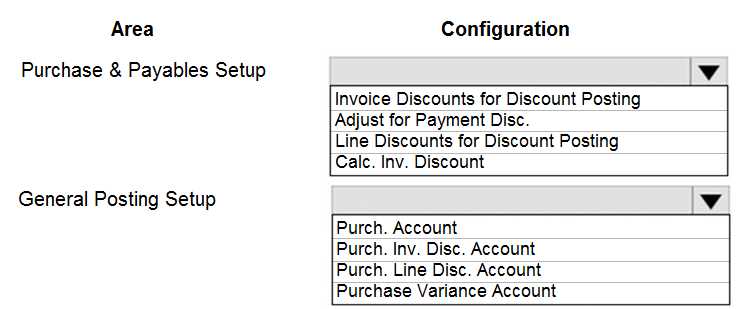
The accountant must be able to report discounts received on purchased items separately from costs.
You need to configure the system to meet the requirement.
How should you configure the system? To answer, select the appropriate configurations in the
answer area.
NOTE: Each correct selection is worth one point.
I think option B makes sense, since posting the discounts to a separate purchase line could help isolate the discount amounts from item costs. That way, discounts aren’t mixed into the standard item cost.
I’d rule out option A because standard item costing usually includes discounts, so it won’t separate them cleanly. Choosing the right G/L account (C) to track discounts separately makes more sense here.
Also consider that applying a separate purchase line discount code (D) might not capture all discount types, especially if discounts come as invoice-level adjustments. So combining the G/L account setup (C) seems safer for clear reporting.
Setting up a separate G/L account for discounts (C) keeps reporting accurate and clear.
Another angle: using a separate G/L account (C) is crucial because if discounts just reduce the cost on the invoice, you lose visibility on how much discount was actually given. This keeps reports clear and accurate.
Option C makes the most sense for clean separation in reports.
I’d go with option C too. Using a separate G/L account for discounts makes it easier to pull accurate reports on discounts apart from the actual purchase costs. That separation is key here.
I agree that just allowing invoice discounts (B) won’t cut it since it lumps discounts together and doesn’t break them out per item. Setting up a separate G/L account for purchase discounts (C) is better because it lets you track those discounts independently from the item costs in financial reports. Also, I’d double-check if you need to enable “Allow Invoice Discount” too, but the separate account for discounts is the main step to meet the requirement here. This way, you get clear visibility on discounts distinct from costs.
I think the key is separating discounts from costs, so setting up a dedicated G/L account for discounts (C) is essential. Allowing invoice discounts alone won’t give detailed reporting per item.
I ruled out B because "Allow Invoice Discount" usually applies at the invoice level, not item-level discount tracking. C seems right since a separate G/L account isolates discounts from costs clearly in reports.
I think option C makes sense to track discounts separately from costs.
This question’s a bit tricky, not sure if setting up a separate G/L account for discounts (C) or using the "Allow Invoice Discount" feature (B) covers it best. Anyone else chose differently?