Free Actual MS-102 Actual Exam Questions – Microsoft 365 Administrator
Dumps Box (DumpsBox) offers up-to-date practice exam questions for MS-102 certification exam which are developed and validated by Microsoft subject domain experts certified in Actual MS-102 – Microsoft 365 Administrator. These practice questions are update regularly as we keep an eye on any recent changes in MS-102 syllabus, and when there is update our team quickly adjusts the questions. This commitment to providing the best quality exam prep material to certification aspirants is what makes DumpsBox.com the best certification exam prep website. On top of that, our strong, yet strictly moderated, community based feedback keeps the content clean and current. Each question has helpful community discussion that provides it extra perspective and introduces helpful resources for better exam preparation. This also saves students from other outdated practice questions or illicit exam dumps that can have adverse affects on career. Browse through our Actual MS-102 – Microsoft 365 Administrator exam questions and pass your exam on first try.
HOTSPOT You have a Microsoft 365 E5 tenant that uses Microsoft Intune. You need to configure Intune to meet the following requirements: Prevent users from enrolling personal devices. Ensure that users can enroll a maximum of 10 devices. What should you use for each requirement? To answer, select the appropriate options in the answer area. NOTE: Each correct selection is worth one point. 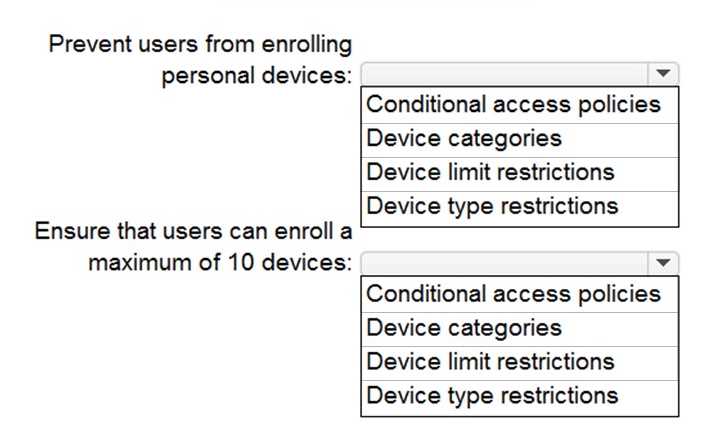
For stopping personal device enrollment, you need the “Device Type Restrictions” inside Device Enrollment Restrictions. The 10-device limit is set by “Maximum number of devices per user” in the same policy. Both fit there.
I agree that both requirements are handled in the Device Enrollment Restrictions policy. You can block personal devices by disabling the device types like iOS or Android in the Device Type Restrictions section, which is part of that policy. The max device limit of 10 per user is also a setting within the same policy, so you don’t need to look elsewhere. Just setting these two parameters in Device Enrollment Restrictions covers both parts of the question independently and clearly.
HOTSPOT You have a Microsoft 365 E5 subscription and an Azure AD tenant named contoso.com. All users have computers that run Windows 11, are joined to contoso.com, and are protected by using BitLocker Drive Encryption (BitLocker). You plan to create a user named Admin1 that will perform following tasks: • View BitLocker recovery keys. • Configure the usage location for the users in contoso.com. You need to assign roles to Admin1 to meet the requirements. The solution must use the principle of least privilege. Which two roles should you assign? To answer, select the appropriate roles in the answer area. NOTE: Each correct selection is worth one point 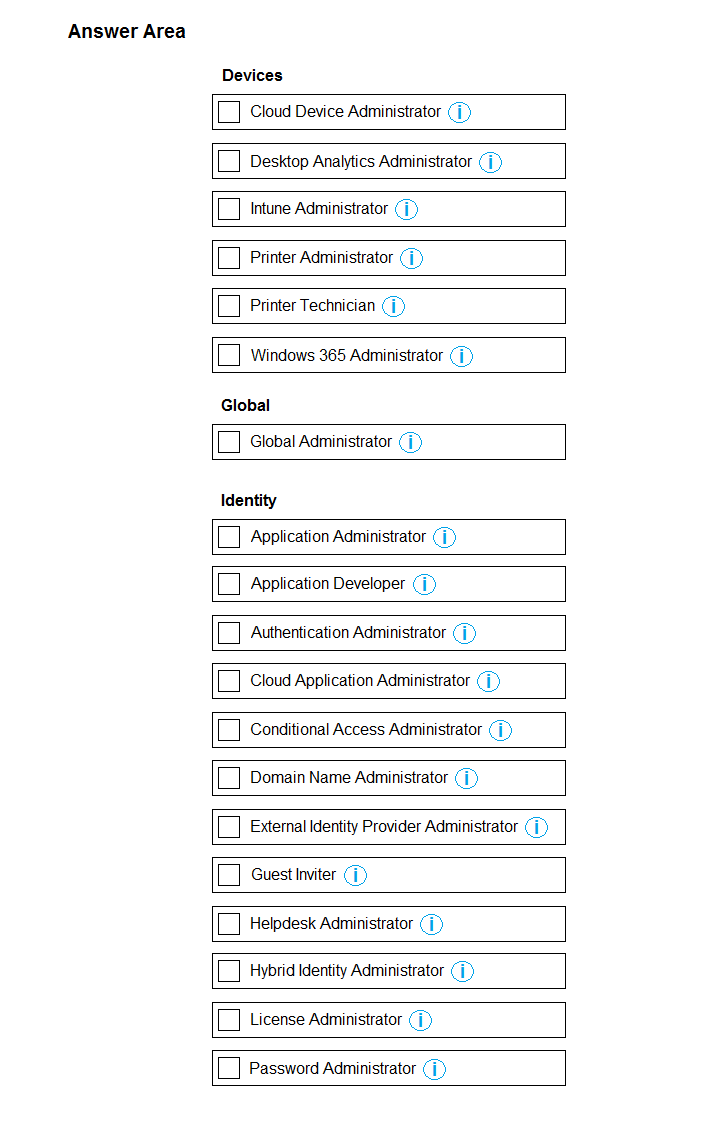
BitLocker Recovery Administrator makes sense for recovery keys. For usage location, User Administrator fits best since it manages user attributes without full admin privileges, aligning with least privilege principle.
Agree with BitLocker Recovery Administrator for keys, but I’d pick User Administrator for usage location since it’s the role that specifically manages user properties without extra rights. Keeps it tight on permissions.
HOTSPOT Your company has a Microsoft 365 subscription that uses an Azure AD tenant named contoso.com. The tenant contains the users shown in the following table.  You create a retention label named Label 1 that has the following configurations: • Retains content for five years • Automatically deletes all content that is older than five years You turn on Auto labeling for Label1 by using a policy named Policy1. Policy1 has the following configurations: • Applies to content that contains the word Merger • Specifies the OneDrive accounts and SharePoint sites locations You run the following command. Set-RetentionConpliancePolicy Policy1 -RestrictiveRetention Strue -Force For each of the following statements, select Yes if the statement is true. Otherwise, select No. NOTE: Each correct selection is worth one point.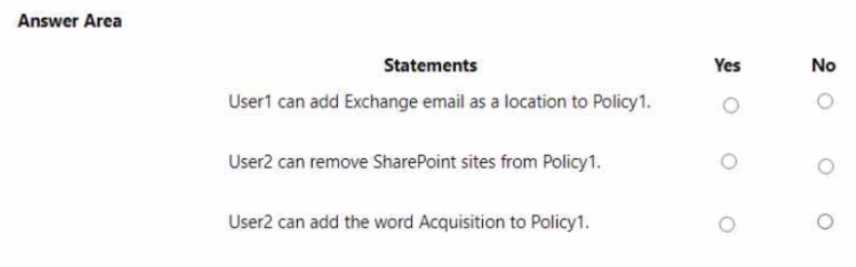
Yes, restrictive retention blocks deletion even if labeled automatically.
I think the key is that restrictive retention means the content is locked during the retention period. So for user2, if their site is included and content has “Merger,” it should be protected from deletion until 5 years pass. That makes me say yes for those scenarios.
HOTSPOT You have a hybrid deployment of Azure AD that contains the users shown in the following table. 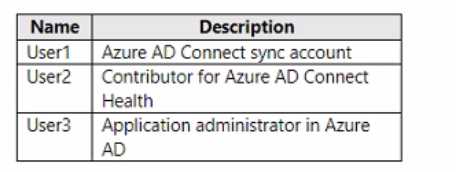 You need to identify which users can perform the following tasks: • View sync errors in Azure AD Connect Health. • Configure Azure AD Connect Health settings. Which user should you identify for each task? To answer, select the appropriate options in the answer area. NOTE: Each correct selection is worth one point.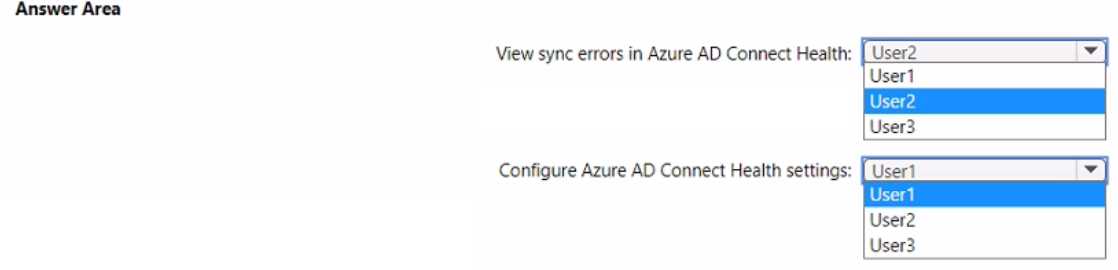
Agree with B for viewing errors and D for configuring settings.
This one looks pretty straightforward. I think the user with the Azure AD Connect Health Service Administrator role can view sync errors, and the Global Administrator can configure the settings. So options B and D for me.
HOTSPOT Your company has a Microsoft 365 subscription that contains the users shown in the following table. 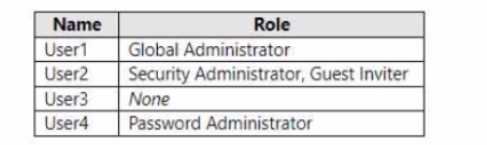 External collaboration settings have default configuration. You need to identify which users can perform the following administrative tasks: • Modify the password protection policy. • Create guest user accounts. Which users should you identify for each task? To answer, select the appropriate options in the answer area. NOTE: Each correct selection is worth one point.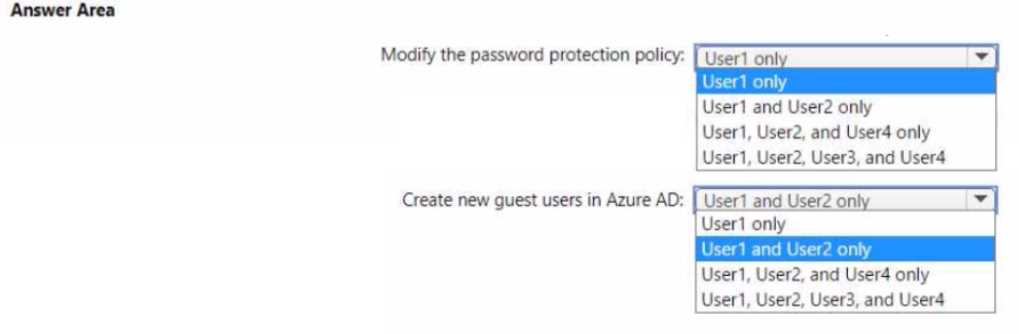
Password policy needs Global admin, guest creation needs User admin.
HOTSPOT You have a Microsoft 365 E5 subscription. You need to create a Conditional Access policy that will require the use of FID02 security keys only when users join their Windows devices to Microsoft Entra ID. How should you configure the policy? To answer, select the appropriate options in the answer area. NOTE Each correct selection is worth one point. 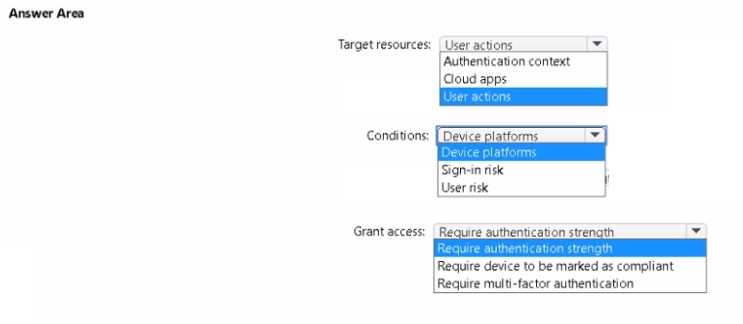
Option B for cloud apps, and require FIDO2 in grant controls.
I noticed that under "Cloud apps or actions," there’s an option called "Device registration" which seems to cover device join scenarios. If we pick that, it should target the join process specifically. Then for "Grant," choosing "Require multi-factor authentication" combined with "Require authentication strength" set to FIDO2 should enforce using FIDO2 keys only. Also, make sure the policy targets Windows devices under "Conditions > Device platforms" so it doesn’t apply to other OSes. This approach narrows down the policy exactly to Windows device join with FIDO2 keys.
HOTSPOT You have a Microsoft 365 E5 subscription that contains two Microsoft SharePoint Online sites named Site1 and Site2. You have the documents shown in the following table. 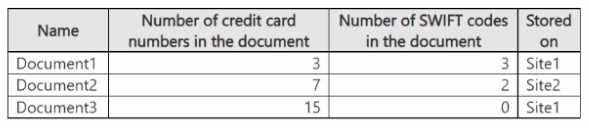 You DLP1 that has the advanced DLP rule as shown in the exhibit. (Click the Exhibit tab.) You apply DLP1 to Site1. For each of the following statements, select Yes if the statement is true. Otherwise, select No. NOTE: Each correct selection is worth one point.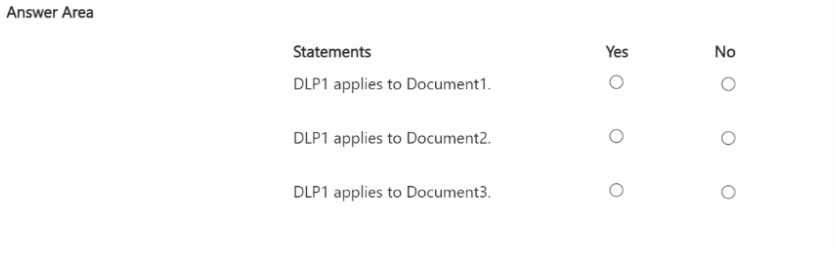
The key point is DLP1 is only assigned to Site1, so Site2 documents are out of scope. Even if Site2 docs contain sensitive info, the rule doesn’t apply there. Also, the advanced DLP conditions focus on specific sensitive info types and file properties, but since Site2 isn’t targeted, none of those documents should trigger alerts. So for any statements claiming Site2 documents will be flagged, those should be No. For Site1, only files matching both the sensitive info and the conditions in the advanced rule get flagged, so it depends on each file’s content and metadata within Site1.
DLP1 only applies to Site1, so Site2 docs won’t trigger any rules.
HOTSPOT You have a Microsoft 365 E5 subscription that contains the users shown in the following table. Each user has an Android device with the Microsoft Authenticator app installed and has set up phone sign-in. The subscription has the following Conditional Access policy: • Name: Policy1 • Assignments o Users and groups: Group1, Group2 o Cloud apps or actions: All cloud apps • Access controls o Grant Require multi-factor authentication • Enable policy: On From Microsoft Authenticator settings for the subscription, the Enable and Target settings are configured as shown in the exhibit. (Click the Exhibit tab.) 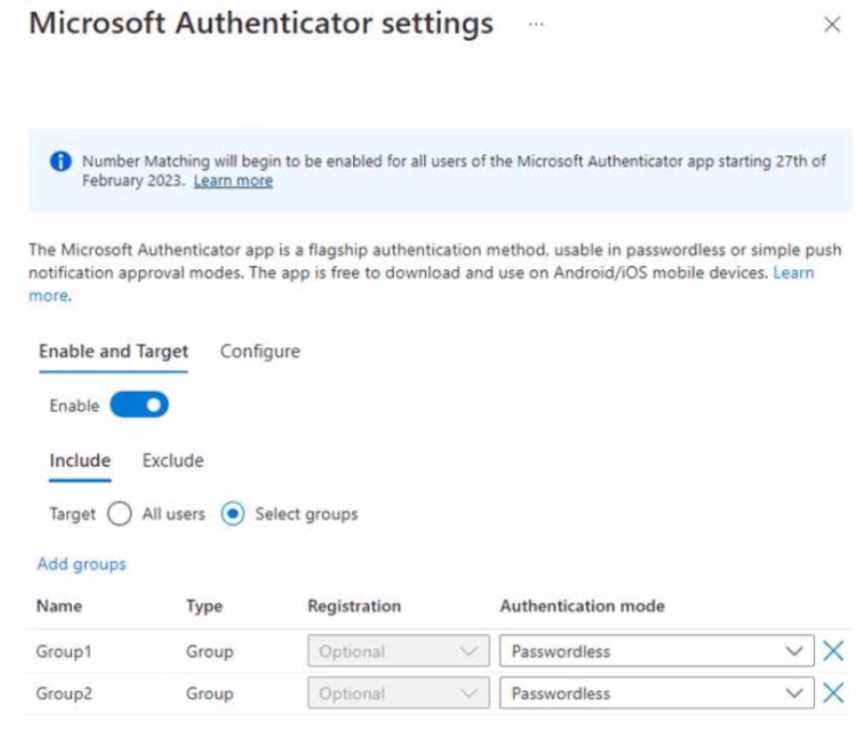 For each of the following statements, select Yes if the statement is true. Otherwise, select No. NOTE: Each correct selection is worth one point.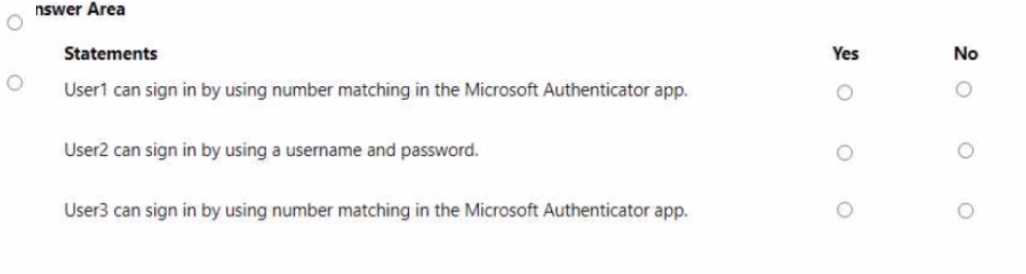
I see why B and D are Yes since those users are in the targeted groups. For A, even though User1 is in Group1, phone sign-in might bypass traditional MFA prompts, so it could be tricky but likely No here.
I’m with the idea that the policy only impacts users in Group1 and Group2. So users outside those groups, like User3 and User5, wouldn’t have MFA enforced by Policy1, making their answers No. Also, the phone sign-in feature doesn’t bypass MFA requirements; it just offers a different way to authenticate. So even if a user has phone sign-in enabled, if they’re in a targeted group, MFA is still required. That supports Yes for User2 and User4 but No for the others not in those groups.
HOTSPOT You have a Microsoft 365 E5 subscription and use Microsoft Defender for Cloud Apps. You need to create a file policy named Policy1 that meets the following requirements: • Inspects files in connected software as a service (SaaS) apps * Inspects protected files Which two settings should you configure? To answer, select the appropriate settings in the answer are a. NOTE: Each correct selection is worth one point.

File policies plus the option to inspect protected files seems right here.
I’d pick file policies because they let you inspect and control files in SaaS apps, which hits the first requirement directly. For inspecting protected files, adding the setting to include protected file types makes sense since those files need special handling. So, the two settings that go hand in hand are the file policy itself plus the option to scan protected file types—both together cover what the question asks fully.
HOTSPOT Your company has a Microsoft Entra tenant that contains the users shown in the following table. 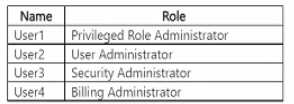 The tenant includes a security group named Admin1. Admin1 will be used to manage administrative accounts. External collaboration settings have default configuration. You need to identify which users can perform the following administrative tasks: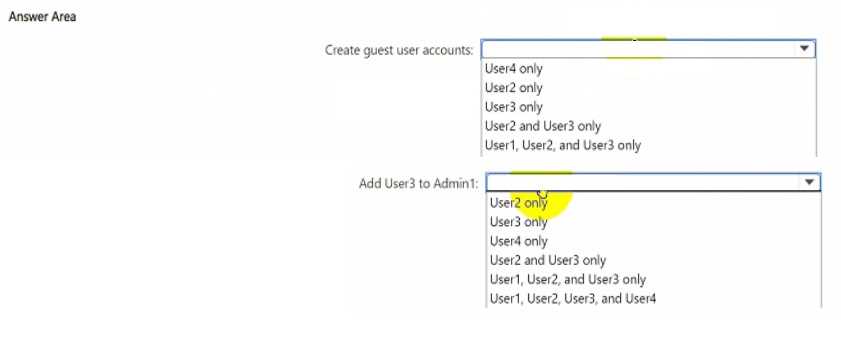
If Admin1 has no admin roles assigned, then only users with built-in admin roles directly assigned can perform the tasks, regardless of group membership. So Admin1 members wouldn’t have admin rights just by being in that group.
If Admin1 isn’t assigned any admin roles, then only users with built-in admin roles can perform those tasks. So it’s about their direct role assignments, not group membership.
HOTSPOT You have a Microsoft 365 subscription. You need to identify all users that have an Enterprise Mobility + Security plan, and then provide a list of the users in the CSV format. Which settings should you use in the Microsoft 365 admin center, and which option should you select? To answer, select the appropriate options in the answer area. NOTE: Each correct selection is worth one point. 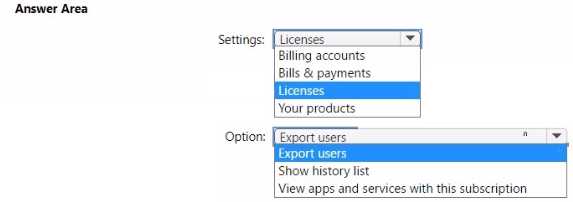
I’d check the Active Users page, because that’s where you can filter by license type. Then just export the filtered list to CSV. The Enterprise Mobility + Security plan should show up as a license option there.
The key here is to focus on filtering users by license type. The "Active users" page in the admin center is where you can filter by license, so picking the Enterprise Mobility + Security plan there makes sense. Then, exporting that filtered list should give you the CSV you need. So, it’s really about combining the right filter with the export option in active users, not digging into other sections like reports or usage. That’s where you get the user details and can export them directly.
HOTSPOT You have a Microsoft 365 E5 subscription. You need to configure threat protection tor Microsoft 365 to meet the following requirements: • Limit a user named User 1 from sending more than 30 email messages per day. • Prevent the delivery of a specific file based on the file hash. Which two threat policies should you configure in Microsoft Defender for Office 365? To answer, select the appropriate threat policies in the answer area. NOTE: Each correct selection is worth one point. 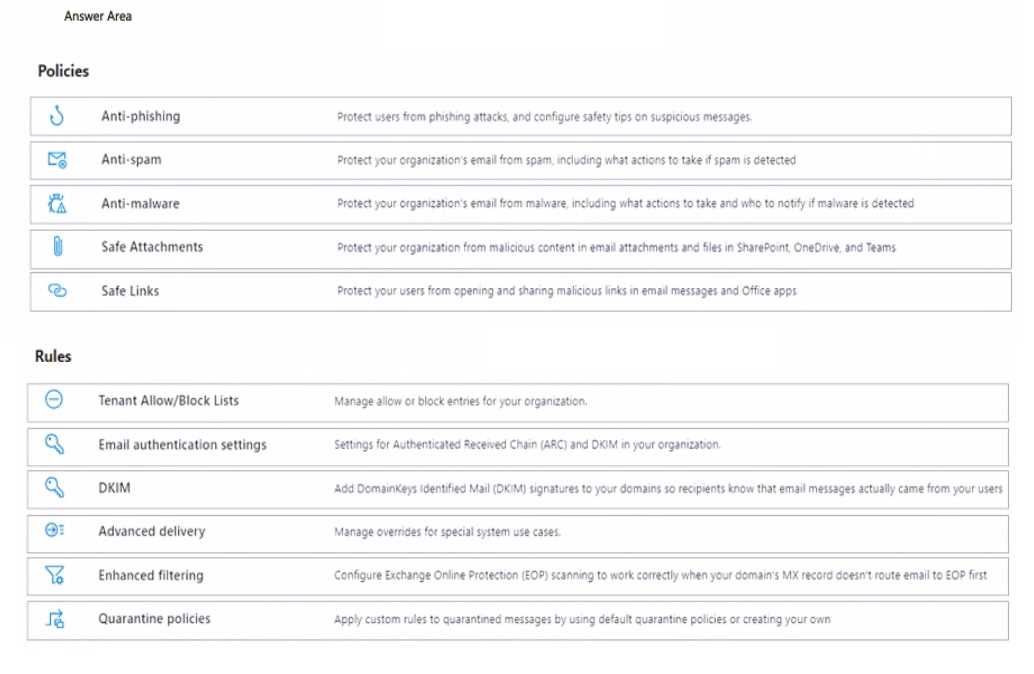
Option D definitely fits for limiting emails sent by User 1 since it’s about sending limits. E makes sense to block files by hash. The send limit in D is the most user-specific choice here.
D limits per user email sends, and E handles file hash blocking, fits best here.
contains the users shown in the following table.
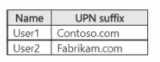
The domain syncs to a Microsoft Entra tenant named contoso.com as shown in the exhibit. (Click the
Exhibit tab.)
User2 fails to authenticate to the Microsoft Entra tenant when signing in as [email protected]
You need to ensure that User2 can access the resources in Microsoft Entra ID.
Solution: From the Microsoft Entra admin center, you add
Does this meet the goal?
Maybe B. Adding a custom domain doesn’t fix a user’s sign-in if their UPN or sync isn’t set up correctly with the matching domain.
Case study
A company, Contoso Inc., has implemented Microsoft Intune and configured Conditional Access policies. The security team has defined a strict security requirement that all devices accessing corporate data must be fully compliant.
The team has created and assigned several device compliance policies to ensure that devices meet specific security standards, such as disk encryption and minimum OS versions. However, they discover a potential loophole: any device that is enrolled but not assigned a specific compliance policy is automatically considered "Compliant" by Intune by default. This could allow devices to access corporate data even without being checked for security compliance.
To meet the technical requirement that all devices must be proven compliant, the security team needs to configure Intune to automatically mark any device that lacks a compliance policy as "Not compliant."
You need to configure the compliance settings to meet the technical requirements. What should you do in the Microsoft Endpoint Manager admin center?
Is there an explicit toggle in compliance settings for unassigned devices, or do we need a new policy assigned?
I think D is the way to go because it directly lets you tweak how compliance is evaluated, including the default status for devices without policies. The other options don’t actually control the compliance state itself, so they won’t fix the loophole where unassigned devices show as compliant. So yeah, modifying Compliance policy settings makes the most sense here.
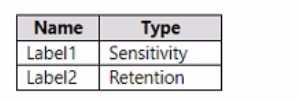
You have the items shown in the following table.

Which items can you view in Content explorer?
A imo, because Content Explorer mainly shows files and emails that have labels applied and are stored in locations you have access to. File1 seems like the safest pick since it’s labeled and clearly in a supported location. Mail items might not always appear if the labels or policies don’t include them for Content Explorer. Without more label details on emails, it feels risky to include Mail1 or Mail2 here. So sticking to File1 only makes the most sense based on typical behavior.
B/C? Need to know if the labels applied to emails vs files affect visibility in Content Explorer or if it's just based on location. The question doesn't clarify that part.