Free Actual MS-102 Actual Exam Questions – Microsoft 365 Administrator - Question 1 Discussion
HOTSPOT You have a Microsoft 365 E5 tenant that uses Microsoft Intune. You need to configure Intune to meet the following requirements: Prevent users from enrolling personal devices. Ensure that users can enroll a maximum of 10 devices. What should you use for each requirement? To answer, select the appropriate options in the answer area. NOTE: Each correct selection is worth one point. 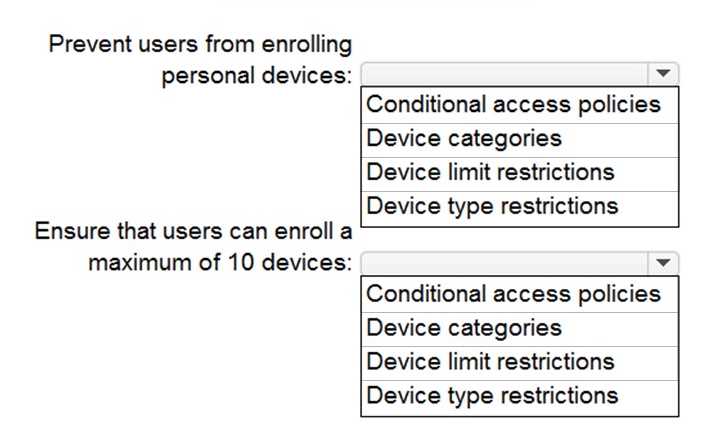
For stopping personal device enrollment, you need the “Device Type Restrictions” inside Device Enrollment Restrictions. The 10-device limit is set by “Maximum number of devices per user” in the same policy. Both fit there.
I agree that both requirements are handled in the Device Enrollment Restrictions policy. You can block personal devices by disabling the device types like iOS or Android in the Device Type Restrictions section, which is part of that policy. The max device limit of 10 per user is also a setting within the same policy, so you don’t need to look elsewhere. Just setting these two parameters in Device Enrollment Restrictions covers both parts of the question independently and clearly.
I think the prevention of personal device enrollment definitely comes from setting device type restrictions within Device Enrollment Restrictions. The 10-device limit also fits there since that policy controls max device count per user.
Blocking personal devices fits under the Device Enrollment Restrictions policy by disabling personal device types. Limiting devices per user is also set within the same policy, so options B and C make the most sense here.
For blocking personal devices, I’d pick the option related to “Device Enrollment Restrictions” since that’s where you can specifically allow or block device types. For limiting devices per user, the same policy usually has a setting to cap the number of devices a user can enroll — that’s where the “maximum number of devices” comes into play. So both requirements are handled under “Device Enrollment Restrictions,” just different settings within it. Makes no sense to use separate policies for these closely related controls.
What’s the exact name of the policy to block personal device enrollment here?