Free Actual MS-102 Actual Exam Questions – Microsoft 365 Administrator - Question 11 Discussion
HOTSPOT You have a Microsoft 365 subscription. You need to identify all users that have an Enterprise Mobility + Security plan, and then provide a list of the users in the CSV format. Which settings should you use in the Microsoft 365 admin center, and which option should you select? To answer, select the appropriate options in the answer area. NOTE: Each correct selection is worth one point. 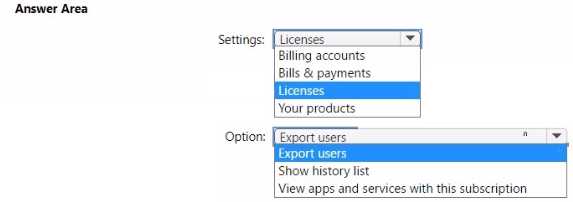
I’d check the Active Users page, because that’s where you can filter by license type. Then just export the filtered list to CSV. The Enterprise Mobility + Security plan should show up as a license option there.
The key here is to focus on filtering users by license type. The "Active users" page in the admin center is where you can filter by license, so picking the Enterprise Mobility + Security plan there makes sense. Then, exporting that filtered list should give you the CSV you need. So, it’s really about combining the right filter with the export option in active users, not digging into other sections like reports or usage. That’s where you get the user details and can export them directly.
Look for the "Active users" section first since that’s where you can filter by licenses. Then pick the Enterprise Mobility + Security plan from the license filter before exporting the list as a CSV file.
Does the question specify which version of the Microsoft 365 admin center interface we should assume? The options might differ depending on whether it's the new or classic admin center. Also, does it say we should use licensing reports specifically, or can we use user export functions? That might help narrow down whether to pick 'Active users' or 'Reports' in the admin center.