Free Microsoft Azure AZ-700 Actual Exam Questions
Dumps Box (DumpsBox) offers up-to-date practice exam questions for AZ-700 certification exam which are developed and validated by Microsoft subject domain experts certified in Microsoft Azure AZ-700 . These practice questions are update regularly as we keep an eye on any recent changes in AZ-700 syllabus, and when there is update our team quickly adjusts the questions. This commitment to providing the best quality exam prep material to certification aspirants is what makes DumpsBox.com the best certification exam prep website. On top of that, our strong, yet strictly moderated, community based feedback keeps the content clean and current. Each question has helpful community discussion that provides it extra perspective and introduces helpful resources for better exam preparation. This also saves students from other outdated practice questions or illicit exam dumps that can have adverse affects on career. Browse through our Microsoft Azure AZ-700 exam questions and pass your exam on first try.
App1.
You need to modify the server variables in the response header of App1.
What should you configure on AppGW1?
B imo, rewrites are designed for modifying headers and URL parts in responses. HTTP settings control backend connections but don’t typically alter response headers directly.
B vs A? Rewrites handle header changes, HTTP settings focus more on backend communication.
the series contains a unique solution that might meet the stated goals- Some question sets might
have more than one correct solution, while others might not have a correct solution.
After you answer a question in this section, you will NOT be able to return to it. As a result, these
questions will not appear in the review screen.
You have on Azure subscription that contains an Azure Virtual WAN named VWAN1. VWAN1 contains
a hub named Hub1.
Hub! has a security status of Unsecured.
You need to ensure that the security status of Hub1 is marked as Secured.
Solution: You implement Azure NAT Gateway.
Does this meet the requirement?
Option B makes the most sense here. NAT Gateway is mostly about managing outbound connections and doesn’t provide the kind of threat protection or traffic inspection needed to change Hub1’s security status to Secured. The question hints that securing the hub usually involves deploying a firewall or similar security appliance, which NAT Gateway doesn’t do. So just adding NAT Gateway isn’t enough to meet the requirement.
B imo, NAT Gateway mainly deals with outbound connectivity and doesn’t impact the security status of the hub. The “Secured” status typically requires a firewall like Azure Firewall or a security appliance integrated into the hub to inspect and control traffic. Just adding NAT Gateway won’t change that flag.
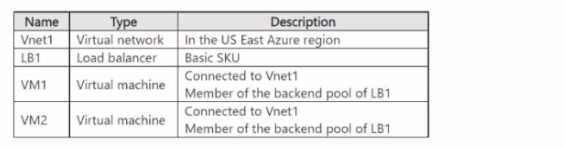
You create a virtual network named Vnet2 in the West US region.
You plan to enable peering between Vnet1 and Vnet2.
You need to ensure that the virtual machines connected to Vnet2 can connect to VM1 and VM2 via
LB1.
What should you do?
It’s D, because allowing traffic forwarding on Vnet1’s peering is key for load balancer traffic.
Option C makes sense since only a Standard SKU LB supports cross-region peering, so upgrading LB1 is necessary. Also, the peering settings on Vnet1 probably need updating to allow traffic forwarding, making D relevant too.
table.

You need to deploy an Azure application gateway named AppGW1 to VNetl To where can you deploy
AppGW1?
Maybe B, since AppGW requires a dedicated subnet and GatewaySubnet is for VPN/ExpressRoute.
Maybe D. Azure Application Gateway needs to be deployed in a dedicated subnet, but it doesn’t have to be the GatewaySubnet specifically reserved for VPN or ExpressRoute gateways. From what I remember, Application Gateway can go into either the GatewaySubnet or another subnet like Subnet2, as long as the subnet has enough IPs. Subnet1 might be too small or not suitable. So options that allow both GatewaySubnet and Subnet2 seem more flexible here.
networking requirements.
What should you use to configure the default route?
C assigning a user-defined route on Vnet1’s GatewaySubnet lets Vnet2 and Vnet3 use its gateway properly.
It’s C for me. Since you want the default route on Vnet2 and Vnet3 to point through Vnet1’s gateway, assigning a user-defined route to the GatewaySubnet in Vnet1 that directs traffic accordingly makes sense. D seems off because GatewaySubnet in Vnet2 and Vnet3 likely can’t have custom routes applied, as others mentioned. BGP is great for dynamic routing, but if the question expects a manual default route setup, then C fits better here. Route filters (A) don’t really configure default routes, so that leaves C as the most reasonable choice.
The company has a web app named App1 that has the Azure Traffic Manager profile shown in the
following table.

In Asia, you plan to deploy an additional endpoint that will host an updated version of App1. You
need to route 10 percent of the traffic from the Tokyo office to the new endpoint during testi What
should you configure in Traffic Manager?
Looks like the key here is controlling traffic specifically from Tokyo. Using two profiles (option D) sounds right since one can handle global routing and the other can manage the new endpoint traffic split for Tokyo. Also, having five endpoints total fits since you’re adding a new one in Asia. One profile might not give precise control over just Tokyo's traffic, so D makes more sense to me.
B tbh. Since you need to split traffic specifically for Tokyo, it makes sense to have two profiles: one handling global routing and another dedicated to Asia or Tokyo endpoints. That way, you can control the 10% test traffic separately without messing with other regions. Four endpoints split between the two profiles sounds about right, given the existing endpoints plus the new one in Asia. One profile might get messy trying to manage weighted routing across all locations for a precise 10% in just Tokyo.
The company has an Azure subscription that contains the virtual networks shown in the following
table.
Name
Location
Vnet1
East LS
Vnet2
North Europe
Vnet3
West US
Vnet4
West Europe
You need to connect the virtual networks to the office by using ExpressRoute. The solution must
meet the following requirements:
• The connection must have up to 1 Gbps of bandwidth.
• The office must have access to all the virtual networks.
• Costs must be minimized.
How many ExpressRoute circuits should be provisioned, and which ExpressRoute 5KU should you
enable?
Not just bandwidth, but the global reach of Premium is crucial here. Since VNets span US and Europe, only one Premium circuit (B) can connect all without multiple expensive circuits.
This is tricky, but I think it has to be B. One Premium circuit covers global connectivity, so it can link the US and European VNets plus the office in one go, which keeps costs down versus multiple circuits. Standard circuits wouldn’t span those regions. Also, since the bandwidth cap is 1 Gbps total, a single circuit should handle it without needing to split. So, one Premium circuit makes the most sense here.
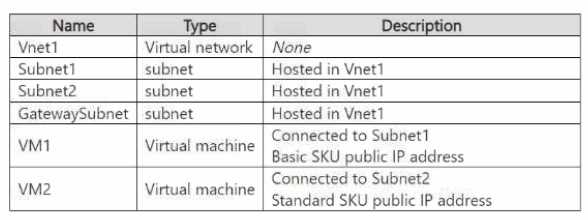
You plan to deploy an Azure Virtual Network NAT gateway named Gateway 1. The solution must
meet the following requirements:
• VM1 will access the internet by using its public IP address.
• VM2 will access the internet by using its public IP address.
• Administrative effort must be minimized.
You need to ensure that you can deploy Gateway1 to Vnet1.
What is the minimal number of subnets that Vnet1 must have?
A/B? You need at least one subnet for the NAT gateway and one for both VMs if they can share a subnet. Separate subnets for each VM aren’t strictly needed unless isolation is required.
Maybe B. One subnet for the NAT gateway, one for VM1, and one for VM2 to keep their public IPs separate and minimize admin effort. That fits the requirement better than just two subnets.
machines shown in the following table.
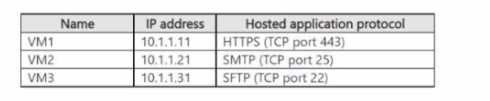
All the virtual machines are connected to VNet1.
You need to ensure that the applications hosted on the virtual machines can be accessed from the
internet. The solution must ensure that the virtual machines share a single public IP address
What should you use?
It’s C because the public load balancer allows multiple VMs to share one public IP for inbound internet traffic, unlike NAT gateway or internal load balancer which don’t expose VMs publicly.
Option C works since it lets multiple VMs share one public IP for inbound traffic.
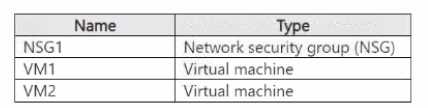
NSG1 is associated to the NIC of VM1 and contains the rules shown in the following table.

You collect NSG flow logs for five minutes for the following activities:
• Two RDP sessions from VM1 to VM2, each initiated from a different TCP port
• Three SSH sessions from VM2 to VM1, each initiated from a different TCP port
You analyze the logs by using Traffic Analytics in Azure Network Watcher. How many aggregated flow
entries will Traffic Analytics identify?
It’s D. Each session has both inbound and outbound traffic, and since each RDP and SSH session uses a unique source port, that means Traffic Analytics will log both directions separately. So for 5 sessions, you get 10 flow entries total. Counting only one direction or aggregating by session wouldn’t capture the full picture here.
D, since each session is bidirectional and has unique ports, doubling the count.

You need to configure FW1 to filter traffic that originates from VNet1 and targets the FQDN of
SQLDB1 Which type of rule should you use?
B, since only application rules let you filter traffic by FQDN directly.
It’s B. Application rules are designed to filter based on FQDNs, which fits perfectly since you need to filter traffic targeting SQLDB1 by its domain name. Network rules generally filter by IPs and ports, so they won’t work well here for FQDN filtering. Plus, DNAT is for inbound translation, not filtering outbound traffic by domain. Infrastructure rules aren’t related to this scenario either. So even if the SKU isn’t specified, the question’s focus on FQDN strongly points to application rules.
(SD-WAN). The SD-WAN uses
BGP.
You have an Azure subscription that contains 20 virtual networks configured as a hub and spoke
topology. The topology contains a hub virtual network named Vnetl.
The virtual networks connect to the SD-WAN by using a network virtual appliance (NVA) in Vnetl.
You need to ensure that BGP route advertisements will propagate between the virtual networks and
the SD-WAN. The solution must minimize administrative effort
What should you implement?
D imo. Azure Route Server makes BGP route sharing seamless between your VNets and the SD-WAN via the NVA without having to manage individual BGP sessions on multiple VPN gateways. Since the question mentions minimizing admin effort, Route Server fits best because it automates route propagation. A could work but managing 40 branches plus 20 VNets with individual VPN gateways sounds like a nightmare. B and C don’t handle routing in this context, so they can be ruled out pretty quickly.
I’m thinking option A could be tricky since you'd have to manage BGP sessions on each VPN gateway, which might increase admin overhead. Does the NVA even support direct BGP peering with Route Server in option D?
HOTSPOT You have an on-premises network that includes the sites shown in the following table.  Each site is connected to the Internet by a firewall. All sites are connected to an SD-WAN. Each site is configured to propagate routes by using BGP. You have an Azure subscription that includes a virtual network named Vnet1 that contains a Virtual Network Gateway named Gateway 1. You create a local network gateway with the configuration shown in the gateway exhibit (Click the Gateway tab.)
  You create a Site-to-Site (S2S) connection with the configuration shown in connection exhibit. (Click the Connection tab)
  For each of the following statements, select Yes if the statement is true Otherwise, select No. NOTE: Each correct selection is worth one point.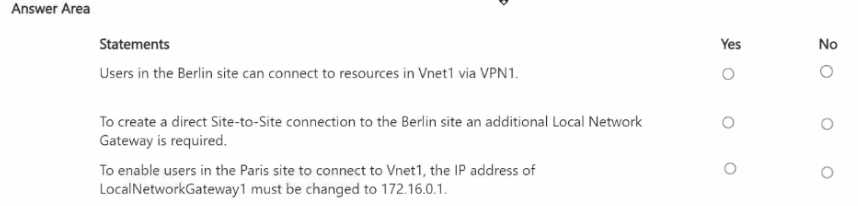
Option A looks off because the BGP peer IP in the connection doesn’t match what's set in the local network gateway. That usually stops BGP from forming properly.
Also thinking option B should be No since for BGP to work, both sides need to agree on the ASN, and here they are different. That mismatch usually breaks BGP route propagation.
HOTSPOT You have an Azure subscription that contains an Azure Firewall policy named FWPolicy1. You need to configure FWPolicy1 to meet the following requirements • Allow traffic based on the FQDN of the destination. • Allow TCP traffic based on the source. Which types of rules should you use for each requirement? To answer, select the appropriate options in the answer area. NOTE: Each correct selection is worth one point. 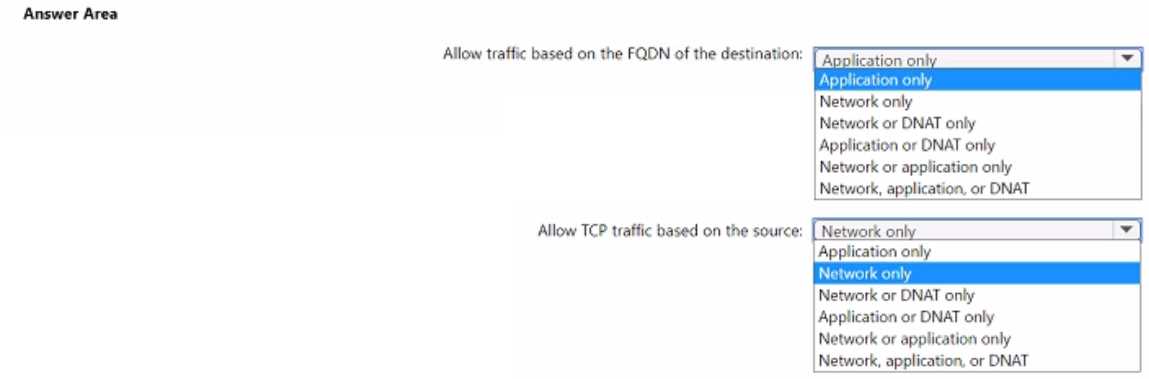
Application rules are best for filtering by FQDN, while Network rules allow control of TCP traffic by source IP. This matches the need to filter destination domains and source-based TCP traffic separately.
Application rules for FQDN and Network rules for TCP by source IP makes sense here.
HOTSPOT You have the network topology shown in the Topology exhibit. (Click the Topology tab.) 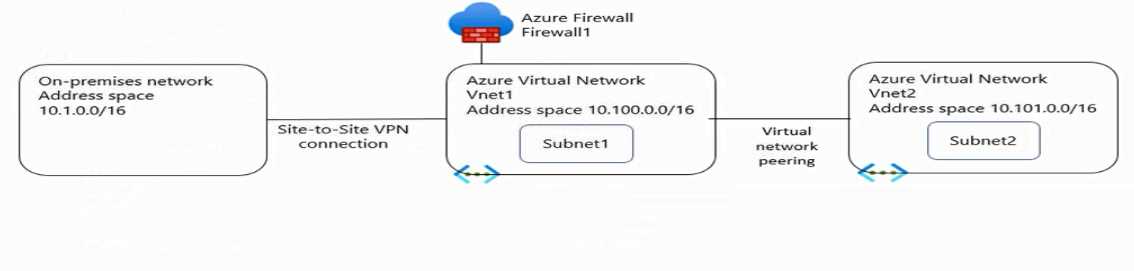 You have the Azure firewall shown in the Firewall 1 exhibit. (Click the Firewall tab.)
 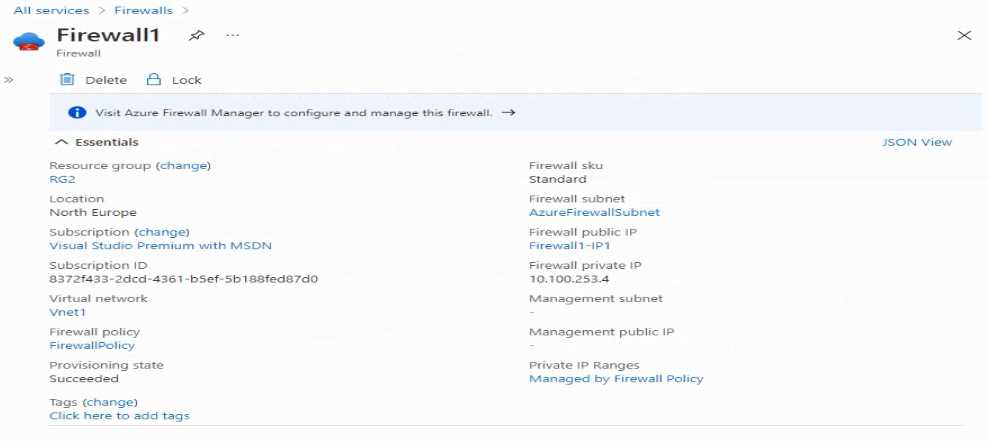 You have the route table shown in the RouteTable1 exhibit. (Click the RouteTable1 tab.)
 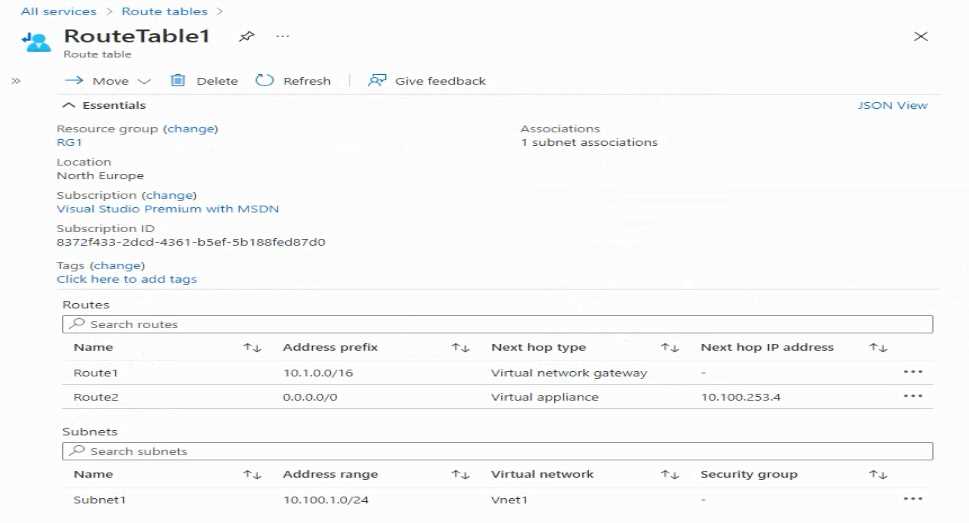 For each of the following statements, select Yes if the statement is true. Otherwise, select No. NOTE: Each correct selection is worth one point.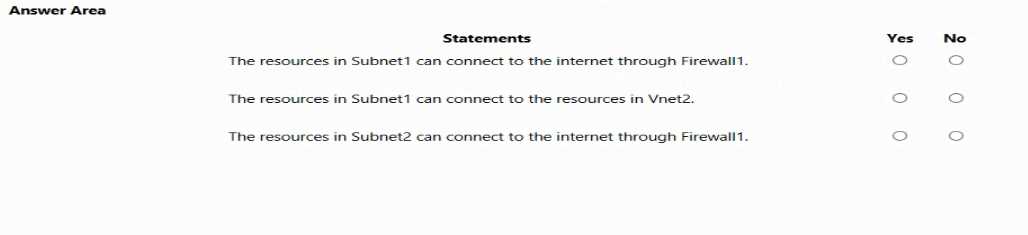
I agree statement 1 is a yes because the default route clearly points to the firewall IP, which means it acts as the next hop for outbound traffic. For statement 2, I’d say no since there’s no indication that all inbound traffic from the internet is forced through the firewall—only outbound seems covered. Also, statement 3 should be no because the route table doesn’t show any specific routes for internal subnet-to-subnet traffic through the firewall or anywhere else. The routing is mostly about outbound internet traffic here.
I think the key is how the firewall IP is set as the next hop for 0.0.0.0/0 in the route table, so that means all outbound traffic will go through the firewall, confirming statement 1. For statement 2, since there’s no route targeting Azure services specifically, it shouldn’t be yes. Also, statement 3 looks off because there’s no user-defined route for the subnet to communicate outside via anything but the firewall, so no direct routing without firewall involvement.