Free CompTIA Server+ SK0-005 Actual Exam Questions
Dumps Box (DumpsBox) offers up-to-date practice exam questions for SK0-005 certification exam which are developed and validated by CompTIA subject domain experts certified in CompTIA Server+ SK0-005 . These practice questions are update regularly as we keep an eye on any recent changes in SK0-005 syllabus, and when there is update our team quickly adjusts the questions. This commitment to providing the best quality exam prep material to certification aspirants is what makes DumpsBox.com the best certification exam prep website. On top of that, our strong, yet strictly moderated, community based feedback keeps the content clean and current. Each question has helpful community discussion that provides it extra perspective and introduces helpful resources for better exam preparation. This also saves students from other outdated practice questions or illicit exam dumps that can have adverse affects on career. Browse through our CompTIA Server+ SK0-005 exam questions and pass your exam on first try.
conditions. Which of the following are likely causes of the issue? (Choose two.)
D imo, B and C are solid picks here since disk speed mismatches can sometimes cause system instability, and incorrectly seated memory definitely leads to BSODs. Faulty memory (A) is an obvious one, but I think the disk-related option D shouldn’t be dismissed completely if the hardware upgrade included storage components. Disk partition errors (B) are less likely to cause random BSODs though, so maybe C and D make more sense if we consider hardware beyond just RAM.
A and C for sure, memory problems are classic BSOD triggers after upgrades.
the following would accomplish this goal while using the least amount of space?
A/D? Rail kits (D) help mount servers properly in racks but don’t really reduce the space they take up. Blades (A) are designed to save space by stacking multiple server blades in one enclosure, so they definitely seem like the best fit for limited rack space. The other options, B and C, don’t specifically address maximizing density. So between A and D, A’s the better choice since it directly tackles the space issue.
A/C? Blade enclosures are definitely denser, but if the servers aren’t blade-compatible, rack mounts might be the fallback. Still, blades usually win for space efficiency.
administrator determined the new kernel was not compatible with certain server hardware and was
unable to uninstall the update. Which of the following should the administrator do to mitigate
further issues with the newly instated kernel version?
Option A feels like the most precise fix here. By explicitly telling the bootloader which kernel to load first, you avoid any risk of it accidentally booting into the incompatible one. Just moving the stanza down (C) might work but isn’t a guaranteed solution since some bootloaders always load the first entry regardless of order changes. Reinstalling the OS (B) seems like overkill and setting a BIOS password (D) won’t solve the kernel issue at all. So, editing the bootloader config to point directly at the last good kernel is the best move to get back to a stable state quickly.
It’s A. Changing the first kernel stanza to point directly at the known-good kernel is the safest way to ensure the system boots correctly without guesswork. Just moving entries around might not guarantee the right kernel loads.
Implemented to increase security against a potential insider threat?
It’s D. Since the system is alt-gapped, physical security measures like a Faraday cage can block wireless signals and prevent data leaks or remote access attempts from insiders trying to exfiltrate info. The question hints at highly sensitive data, so stopping any wireless communication is key. Options like MFA or SIEM are good but won’t stop a trusted insider with physical access from using radios or other devices to leak info. A Faraday cage adds a strong physical barrier that complements existing controls.
A/E? Two-person integrity prevents a single insider from making changes alone, while MFA adds another layer by requiring multiple factors to access. Both together could really tighten security here.
A imo. The term "constant replication" sounds like it fits the idea of all files being replicated all the time without gaps. Full replication (D) usually means copying everything, but not necessarily continuously or constantly. Synthetic full (C) is more about creating a full backup from incremental ones, so that seems off. Application consistent (B) is about data state, not frequency or scope of replication. So A seems like the better fit here if we focus on "all files... all the time."
Not B, application consistent usually means data is captured in a stable state, not necessarily all files all the time. D feels more on point since full replication copies everything continuously.
should the technician do FIRST to ensure the OS will work as intended?
Probably A still works best since you want to confirm the hardware will run the OS before anything else. Dust or formatting won’t help if the hardware isn’t compatible in the first place.
A/D? I’d start with A to avoid compatibility issues, but D is also important since overheating can cause unexpected shutdowns during install. Still, you can’t skip checking the HCL first.
which of the following architecture types should be used to minimize cost?
Is there any info on the number of cameras or recording resolution? That might affect which server type is best for cost efficiency here.
high availability cluster?
B imo, fallback cluster services sounds like a safer, more controlled step than just failing over all VMs.
Makes sense to me, D ensures host is clear before patching. D
utilized in a first-in, first-out method?
A imo, Waterfall isn’t about rotating media by time periods like daily, weekly, monthly—it’s more about sequential backups. That makes D the only one matching the FIFO rotation described here.
I’m with the idea that D fits best here, but just to add: Tower of Hanoi (C) also uses a rotation scheme, but it’s more complex and not strictly FIFO with daily, weekly, monthly media. So that could help narrow it down.

Which of the following is MOST likely the issue?
D, different VLANs often cause unreachable local hosts despite correct IPs.
It’s D because the ping shows the correct IP but no response, which can happen if the device is on a different VLAN and not properly routed. Firewall would usually block all traffic, not just ping.
the server from the rack but then decides to repurpose the system as a lab server instead of
decommissioning it. Which of the following is the most appropriate NEXT step to recycle and reuse
the system drives?
Option A could be considered since reinstalling the OS would overwrite system files, but that alone won’t guarantee removal of all user data or sensitive info. Wiping the drives (B) is more thorough and ensures a fresh start without leftover data. Plus, reinstalling the OS can come after wiping. Degaussing (C) isn’t suitable here because it physically destroys the drives, which contradicts the goal of repurposing. So yeah, wiping first makes the most sense as the next step before doing anything else like reinstalling or updating network settings.
B. Wiping the drives is safer than just reinstalling the OS (A) because leftover data might remain. Updating IP (D) comes later, after the drives are clean and ready to use.
Option C and D both mention support, but does "Maintenance and support" cover vendor help or is that just about updates? Anyone sure?
An administrator is troubleshooting performance issues on a server that was recently upgraded. The administrator met with users/stakeholders and documented recent changes in an effort to determine whether the server is better or worse since the changes. Which of the following would BEST help
answer the server performance?
B, assuming the baseline was taken before the upgrade for comparison.
A/B? I’m thinking B still edges it out because a baseline gives you a solid reference to measure if the upgrade improved or worsened performance. If the baseline wasn’t captured before, then yeah, A could help by showing current thresholds and spotting weird behavior, but it’s less about comparison and more about alerting. C and D don’t really fit since hardware lists and SLAs aren’t direct measures of how the server runs after changes. Without a baseline, you’re kinda flying blind for performance trends.
HOTSPOT
A systems administrator deployed a new web proxy server onto the network. The proxy server has two interfaces: the first is connected to an internal corporate firewall, and the second is connected to an internet-facing firewall. Many users at the company are reporting they are unable to access the Internet since the new proxy was introduced. Analyze the network diagram and the proxy server’s host routing table to resolve the Internet connectivity issues.
INSTRUCTIONS Perform the following steps:
1. Click on the proxy server to display its routing table.
2. Modify the appropriate route entries to resolve the Internet connectivity issue.
If at any time you would like to bring back the initial state of the simulation, please click the Reset All button.
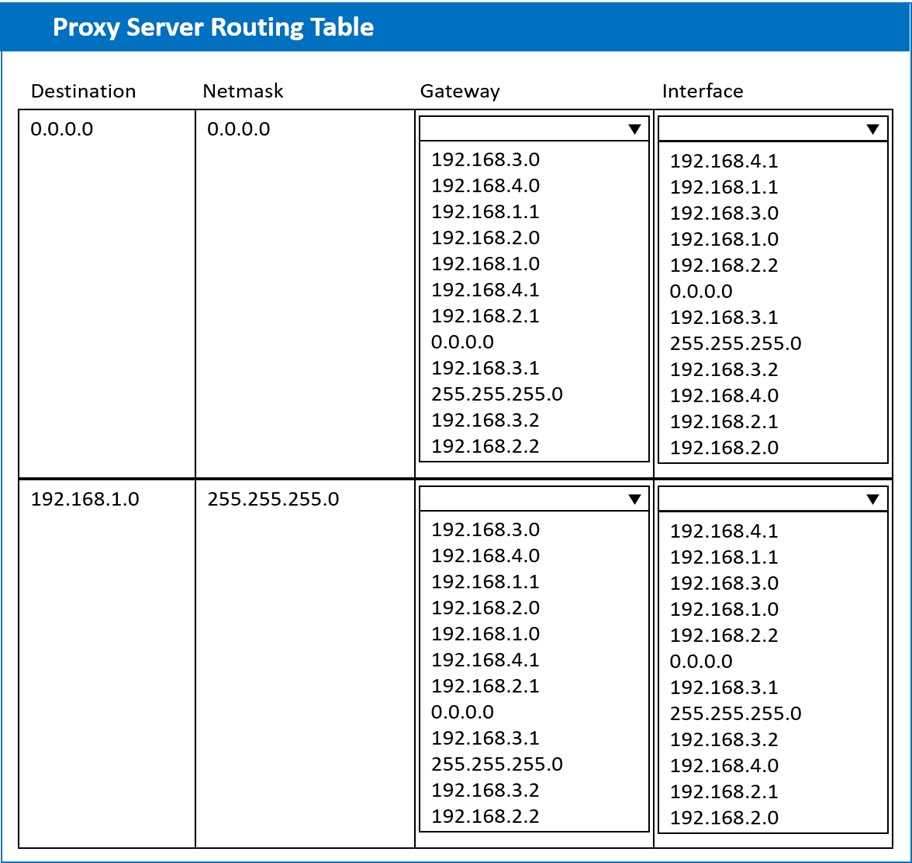
I’d check if there’s a conflicting static route that sends internet traffic back through the internal firewall instead of the internet one. Removing that could fix the routing loop and restore connectivity.
Double-check the routes for any overlapping entries that could confuse the proxy. If there's a more specific route directing traffic away from the internet interface, that could block access even if a default route exists.
Users report that the FinanceApp software is not running, and they need immediate
access. Issues with the FinanceApp software occur every week after the IT team
completes server system updates. The users, however, do not want to contact the
help desk every time the issue occurs. The users also report the new MarketApp
software is not usable when it crashes, which can cause significant downtime. The
technician who restarted the MarketApp software noticed it is running under a test
account, which is a likely cause of the crashes.
INSTRUCTIONS
Using the Services menu provided, modify the appropriate application services to
remedy the stated issues.
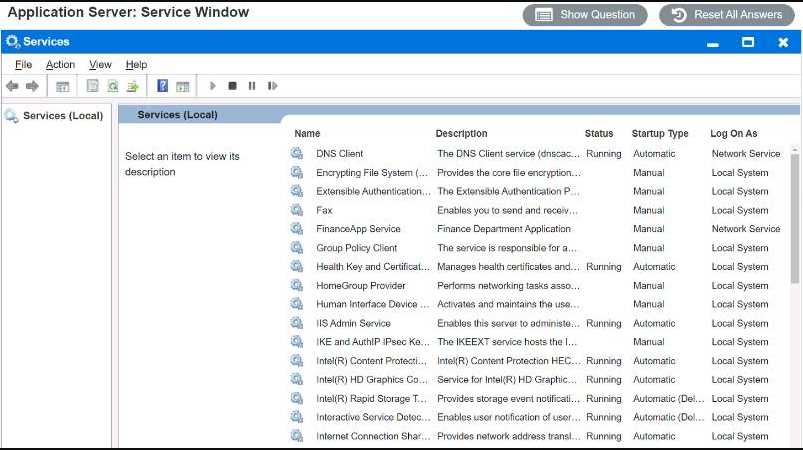
FinanceApp on Automatic startup might avoid weekly downtime after updates.
I agree that FinanceApp needs to be set to Automatic startup so it launches after updates without manual intervention. But for MarketApp, since the crashes happen due to running under a test account, the fix isn’t just restarting the service but making sure it runs under the correct user account with proper permissions. Just restarting won’t help if the account isn’t changed. So both services need different settings changed, not just a restart or startup type tweak.