Free CompTIA Server+ SK0-005 Actual Exam Questions - Question 14 Discussion
HOTSPOT
A systems administrator deployed a new web proxy server onto the network. The proxy server has two interfaces: the first is connected to an internal corporate firewall, and the second is connected to an internet-facing firewall. Many users at the company are reporting they are unable to access the Internet since the new proxy was introduced. Analyze the network diagram and the proxy server’s host routing table to resolve the Internet connectivity issues.
INSTRUCTIONS Perform the following steps:
1. Click on the proxy server to display its routing table.
2. Modify the appropriate route entries to resolve the Internet connectivity issue.
If at any time you would like to bring back the initial state of the simulation, please click the Reset All button.
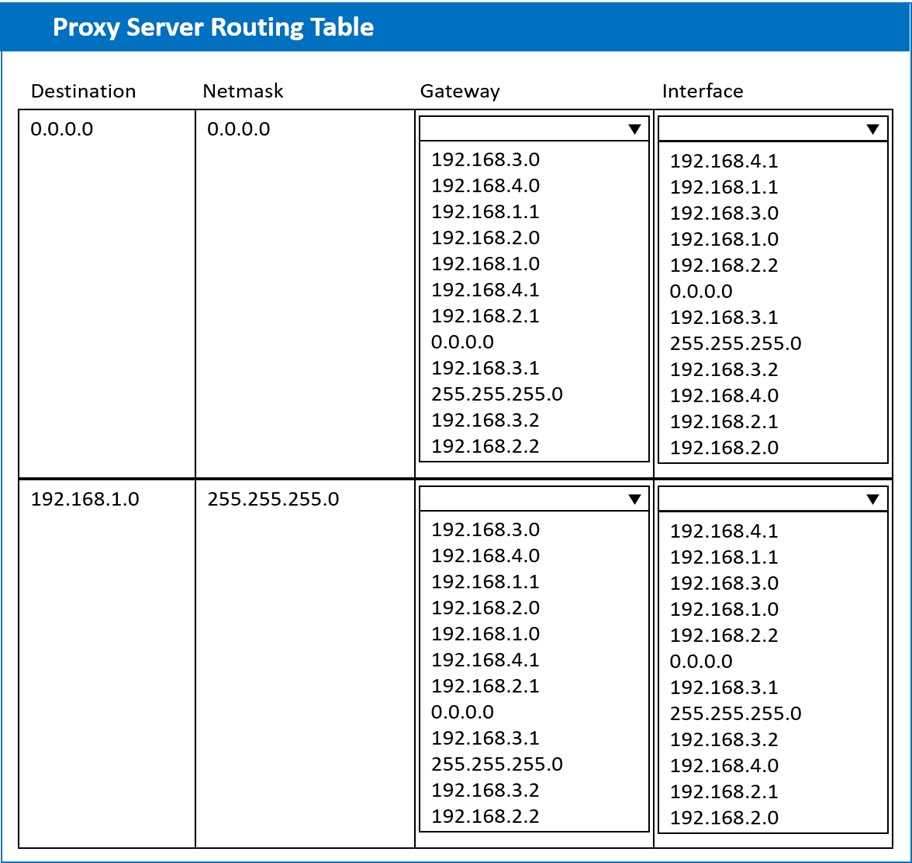
I’d check if there’s a conflicting static route that sends internet traffic back through the internal firewall instead of the internet one. Removing that could fix the routing loop and restore connectivity.
Double-check the routes for any overlapping entries that could confuse the proxy. If there's a more specific route directing traffic away from the internet interface, that could block access even if a default route exists.
Looks like the default gateway should be set to the interface connected to the internet firewall.
I think the main problem is that the proxy’s routing table doesn’t have a proper default route sending traffic out the internet-facing interface. Without that, it won’t know where to send packets destined for the internet. Fixing or adding a default route pointing to the firewall on the internet side should clear this up. Also, double-check if any existing routes are incorrectly pointing all traffic back to the internal firewall instead of the external one, because that could block outbound internet access too.
Is the routing table missing a default route pointing to the internet-facing firewall?