Free Cisco SWSA 300-725 Actual Exam Questions
Dumps Box (DumpsBox) offers up-to-date practice exam questions for SWSA 300-725 certification exam which are developed and validated by Cisco subject domain experts certified in Cisco SWSA 300-725 . These practice questions are update regularly as we keep an eye on any recent changes in SWSA 300-725 syllabus, and when there is update our team quickly adjusts the questions. This commitment to providing the best quality exam prep material to certification aspirants is what makes DumpsBox.com the best certification exam prep website. On top of that, our strong, yet strictly moderated, community based feedback keeps the content clean and current. Each question has helpful community discussion that provides it extra perspective and introduces helpful resources for better exam preparation. This also saves students from other outdated practice questions or illicit exam dumps that can have adverse affects on career. Browse through our Cisco SWSA 300-725 exam questions and pass your exam on first try.
two.)
Not B, D. Warn is more of an action after decryption rather than a direct setting within the decryption policy itself, and Allow usually controls overall access, not the decryption step. A and C fit better here.
B imo. Warn makes sense as part of a decryption policy to notify users without blocking. Pass Through fits too since it lets traffic go without decrypting, so A and B could work together here.
DRAG DROP Drag and drop the Cisco WSA access policy elements from the left into the order in which they are processed on the right. 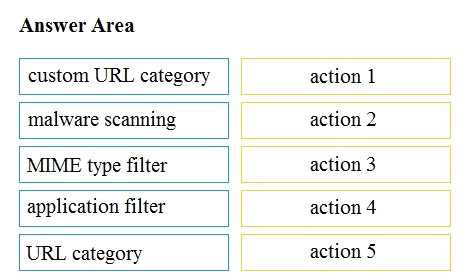
Device profiling sets the stage, so it makes sense to process it first.
Device profiling has to happen first to set the context for user identity.
(Choose two.)
It’s B and E for me. AMP focuses on advanced threat detection like zero-day and targeted file-based attacks, which traditional engines typically don’t catch as well. Options A and D seem more general and overlap with what other scanners already do, while C (spam) is definitely outside AMP’s scope. So B and E highlight AMP’s unique strengths compared to standard scanning engines on the Cisco WSA.
I’m thinking B and E too, because AMP is really about catching zero-day and targeted threats that other engines might miss. Spam and general virus protection are covered by other tools, so they don’t stand out here. B E
A seems off, profiles typically tie to some authentication.
B/D? I’m not convinced that guest profiles are always processed first by default, but maybe that’s how Cisco designed the defaults to catch unauthenticated traffic early. D feels plausible since alphabetical processing is a common default behavior in many systems, and AsyncOS might just follow that pattern. A seems off because identification profiles usually involve some kind of authentication step, and C is likely wrong from what I recall. So between B and D, the alphabetical processing (D) seems like a safer bet if we’re talking about default behavior on AsyncOS.
A/D? PAC is classic for explicit proxy setups since clients know the proxy, but PBR can also direct traffic explicitly at the router level. WCCP and ITD are more about interception, so less likely here.
Maybe A, since explicit mode mostly means client-side proxy setup with PAC files.

Which statement about the transaction log is true?
Not C, there’s no port 8187 mentioned anywhere in the log.
The policy group name is visible, so D fits well. B might be tricky since the log doesn't clearly prove no outside contact happened. D it is.
DRAG DROP Drag and drop the Cisco WSA methods from the left onto the correct deployment modes on the right. 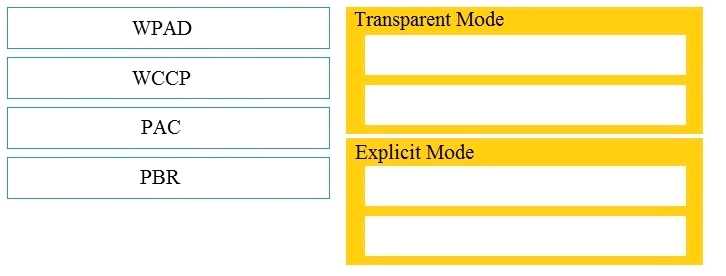
WCCP usually runs inline, so that’s my pick for the inline deployment mode.
I agree on putting explicit proxy types under proxy mode since they need client setup. For WCCP, if no client config is mentioned, it’s safer to put it under inline deployment because it usually intercepts transparently.
D imo, 307 is usually a temporary redirect, so it doesn’t fit a policy block scenario. Between the others, B (401) is about authentication required, and A (407) is proxy authentication needed. C (403) makes the most sense as it’s a direct denial without asking for credentials, which aligns best with blocking due to a policy rather than just an auth issue. So, C really stands out as the clearest indicator of policy-based blocking in logs like these.
It’s C because 403 clearly means forbidden, which fits a policy block better than 401 or 407 that relate more to authentication issues rather than explicit denial.
Probably D here. 3128 is pretty much the go-to port for many proxy servers, not just Cisco’s. The other options don’t really line up with typical web proxy ports. 8443 tends to be used more for secure admin interfaces or management, and 8021 is uncommon for proxy traffic. So sticking with the usual standard, 3128 makes the most sense as the browser-configured port for Cisco WSA.
D, 3128 matches standard proxy port setups across most web proxy tools.
It’s A, because allowing or blocking right away would be risky without traffic analysis.
Option A makes the most sense since blocking right away could disrupt legitimate traffic. Monitoring first lets you see what’s being flagged before taking tougher actions.
I agree that B seems unlikely because indexing data typically requires a license in Cisco products. Also, C doesn’t sound right since removing log files after indexing could risk losing important audit trails or data needed for troubleshooting. AWSR likely keeps logs intact for compliance and analysis. So, I’d back D too, as CLI installs on Windows and Red Hat make sense given Cisco’s usual deployment methods for this tool. The focus on CLI installation aligns with enterprise security software norms.
A seems off since IPs aren’t reliable for differentiating WSA deployments.
DRAG DROP Drag and drop the properties from the left onto the correct advanced web proxy setting descriptions on the right. 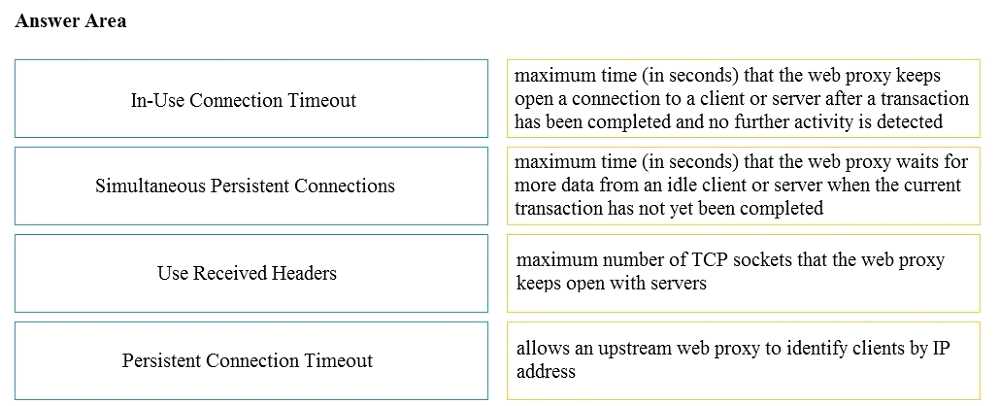
Not sure about the version either, but B sounds like max connections since it mentions limits on simultaneous users. That kind of fits better than timeout, which I’d expect to be more about idle or request time length.
Looking again, A looks more like a retry setting since it talks about attempts and delays, not just timeouts. B clearly matches max connections because it references concurrency limits. C mentioning idle times aligns perfectly with idle timeout settings. D’s about session persistence, no doubt—keeping sessions consistent is the key there. So the order should be A for retries, B for max connections, C for idle timeout, and D for session persistence. That makes the most sense with the terminology they used.
Under which two actions must the administrator apply this restriction to an access policy? (Choose
two.)
A imo. “Monitor Facebook General” seems like it would catch all baseline actions on Facebook, including uploads, while “Monitor Facebook Photos and Videos” zeroes in on the actual media files being shared. This combo covers both broad and specific upload activities. B feels too generic and wouldn’t necessarily block file uploads specifically.
It’s B and C for me. Social Networking captures the overall Facebook activity, while Photos and Videos specifically cover media uploads, which is what file restrictions need to target.
D imo, 50 characters might exceed length limits set by WSA or LDAP servers, causing authentication errors. Sometimes it’s not just character type but overall length that trips up the system.
It’s A because many systems reject overly short passphrases for security, which can cause auth failures unrelated to character encoding issues. That might explain problems if the passphrase is just 5 characters.
Makes sense that machine ID wouldn’t be supported on Cisco WSA, so B sounds right.
A. From what I know, the Cloud Web Security Connector in AD mode is designed to support machine authentication, unlike WSA, so A could be the one here.