Free VMware 2V0-11.25 Actual Exam Questions
Dumps Box (DumpsBox) offers up-to-date practice exam questions for 2V0-11.25 certification exam which are developed and validated by VMware subject domain experts certified in VMware 2V0-11.25 . These practice questions are update regularly as we keep an eye on any recent changes in 2V0-11.25 syllabus, and when there is update our team quickly adjusts the questions. This commitment to providing the best quality exam prep material to certification aspirants is what makes DumpsBox.com the best certification exam prep website. On top of that, our strong, yet strictly moderated, community based feedback keeps the content clean and current. Each question has helpful community discussion that provides it extra perspective and introduces helpful resources for better exam preparation. This also saves students from other outdated practice questions or illicit exam dumps that can have adverse affects on career. Browse through our VMware 2V0-11.25 exam questions and pass your exam on first try.
that have been migrated into a VMware Cloud Foundation (VCF) instance so that they are compliant
with the company's security policies. The following information is shared with the administrator
about this task:
● The VMs have been migrated from environments running earlier releases of vSphere.
● The VMs are spread across multiple clusters within a single workload domain in the VCF instance.
● The upgrade must not initiate a reboot of the VMs to avoid downtime to the business.
Which three steps should the administrator perform in order to complete this task? (Choose three.)
It’s B, D, and F for sure. Using Lifecycle Manager (B) handles the upgrade across clusters, Upgrade to Match Host (D) avoids reboot, and Auto Update (F) keeps it ongoing without downtime. A or C won’t cover all clusters.
B (Lifecycle Manager handles upgrades across clusters without reboot)
Foundation (VCF) SDDC Manager and NSX components to allow them to be recovered in the event of
a full site failure? (Choose two.)
I’m with the group on B and D too. SDDC Manager is the main backup orchestrator here, so you definitely want to configure backup settings there. And since backups need a place to go, setting up an external SFTP server is a must. Exporting NSX configs manually (A) seems like extra work and doesn’t cover the full recovery scenario. Image-based backup for NSX (C) or snapshots (E) don’t fit as well because they aren’t typically part of the VCF backup workflow. So B and D feels like the right combo to me.
Not A, D. Exporting NSX config seems manual and incomplete; setting up an external SFTP server (D) is essential for storing backups. Plus, configuring backups in SDDC Manager (B) covers the overall process better than A.
Foundation (VCF)-based private cloud. The new application will include both virtual machines and
containers.
Which two components of VCF could the administrator use to complete the task? (Choose two.)
Not B or D because those focus more on lifecycle management and operations rather than deploying or running apps directly. C and E provide the core networking and container runtime needed here.
A B don’t fit here since HCX is for migration and Aria Suite Lifecycle is more about automation and monitoring. The core essentials for running VMs and containers in VCF should be NSX (C) for networking/security and Supervisor (E) for Kubernetes support.
management domain is designed to be created with three virtual distributed switches (VDS)
configured as follows:
● VDS1 - used for management and vMotion traffic
● VDS2 - used for vSAN traffic
● VDS3 - used for NSX Overlay traffic
What action would the administrator take to deploy the designed configuration?
Maybe A, since three separate VDSes suggest a custom setup that standard profiles probably don’t cover. Preparing a JSON with the network config seems like the way to go here.
Makes sense to me, the standard workbook likely won’t cover three separate VDSes, so A fits best Shah Z.
optimizing resource utilization, ensuring data availability, and meeting application-specific
requirements?
I think D fits best here since VM storage policies are all about setting explicit requirements for things like performance and redundancy, which directly supports availability and resource use. A and B seem too narrow—A just focuses on IOPs for one VM, and B’s about traffic flow, not policy enforcement. C is more about backups, which is a different area altogether. So, D nails the comprehensive role of these policies in managing storage based on what the app needs.
D/B? D nails the broad coverage of requirements, but B’s focus on optimizing storage traffic could also help with resource use. Still, B feels more about data flow than setting clear rules like D does.
VLAN ID play in network management and traffic isolation?
It’s B. VLAN IDs are designed to separate traffic logically within a switch, so setting one on a VDS port group isolates its network traffic from others. The other options don’t really fit VLAN functionality.
Maybe B, since VLAN IDs are all about keeping traffic separate and secure between different network segments. The other options don’t really connect with VLAN functionality.
Good point about HA’s main job being VM restarts after failure. Also, if hosts keep disconnecting (C), it can mess with HA communication, but the real symptom is VMs not restarting (D).
D/B? If HA host states have issues, VMs might not restart as expected after a failure, which is a big red flag. Snapshots (B) seem less related to HA host state problems.
deploying VMware Aria Suite Lifecycle. The following information has been provided for the Aria
Suite Lifecycle implementation:
● hostname: lcm
● domain: vcf.company.com
● IP address: 10.0.0.150 /24
● IP gateway: 10.0.0.1
Which three items must the Cloud Administrator ensure are available prior to deploying VMware
Aria Suite Lifecycle? (Choose three.)
Probably A, B, and C. You need proper network connectivity (A), a DNS A record so the hostname resolves (B), and if the deployment includes load balancing, that IP has to be ready (C). The PTR record and SSL cert might not be mandatory upfront.
Makes sense to skip the PTR record since it’s mostly for reverse lookups, not a strict deploy requirement. So I’d go with A, B, and C because the load balancer IP is critical if the architecture calls for it upfront.
Foundation environment to grant specific privileges to a group of users.
Which two actions should be taken to create this custom role? (Choose two.)
Yeah, B and A seem like the right combo. You first have to go into the Roles section in vSphere Client (B) and then pick which privileges you want to include (A). Cloning roles from SDDC Manager (E) doesn’t sound right since custom roles are handled directly in vCenter. Also, assigning permissions before setting privileges (D) is backwards—it’s the other way around. So, B and A are the only logical steps to create a new role here.
D imo, you can’t assign permissions before setting privileges, so D is out. B for accessing Roles and A for picking privileges are the only logical steps to create the role.
During a routine check, an administrator observes that several VMs are reporting high memory usage in VMware Aria Operations. They need to verify if the high memory usage is due to memory contention. What actions should be taken in VMware Aria Operations to verify this?
Makes sense to check ballooning since it’s a direct symptom of memory contention, so I’d go with C on this one. CPU ready time (A) doesn’t really relate to memory issues.
C/A? Ballooning definitely points to memory contention, so C is a solid pick. But I’d still check CPU ready time (A) just in case the issue is CPU-related instead of memory. Network and storage metrics don’t make sense here since they don’t show memory pressure. So focusing on C with a quick look at A seems like a good call.
to identify and resolve the network connectivity issue.
What three steps should the administrator follow? (Choose three.)
A/C/D? Checking the VM's internal network settings (A) and the adapter connection (C) is a must, plus confirming the port group name (D) since a mismatch there kills communication. Rebooting (B) seems pointless here.
I'd go with A, C, and D here. Check the VM's network settings, confirm the adapter is connected, and make sure the port group exists and is spelled right. Restarting (B) might not fix config issues, and E seems unrelated to VM-to-VM comms.
deployment of a new VMware Cloud Foundation (VCF) environment. While performing the bring-up
of the Management Domain, one of the tasks fails. The administrator is unable to identify the root
cause of the failure and needs to generate a support bundle to send to VMware support.
Which tool should the administrator use to generate the support bundle for the failed bring-up?
C The bring-up failure happens on Cloud Builder itself, so its SoS utility is the right place to generate the support bundle, especially since SDDC Manager isn’t deployed yet.
C imo, since the failure happens during the initial bring-up with Cloud Builder, the support bundle should come directly from that appliance. The SDDC Manager isn’t even deployed yet at this stage, so option D wouldn’t make sense. vCenter or host-level options (A or B) aren’t relevant here because the bring-up is managed by Cloud Builder initially.
to prioritize storage traffic over other types of traffic.
Which two steps should be followed? (Choose two.)
Option B is definitely needed to turn on NIOC first. Then, option E makes sense because you have to assign shares or limits to control priority; creating a new port group (D) isn’t always required if one’s already set up.
B/E makes sense since enabling NIOC and setting shares is key for prioritizing storage.
DRAG DROP Put the following steps in the correct order to optimize resource allocation using Aria Operations. 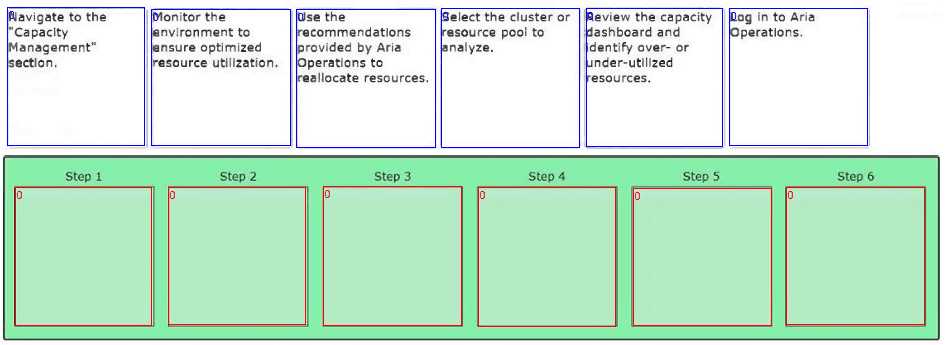
I’d put analyzing usage before setting policies, so C then B.
I’d say start with identifying resources first, then analyze usage to understand patterns, and finally set policies to optimize based on that data. That order makes more sense to me than setting policies upfront.
DRAG DROP Match each networking issue with the corresponding troubleshooting step. 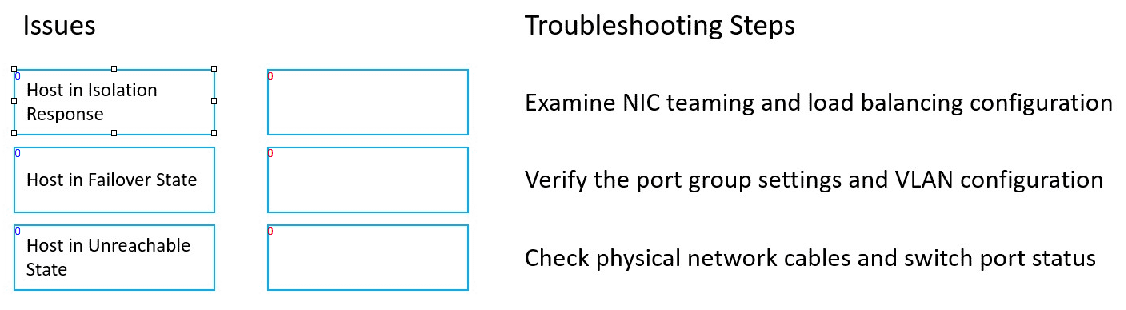
I think option D for intermittent drops makes sense since it’s about refreshing settings without full reset.
For me, the key was separating hardware from software issues. No connectivity usually means something’s wrong with physical links, so checking cables (B) fits best. For intermittent drops, it could be signal interference or hardware faults, so a reset (D) might help clear temporary glitches. Slow speeds often relate to software stuff like bandwidth hogs or misconfigs, so checking for heavy apps or adjusting settings (C) feels more logical there. Matching each step cleanly to the issue type helps avoid confusion between physical and software troubleshooting methods.