Free VMware 2V0-11.25 Actual Exam Questions - Question 15 Discussion
DRAG DROP Match each networking issue with the corresponding troubleshooting step. 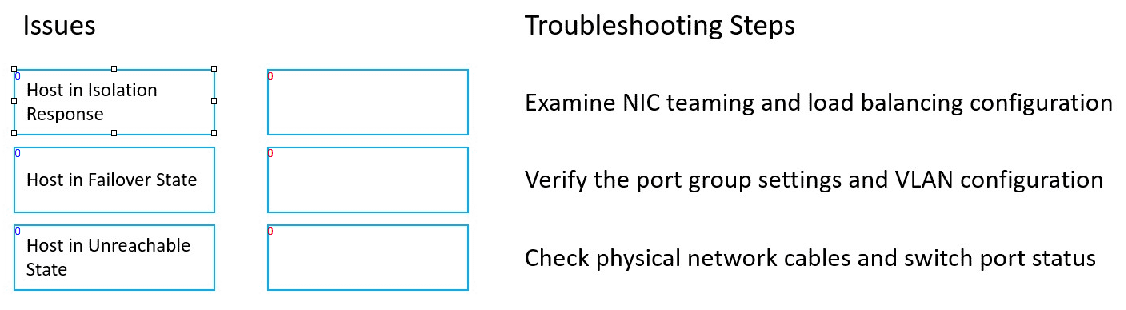
I think option D for intermittent drops makes sense since it’s about refreshing settings without full reset.
For me, the key was separating hardware from software issues. No connectivity usually means something’s wrong with physical links, so checking cables (B) fits best. For intermittent drops, it could be signal interference or hardware faults, so a reset (D) might help clear temporary glitches. Slow speeds often relate to software stuff like bandwidth hogs or misconfigs, so checking for heavy apps or adjusting settings (C) feels more logical there. Matching each step cleanly to the issue type helps avoid confusion between physical and software troubleshooting methods.
I think matching the “slow network speed” issue with checking for bandwidth-heavy apps makes sense since software can cause congestion. Physical checks won’t always catch that kind of problem.
I saw that option B deals with checking physical connections, which fits well for issues like no connectivity or intermittent drops. Another way to think about it is if the problem sounds like a configuration or signal issue, then matching with steps involving resets or software checks makes more sense. So skipping steps that don’t address the specific symptom directly helps narrow down faster. This way we avoid pairing something like “replace hardware” with a problem that’s clearly just a misconfiguration or loose cable.
I’d rule out the obviously wrong matches first-like the one that doesn’t seem related to connectivity issues. After that, it’s easier to pair the rest based on what the problem seems to be about, like checking cables for physical issues.