Free Microsoft PL-600 Actual Exam Questions
Dumps Box (DumpsBox) offers up-to-date practice exam questions for PL-600 certification exam which are developed and validated by Microsoft subject domain experts certified in Microsoft PL-600 . These practice questions are update regularly as we keep an eye on any recent changes in PL-600 syllabus, and when there is update our team quickly adjusts the questions. This commitment to providing the best quality exam prep material to certification aspirants is what makes DumpsBox.com the best certification exam prep website. On top of that, our strong, yet strictly moderated, community based feedback keeps the content clean and current. Each question has helpful community discussion that provides it extra perspective and introduces helpful resources for better exam preparation. This also saves students from other outdated practice questions or illicit exam dumps that can have adverse affects on career. Browse through our Microsoft PL-600 exam questions and pass your exam on first try.
HOTSPOT You need to recommend a collaboration tool for each group. Which tool should you use? To answer, select the appropriate tool in the answer area. NOTE: Each correct selection is worth one point. 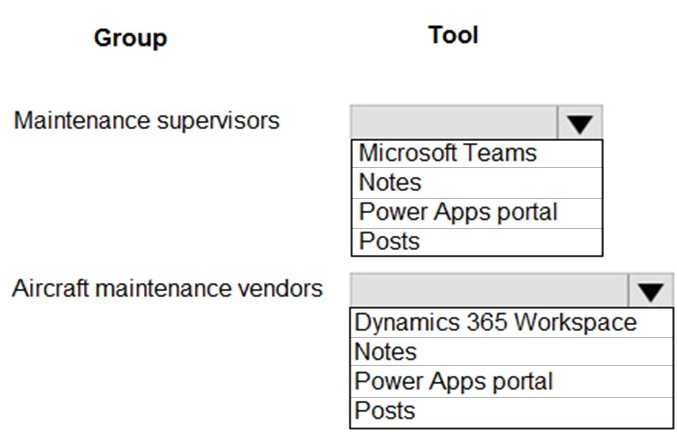
For HR, I’d go with SharePoint instead of OneNote because they likely need a centralized place for policy documents and team resources, not just notes. For R&D, Teams sounds right since they do lots of quick chats and video calls during development. Marketing should probably use OneDrive to easily share large files and presentations. Sales might benefit most from Teams for instant communication, while Finance is better off with OneDrive to securely store and manage sensitive documents. This setup covers each group’s main collaboration needs without overlap.
I’d say for HR, OneNote fits best since they need to organize notes and info, and for R&D, Teams makes sense because they need real-time collaboration and meetings. It matches their typical workflow better.
processes across the following regions: North America, Europe, and Asia.
Each region operates independently but reports to a global headquarters. The company has several
business units that correspond to each region. Within each business unit ate multiple teams based
on countries/regions.
Company employees have the following requirements:
• Sales representatives must have access only to data relevant to their specific country/region.
• Regional managers must be able to view and manage data across all areas within their region.
• Some global analysts require read-only access to sales data across the corporation by using third-
party tools.
• External contractors need limited access to the system to input their progress.
You need to design a solution for the company. What should you do?
Probably D again. Business units are made for this kind of regional and team segregation, which fits the internal access needs perfectly without overcomplicating things.
D, because business units naturally segment data by region and team effectively.
The solution will contain an interactive experience dashboard.
You need to ensure that the columns you create can be used as global filters for the dashboard
Which two data types can you use? Each correct answer presents a complete solution.
NOTE: Each correct selection is worth one point
Not sure about Multiline Text (D) since it’s usually for long notes, probably not good for filtering. Text (C) might work if it’s consistent values but less ideal than Choice or Lookup. Does global filtering need fixed options?
Option B and E seem solid since both Choice and Lookup types let you filter across multiple records easily, which is key for global filters. Yes/No is too limited for interactive filtering.
DRAG DROP A medium-size company is evaluating Microsoft Power Platform functionality to enhance its business processes. The company currently uses a mix of spreadsheet tools and an outdated CRM system. The company requires the following business solutions: • bidirectional data sync between the outdated system and a new custom app • improved efficiency of data transfers • comprehensive real-time sales data displays You need to configure the solution components for each requirement Which components should you configure? To answer, move the appropriate solution components to the correct requirements. You may use each solution component once, more than once, or not at all. You may need to move the split bar between panes or scroll to view content. NOTE: Each correct selection is worth one point.

If the CRM lacks API support, using an on-premises data gateway with custom connectors might be the best for sync, while Power BI is clearly ideal for real-time sales displays. Power Automate fits better for improving data transfer efficiency.
If the old CRM doesn’t have modern API support, Power Automate might struggle with real-time sync, so maybe custom connectors or on-premises data gateway could help. For sales data display, Power BI dashboards seem like the best fit anyway.
multiple system user accounts daily.
You need to recommend a security concept which will facilitate complex security profiles to entities
for large groups of users across the Power Apps and Dynamics 365 applications.
What should you recommend?
Maybe C here, since user access management covers adding and removing accounts daily. It seems more about handling user lifecycle than just permissions, which might be key with that high turnover.
D imo, since team privileges make it easier to manage access for big groups, especially with constant user changes. Hierarchy security is more about org structure, not quick bulk updates.
DRAG DROP You need to recommend solutions to meet the organization’s communication needs. What should you recommend? To answer, drag the appropriate technologies to the correct groups of users. Each technology may be used once, more than once, or not at all. You may need to drag the split bar between panes or scroll to view content. NOTE: Each correct selection is worth one point. 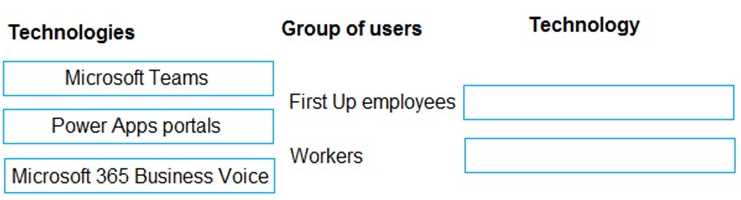
Chat works best for frontline; video suits management; email fits occasional users.
I see this differently—frontline workers need something that works on the go and doesn’t require heavy data, so chat fits well. Management should get video for face-to-face collaboration on complex issues. For users who aren’t always online or need less frequent updates, email is better because it doesn’t require immediate response and works anywhere. This way, each group’s communication style and availability are respected.
DRAG DROP You are a Microsoft Power Platform solution architect capturing requirements for a national retail chain protect. The project has the following requirements • Retail employees must use the application on a company- prowled tablet device. • The app must store data offline • Environment capacity must be monitored to ensure usage stays within 80 percent of available capacity • Apps are shared with security group teams for users to access. You need to identify the project s functional and non-functional requirements. How should you categorize the requirements? To answer, drag the appropriate categories to the correct requirements. Each category may be used once, more than once, or not at all You may need to drag the split bar between panes or scroll to view content. 
I’d say using the company tablets and offline data storage are definitely functional requirements since they dictate what the app needs to do. Monitoring environment capacity and sharing apps with security groups seem more like non-functional requirements because they relate to performance and security management rather than direct app functionality. So those two fit in non-functional for sure. The key is that functional requirements describe specific behaviors or actions, while non-functional cover how the system performs or constraints it must operate under.
For me, offline data and device use sound like functional needs since they define app behavior. Monitoring capacity and sharing via security groups seem more about performance and access control, so non-functional fits better there.
DRAG DROP You are a Microsoft Power Platform architect. You have identified several project risks. You need to categorize potential risks that are specific to your customer. How should you categorize the risks? To answer, drag the appropriate categories to the correct risks. Each category may be used once, more than once, or not at all. You may need to drag the split bar between panes or scroll to view content. NOTE: Each correct selection is worth one point. 
Customer-specific risks often link to business or operational factors, so that fits.
Customer-specific risks usually fall under business or environment categories.
The company has turned off out-of-the-box quote calculations in order to implement its own custom
calculations.
When users update a line item on a quote, they expect to see an updated total for the quote in real
time. Users are reporting inconsistent behavior, with some aggregations taking up to two hours.
You review the system design and notice many asynchronous workflows.
You need to recommend a solution to enable the calculation in real time.
Which two options should you recommend? Each answer presents a complete solution.
NOTE: Each correct selection is worth one point.
A/D? Real-time workflows and synchronous plug-ins both handle immediate updates, which cuts down delay. Also, merging multiple async workflows into one (B) still won’t fix the lag since it stays async.
A/D? Real-time workflows or synchronous plug-ins both trigger instantly, which should fix the delay issue. B just delays things more, and C doesn’t really address real-time calculation needs.
HOTSPOT You are designing a model-driven app for a hospital. The app will be used to track teams at the hospital including: 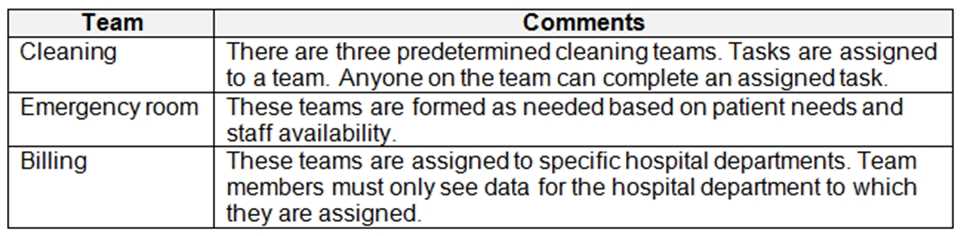 You need to recommend the team types to use. Which team types should you recommend? To answer, select the appropriate options in the answer area. NOTE: Each correct selection is worth one point.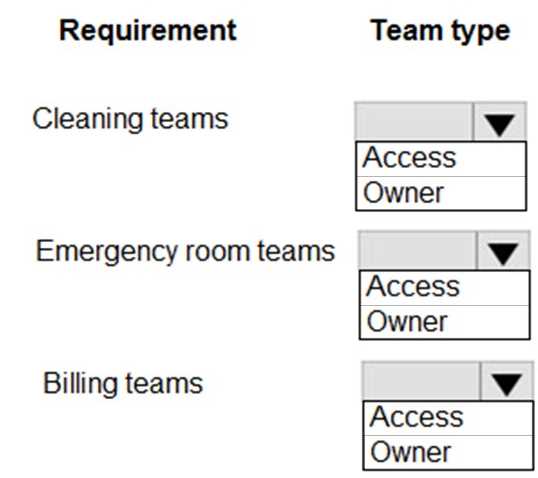
Owner teams handle ownership well, access teams are perfect for sharing access.
I’m thinking owner teams and access teams fit best here. Owner teams are good if these hospital teams need to own records and control access, while access teams are great for giving shared access without changing ownership. Since hospital teams often need strict control over patient or case records but also need collaboration, using both types covers those needs. Security groups or just access teams alone wouldn’t handle ownership well, so those seem less ideal.
Employee user accounts are in multiple Azure AD tenants and are not located in the tenant that is
running the app.
Employees must be added as Azure AD guest accounts within the tenant that will be running the app.
Employees must access the model-driven app by being a member of a security team. The security
team has been assigned the Employee Security role. Employees must create personal views of
records to view within the system.
You need to implement a security solution.
Which privilege should you use?
A/C? The question points out that employees need to be members of a security team with the Employee Security role, so option C feels right for managing that team membership and role assignment. But creating personal views usually requires at least basic privileges, so maybe A (Direct basic level) is necessary to cover that part. Just relying on team membership (C) might not be enough if that role doesn’t include the privilege to create personal views.
Maybe C since the security team membership is crucial for access control here.
DRAG DROP You are designing data loss policies for a Microsoft Power Platform implementation. You have the following requirements: • Solutions that use the HTTP connector must not include any other connectors. • Prevent the use of the Microsoft Forms connector. • Allow the use of the Azure DevOps connector. You need to determine in which data policy group to add each connector. 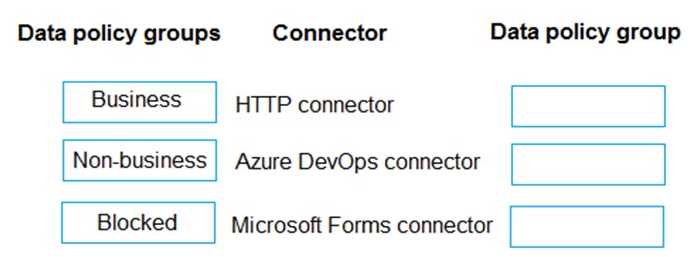
I agree with choosing the group that isolates the HTTP connector since mixing it with others breaks the rules. Blocking Microsoft Forms outright is straightforward since it's not allowed at all. Putting Azure DevOps in a separate allowed group ensures it’s usable without restrictions. Another way to look at it is by process of elimination: any group combining HTTP with other connectors violates the first rule, so that narrows down options quickly. Also, the question doesn’t forbid having other connectors with Azure DevOps, but since we want to keep things clean, isolating HTTP and blocking For
I’d pick D because isolating HTTP connectors stops unauthorized combos. Blocking Forms outright also matches the rules, while Azure DevOps goes in allowed without restrictions. Seems like the cleanest fit.
365.
What should you include in the recommendation?
A vs D? I’m thinking A because syncing identities usually covers most scenarios without the hassle of setting up federation. Federation (D) could be overkill unless there’s a strong existing need or infrastructure for it. B and C seem more about tenant management than directly solving authentication challenges. Without clear signs that they want separate tenants or already have federation, syncing identities looks like the straightforward approach here.
If the company already uses Office 365, option B makes sense to keep users under one tenant without extra setup. Creating a new tenant (C) feels like extra work unless isolation is needed. Thoughts on that?
HOTSPOT A company plans to create a Power Platform solution that integrates with Dynamics 365 Sales. The solution must meet the following requirements: Connect directly with a Microsoft Azure SQL database as an external data source at run time where specific data is available in the Dynamics 365 Sales solution without the need for data replication. An external system needs to send data to the company’s Dynamics 365 Sales solution. You need to recommend the most suitable solution to integrate Dynamics 365 Sales with both systems. What should you recommend? To answer, select the appropriate option in the answer area. NOTE: Each correct selection is worth one point. 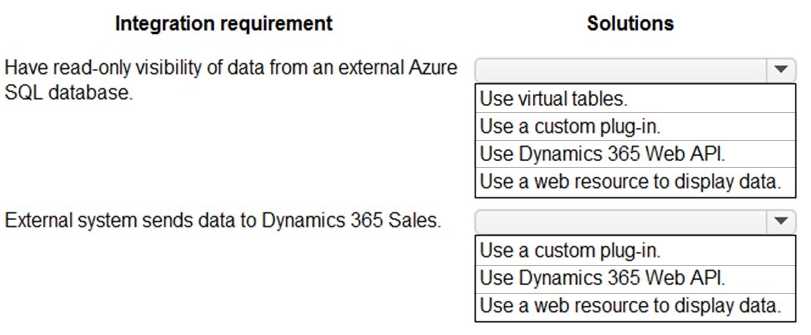
I also think D works well for connecting to Azure SQL without data replication since virtual entities show live data directly. For the external system sending data into Dynamics 365 Sales, C makes sense because Power Automate is designed for easy integration and can handle data pushes without complex coding. Unless the external system requires a super custom setup or real-time API calls, Power Automate should cover most scenarios efficiently. This combo keeps the architecture simple and meets the no-replication requirement nicely.
Virtual entities (D) make sense for Azure SQL since data stays external and live. For the external system sending data, an API or Power Automate (C) works best to push info into Dynamics 365 Sales directly.
DRAG DROP A national retail company has multiple data sources, including the following: • online e-commerce platform • CRM system • HR system • customer support system The company requires a unified view that includes all relevant data for the following data source requirements: • include certification information for employees • understand purchasing behavior and preferences • enhance customer service You need to configure the solutions. Which data source should you configure for each requirement? To answer, move the appropriate data sources to the correct requirements. You may use each data source once, more than once, or not at all. You may need to move the split bar between panes or scroll to view content NOTE: Each correct selection is worth one point. 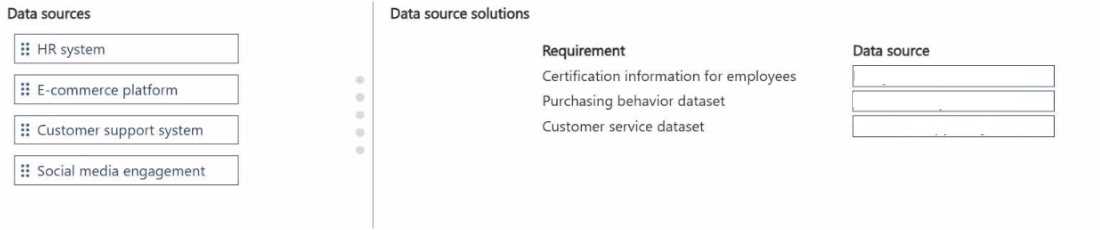
I’d say HR is definitely for certification info since employees are managed there. Online e-commerce fits purchasing behavior, and customer support system aligns best with enhancing customer service. CRM seems less relevant here.
Customer support system fits best for enhancing customer service here.