Free Microsoft Power Platform PL-200 Actual Exam Questions
Dumps Box (DumpsBox) offers up-to-date practice exam questions for PL-200 certification exam which are developed and validated by Microsoft subject domain experts certified in Microsoft Power Platform PL-200 . These practice questions are update regularly as we keep an eye on any recent changes in PL-200 syllabus, and when there is update our team quickly adjusts the questions. This commitment to providing the best quality exam prep material to certification aspirants is what makes DumpsBox.com the best certification exam prep website. On top of that, our strong, yet strictly moderated, community based feedback keeps the content clean and current. Each question has helpful community discussion that provides it extra perspective and introduces helpful resources for better exam preparation. This also saves students from other outdated practice questions or illicit exam dumps that can have adverse affects on career. Browse through our Microsoft Power Platform PL-200 exam questions and pass your exam on first try.
HOTSPOT You configure an alert in Power Bl. You need to alert users when the value of a tile exceeds a threshold. To answer, select the appropriate options in the answer area. NOTE: Each correct selection is worth one point. 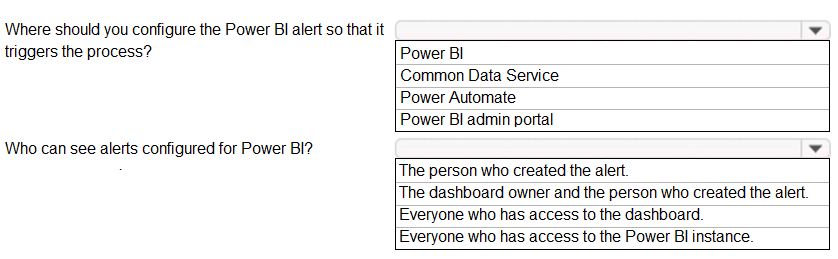
I’d pick the option for the tile itself because alerts in Power BI only work on tiles pinned from report visuals, not entire reports or dashboards. The threshold has to be set on the numeric data shown in the tile.
Marked the tile and threshold, seems like that’s how you set alerts in Power BI. The alert definitely works when the value goes above the limit, so that option fits. Didn’t think much about other options since this is pretty straightforward.
DRAG DROP A company is creating a business process flow in Power Automate to analyze the probability that a customer will buy a specific product. The company uses ratings from zero to one hundred. The company assigns likelihoods based on the following table: 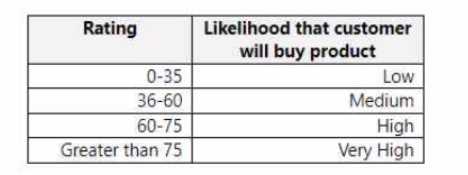 You need to define the business process steps. All logic must be included in a single evaluation statement. Which step should you use? To answer, drag the appropriate steps to the correct ratings. Each step may be used once, more than once, or not at all. You may need to drag the split bar between panes or scroll to view content NOTE: Each correct selection is worth one point.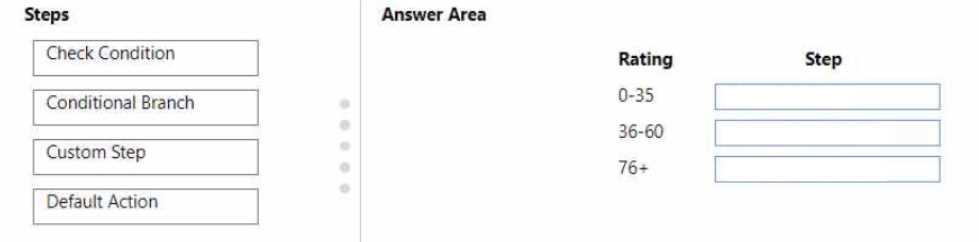
I think using a switch case would be complicated here since the ranges overlap. A nested if statement is probably better to cover all ratings in one go without missing any intervals.
Does anyone know if the rating scale is inclusive of the boundary numbers, like does 50 count as low or medium likelihood? That would affect how we set up the steps.
DRAG DROP You are a Dynamics 365 administrator. You create a new app. You need to create the site map for the app. Which three actions should you perform in sequence? To answer, move the appropriate actions from the list of actions to the answer area and arrange them in the correct order. 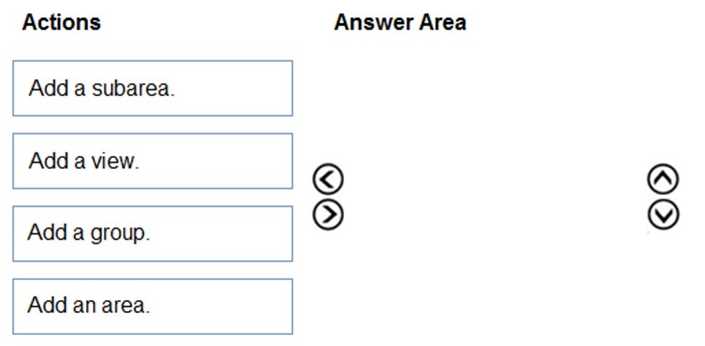
First, open the app designer to get access to the site map, then select to edit or create a new site map, and finally customize it by adding areas, groups, and subareas. This keeps things organized step-by-step.
Start by opening the app designer, then create a new site map, and finally customize the components to fit your app’s navigation needs. This order helps build the structure systematically.
DRAG DROP A company uses Power Apps. You create a custom phone table that is a child of the contact table. You need to configure the cascading rules for each action. Which behavior should you use? To answer, drag the appropriate behaviors to the correct actions. Each behavior may be used once, more than once, or not at all. You may need to drag the split bar between panes or scroll to view content. NOTE: Each correct selection is worth one point. 
Without the behavior list, I’d pick Cascade Delete for Delete action, none for Assign.
Can someone clarify if the question is asking about cascading behaviors for actions like assign, share, delete, reparent, and merge? Also, is it expected that every action has a unique behavior or can some behaviors be repeated? The image link isn’t loading on my end, so I’m missing context to match behaviors properly. Does anyone have the full list of behaviors we should consider? Without that, it’s tricky to decide which fits each action best.
the series contains a unique solution that might meet the stated goals. Some question sets might
have more than one correct solution, while others might not have a correct solution.
After you answer a question in this section, you will NOT be able to return to it. As a result, these
questions will not appear in the review screen.
You are creating Power Virtual Agents chatbot that captures demographic information about
customers.
The chatbot must determine the group a customer belongs to based on their age. The age groups
are:
0 - 17
18 - 25
26 - 35
36 - 55
55 - 100
You need to configure the chatbot to ask a question that can be used to determine the correct age
group.
Solution: Use Date and time for Identify in the question and then add branches that use conditional
logic to determine the age group.
Does this meet the goal?
B imo, just asking for a date/time input isn't enough unless the bot calculates the age from it. The solution doesn't mention that step, so it probably doesn't meet the goal.
A/B? Using Date and time could work if the bot calculates age from the input, but if it just collects date/time without calculation, it won’t group properly. So it depends on that extra step.
HOTSPOT You are a Dynamics 365 Customer Services administrator. You have a Production instance and Sandbox instance. Users record Production instance data in the Sandbox instance. You need to ensure that the users only record data in the Production instance. Which security function needs to be edited to prevent access to the Sandbox? To answer, select the appropriate options in the answer area. NOTE: Each correct selection is worth one point. 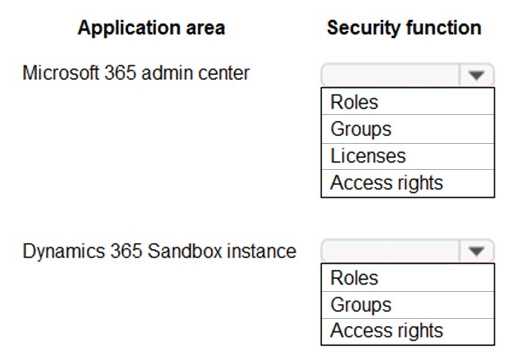
This seems to be about controlling environment access itself, so editing the Environment Access security function makes sense to block sandbox usage. User roles won't stop them if they can still enter that environment.
I think the key here is the Environment security role, but not the user roles themselves. The users shouldn’t have access to the Sandbox environment at all if we want to block data entry there. So editing the Environment security role to restrict access to Sandbox makes more sense than just tweaking user roles in Production. That way, users won’t even be able to open the Sandbox instance, forcing them to use Production only. The Environment access setting alone feels too broad or different; it’s more about which environments they can use rather than what actions they can perform inside them.
the series contains a unique solution that might meet the stated goals. Some question sets might
have more than one correct solution, while others might not have a correct solution.
After you answer a question in this section, you will NOT be able to return to it. As a result, these
questions will not appear in the review screen.
A company uses Dataverse.
The company plans to store and manage documents and data in the environment. The company
requires a solution that minimizes Dataverse storage consumption.
You need to recommend a solution.
Solution: Enable attachments for a table.
Does the solution meet the goal?
B Attachments are stored within Dataverse, so they won’t reduce storage consumption. The solution doesn’t meet the goal since it doesn’t offload data outside Dataverse.
Probably B, attachments still use Dataverse storage space.
HOTSPOT You need to embed the FAQbot into the communication solution. Which actions should you perform? To answer, select the appropriate options in the answer area. NOTE: Each correct selection is worth one point. 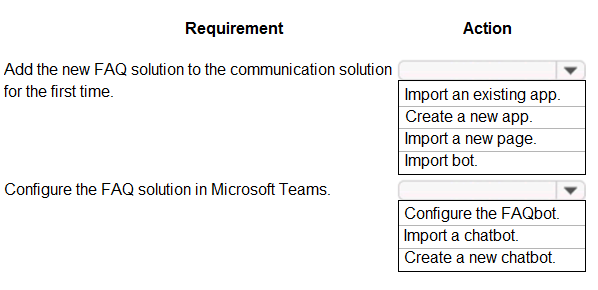
This one’s kinda confusing, not sure if it’s about configuration or actual coding. I went with the options that mentioned API keys and bot integration. What did you pick?
Which two actions should you perform? Each correct answer presents a complete solution
NOTE: Each correct selection is worth one point.
D imo, updating the Qualification records to finished seems essential to mark the process complete. For the second action, I’d go with A, adding a Dataverse connector, since qualification data usually lives there and you need to automate interactions with it. The Outlook connector (B) or Service Request (E) might be useful in some contexts but aren’t core requirements for verification itself. Without any mention of on-premises data, the gateway (C) feels unnecessary here.
B tbh, using the Outlook connector could be useful if the qualification process involves communicating with candidates or stakeholders via email as part of verification. Also, creating a Service Request (E) fits if you consider that verifying qualifications might trigger some kind of follow-up or support ticket. So A plus E might cover both data access and process initiation, especially if the question implies some ongoing case management beyond just updating records.
HOTSPOT You need to design the FAQ solution to handle unknown responses. Which component should you use? To answer, select the appropriate options in the answer area. NOTE: Each correct selection is worth one point. 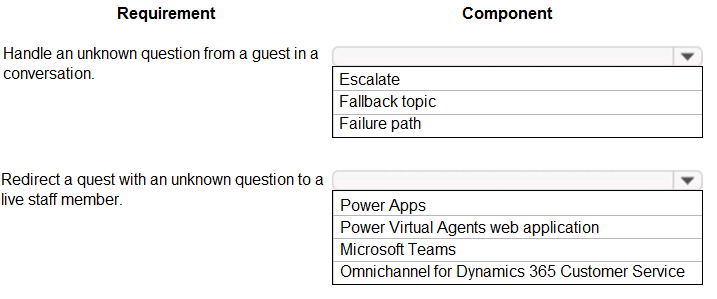
Fallback’s for catching those weird inputs that don’t fit any FAQ, but without a knowledge base or QnA Maker, there’s nothing to respond with. So I’d say both fallback and knowledge base are necessary here.
Besides fallback, I think the QnA Maker or knowledge base part is key since it holds the FAQs themselves. You can’t handle unknown questions if there’s no source to check first.
HOTSPOT You manage the Dynamics 365 environment for a company. You need to ensure that there are no leads for a customer before you create a new opportunity for the customer. How can you use duplicate detection rules to achieve this goal? To answer, select the appropriate options in the answer area. NOTE: Each correct selection is worth one point. 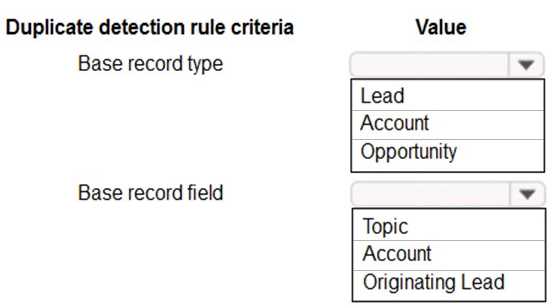
I’m thinking the rule should be triggered on creating or updating leads, not opportunities, so options focused on leads (like D) make more sense. You wanna catch duplicates before the opportunity stage, not after.
Option D makes sense since enabling duplicate detection on leads catches existing leads before new opportunities.
business intelligence to provide recommendations for schedule changes based on weather data.
You must implement a business rule that changes information for several forms in the canvas app
based on business intelligence data.
You need to configure the business rule.
Which scope should you use?
A/C? Table scope affects the whole table, so multiple forms get updated too. But if some forms aren’t tied to the same table, form-specific might be needed for those cases.
A/B? Table makes sense for consistency across forms, but if the app uses multiple distinct forms not linked to the same table, All Forms might be needed. Canvas apps usually lean on table scope though.
form for data entry. The functionality will be distributed to other lines of business in the company,
each with its own Dataverse environment.
New forms must not be created in order for updates to the functionality to work correctly.
You need to package the new functionality for distribution.
What should you do?
It’s D because managed solutions prevent changes, and disabling new forms stops form creation.
I think option C might be a trap here since unmanaged solutions let people edit and create new stuff, which breaks the no-new-forms rule. But not sure if disabling new forms is even possible in D?
The company needs to automatically update the Status column in real time.
You need to configure this feature.
Solution: Create a workflow that has a Change Status step.
Does the solution meet the goal?
Workflows usually run after the event completes, so the Status column won’t update exactly in real time. Wouldn’t a synchronous plugin or a real-time Power Automate flow be better here?
B. Workflows usually run asynchronously, so they don’t update fields instantly. For true real-time updates, you’d want a Power Automate flow with the “run after” trigger or a plugin that fires synchronously. Workflows just can’t guarantee that immediate status change the question is asking for.
HOTSPOT You create a desktop flow to interact with a certification authority’s website. You need to get data in and out of the desktop flow. How should you set up the input and output parameters? To answer, select the appropriate options in the answer area. NOTE: Each correct selection is worth one point. 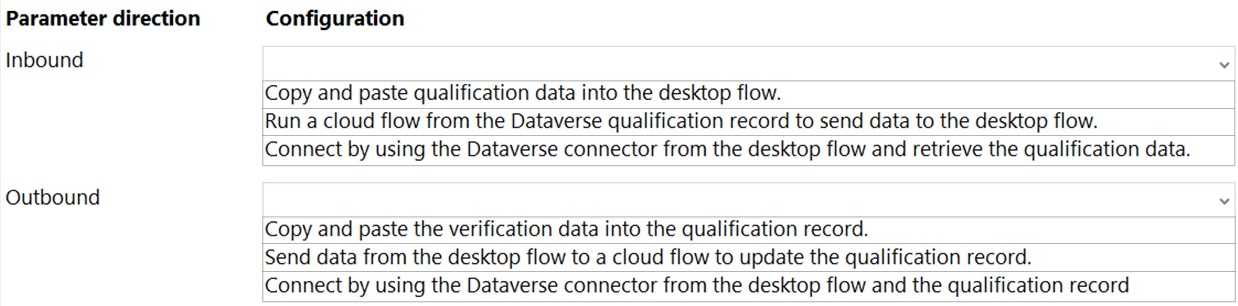
Input for request details, output for response status (D/A) works best here.
I’d say inputs should handle the request details, not credentials, since the question doesn’t specify logging in. Outputs probably capture whatever response or status the site returns after processing.