Free Cisco 500-220 Actual Exam Questions
Dumps Box (DumpsBox) offers up-to-date practice exam questions for 500-220 certification exam which are developed and validated by Cisco subject domain experts certified in Cisco 500-220 . These practice questions are update regularly as we keep an eye on any recent changes in 500-220 syllabus, and when there is update our team quickly adjusts the questions. This commitment to providing the best quality exam prep material to certification aspirants is what makes DumpsBox.com the best certification exam prep website. On top of that, our strong, yet strictly moderated, community based feedback keeps the content clean and current. Each question has helpful community discussion that provides it extra perspective and introduces helpful resources for better exam preparation. This also saves students from other outdated practice questions or illicit exam dumps that can have adverse affects on career. Browse through our Cisco 500-220 exam questions and pass your exam on first try.
cannot be used on iOS or Android mobile devices? (Choose two.)
Maybe D and E, since screenshot and remote desktop are desktop-specific features.
I agree E and D stand out since mobile OSes have stricter app controls. But C seems off too—selective wipe usually targets mobile devices, so it might actually be meant for iOS/Android and not Macs or Windows. Could that be the difference here?
template?
C vs D? I think C makes more sense because templates typically provide a default setup, but specific changes on the bound MX network should override those defaults to allow customization. If the template always overrode local changes (D), it would be tough to tailor individual networks as needed. Plus, it fits with how overrides usually work in config management—local wins unless you explicitly push a new template version.
It’s A, actually. The config change in the bound network doesn’t just override or get overridden; it merges with what’s already in the template. So the final setup is a combination of both, not just one taking full control. This way, you get flexibility without losing the baseline settings from the template.
It’s B and E. The VPN registry normally uses UDP 9350, and IPsec tunneling relies on UDP ports 500 and 4500—not TCP or high port ranges. The high UDP range is uncommon for this use.
Option B stands out because the VPN registry is known to use UDP port 9350. Option E matches standard IPsec behavior using UDP ports 500 and 4500, which fits the tunneling requirements perfectly.
B, E, F. PUT and POST are obviously for updating and adding, but GET is definitely a core request verb for fetching info, so it should count here over PATCH or ADD.
Maybe F is a trick here since GET is a basic request verb for retrieving data, so it should be included. So I’d say B, C, and F because PUT and PATCH update, and GET retrieves.
Makes sense that C fits best since Meraki uses VRRP for both MX and MS devices, so C.
Option C makes the most sense since Meraki typically uses VRRP for failover on both MX and MS devices, so active/passive fits better than active/active or just MX only.
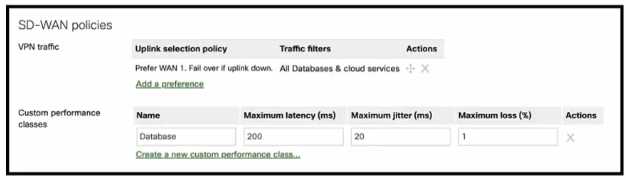
Which condition or conditions will cause the "All Databases & cloud services" SD-WAN traffic to be
routed via a VPN2 tunnel on WAN2?
Option D doesn’t consider WAN2’s state, so it risks routing traffic over a bad tunnel just because WAN1 is slow. That seems risky compared to options that check WAN2’s quality before switching.
WAN2 only gets traffic if WAN1 is slow and WAN2 is good, so B.
Maybe B makes the most sense here since the tool probably wants the lowest VLAN ID marked YES to keep things consistent and simpler for routing across the VPN. Highest VLAN might cause confusion or conflicts if multiple VLANs are set to YES. The question seems to point toward picking the VLAN that’s explicitly enabled for VPN usage, so picking the lowest one marked YES aligns with how some other Meraki features prioritize VLANs. The options mentioning NO for VPN probably can be eliminated since the tool is meant to source pings through an active VPN VLAN.
C makes sense too since choosing the highest VLAN set to use VPN could help avoid conflicts with other VLANs and ensures the ping comes from a VPN-enabled segment.
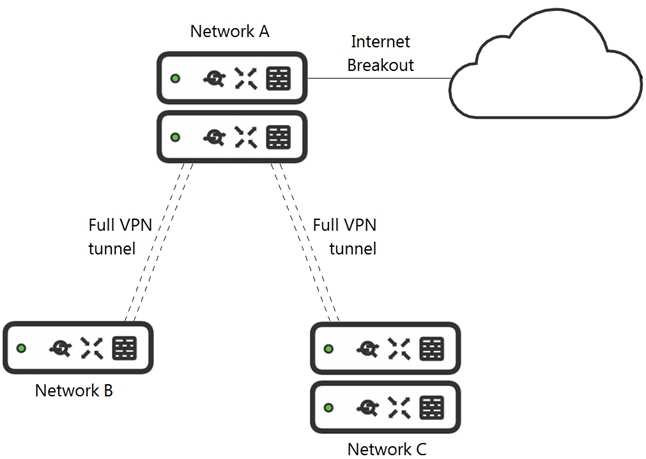
What is the minimal Cisco Meraki Insight licensing requirement?
I think it’s about the app’s location, so B fits best here.
I agree with the logic about the app location being key here. Since Web App Health monitors the app itself, licensing on network B seems enough for visibility. So, B makes sense.
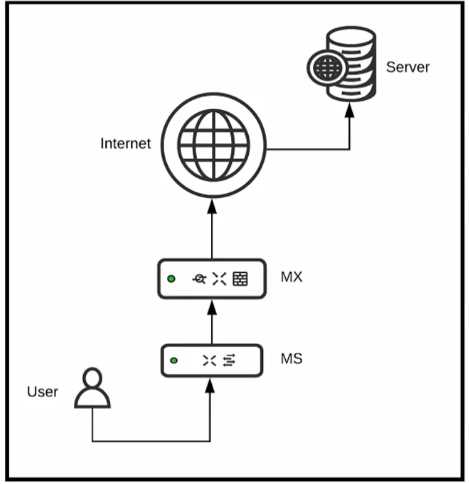
Which two configurations are needed to successfully monitor custom applications that a user is
accessing using Cisco Meraki Insight? (Choose two)
Not sure about the SMB option either, so D is out for me. The question's about monitoring custom apps, and Meraki Insight is known to handle TLS/HTTPS traffic well. So, I’m going with A because TLS on any port should cover custom setups, plus C since HTTPS on TCP 443 is the default secure web traffic port. These two together seem like the best fit based on how Meraki Insight works with encrypted traffic.
D imo, SMB/CIFS (option D) is primarily for file sharing and not really something Meraki Insight focuses on for custom app monitoring. So that can be ruled out.
B also seems reasonable because HTTP on port 8080 is a common custom app scenario and Meraki Insight should be able to monitor that. So I’d go with B and maybe C instead of A since HTTPS on TCP 443 is the default secure port and more specific than “TLS on any ports.”
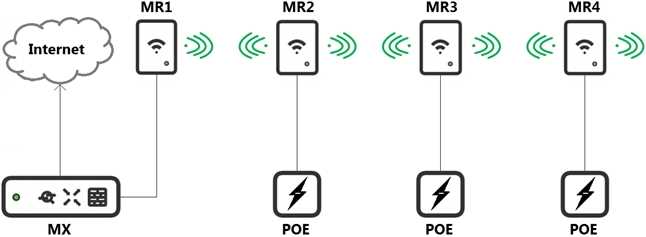
Which design recommendation should be considered?
I agree that the throughput loss per hop is around 25%, not 50%, so options C and D seem off. Meraki’s recommendation tends to limit hops to one, so A fits better here.
Option A makes sense because the typical throughput loss per hop in a mesh is around 25%, and Meraki usually recommends keeping it to just one hop to avoid compounding losses. Two hops could lead to significant performance issues. Also, a 50% loss per hop feels way too high for standard Meraki guidance. The question doesn’t specify indoor or outdoor, but the safest bet is sticking with the stricter one-hop max rule that’s generally recommended. So I’d rule out B, C, and D since they either overstate the loss or allow more hops than best practice suggests.

Which outcome occurs when logging is set to Enabled?
Good point on syslog details missing, so B seems safest for enabling hits count. B
I think D can be ruled out because it looks like a typo and inbound vs outbound flow matters here. A seems off without a syslog sender explicitly mentioned. B makes the most sense since enabling logging usually tracks hits on the rule. B
What are two effects on connectivity? (Choose two.)
I’m thinking D for sure because containment should block new clients. But what about C? Could containment add traffic restrictions instead of disconnecting users? That might reduce risk without cutting them off completely.
Option D makes sense since blocking new clients is straightforward to stop spread. Also, option A fits because disconnecting current users instantly would be disruptive, so they probably stay connected.
A/D? The question hints at usage, so live data in A seems logical, but D’s config settings might include thresholds that define what counts as high usage. Could be about knowing limits, not just current data.
Option A seems best since the question asks about usage, and live data shows actual current traffic load, not just historical or config info. Real-time usage is what determines high usage moments.
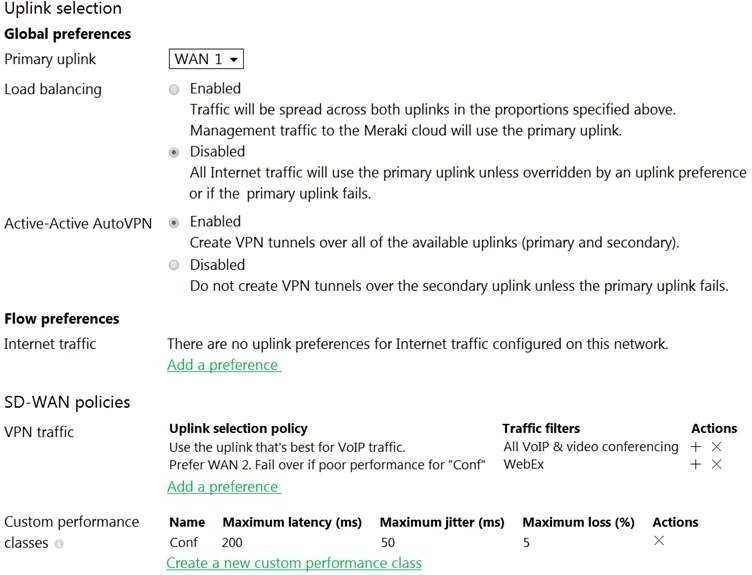
Assuming this MX has established a full tunnel with its VPN peer, how will the MX route the WebEx
traffic?
Maybe C here. Since WAN 2 is tied to the "Conf" performance class and assuming it's up, the MX might just route WebEx traffic there regardless of the SLA thresholds being fully met. The question says the MX has a full tunnel, so it should honor the monitored status more than just primary or load balancing. WAN 1 being primary doesn’t seem to matter for this specific traffic type if WAN 2 is available and healthy. That makes D less likely since load balancing usually happens when no clear preference is set by performance or policy.
Option A seems right since WAN 2 has the performance class preference for WebEx traffic.
and 5 Ghz will be used. Roughly how many APs (rounded to the nearest whole number) are needed
based on client count?
B tbh, if we assume each AP can handle clients on both bands simultaneously, then for 30 users on 2.4 GHz (max 15 per AP) you’d need 2 APs, and for 70 users on 5 GHz (max 25 per AP), around 3 APs. So combined, that’s roughly 3 APs total if dual-band APs can share load efficiently, but 5 if single band. Since the question hints at a split but doesn’t clarify single or dual-band APs, 3 seems like the best estimate for dual-band capable setups.
If I break it down, 30 users on 2.4 GHz and 70 on 5 GHz, and assuming typical max clients per AP are about 15 for 2.4 GHz and 25 for 5 GHz, that means you’d need at least 2 APs for the 2.4 GHz users and about 3 APs for the 5 GHz side. So combined, that’s around 5 APs total. But if APs are dual-band and can handle clients across both bands simultaneously, maybe the load balances differently. Anyone else think the client distribution per AP might be more flexible, or should we stick strictly to those typical maxs?