Free CheckPoint 156-215.81 (R81.20) Actual Exam Questions
Dumps Box (DumpsBox) offers up-to-date practice exam questions for 156-215.81 (R81.20) certification exam which are developed and validated by Checkpoint subject domain experts certified in CheckPoint 156-215.81 (R81.20) . These practice questions are update regularly as we keep an eye on any recent changes in 156-215.81 (R81.20) syllabus, and when there is update our team quickly adjusts the questions. This commitment to providing the best quality exam prep material to certification aspirants is what makes DumpsBox.com the best certification exam prep website. On top of that, our strong, yet strictly moderated, community based feedback keeps the content clean and current. Each question has helpful community discussion that provides it extra perspective and introduces helpful resources for better exam preparation. This also saves students from other outdated practice questions or illicit exam dumps that can have adverse affects on career. Browse through our CheckPoint 156-215.81 (R81.20) exam questions and pass your exam on first try.
A, since Kerberos and OTP are mostly for users, not gateway VPN auth.
A, because dynamic OTP isn’t typically used for gateway-to-gateway VPN authentication.
This one’s definitely UDP (A). The other options like CCP or TDP don’t really fit here since RADIUS uses a connectionless protocol for speed and simplicity. HTTP is way too heavy for what RADIUS does. So, UDP makes the most sense given RADIUS’s need to quickly authenticate and authorize without the overhead of TCP.
D imo, UDP makes the most sense here because RADIUS needs to send small, quick packets without the overhead of connection setup. CCP and TDP aren't even protocols used for this kind of network communication, so they're easy to rule out. HTTP is mostly for web traffic, so definitely not relevant for RADIUS in communicating with gateways.
It’s A since IPS signatures must be updated regularly, unlike VPN or firewall blades.
B imo, the IPSEC VPN blade often needs ongoing license renewals for support and updates, unlike the firewall blade which is more hardware-focused. That fits the subscription model better than others here.
It’s D for me. The term “untranslated packet” matches the input before any changes, and “manipulated packet” covers the packet after the translation rules are applied. This feels more accurate than just “original” and “translated,” since translation implies some manipulation. Also, “manipulated packet” is a common phrase in networking contexts when describing packet processing, so it makes sense here. The other options don’t capture both states as clearly or use less standard terminology.
A imo, the original and translated packets clearly show the before and after states of address translation. The terms manipulated and untranslated feel less precise here.
organization, such as the following
C imo since it covers core essentials without overreaching into threat prevention, which might be a separate tool. It’s a solid middle ground between A and B.
B tbh
C imo, because Common Name, Country, and Organizational Unit are all standard DN attributes you see in certificates and LDAP entries. User container sounds more like a folder or grouping in some directory systems but not a DN attribute itself. It doesn’t follow the usual naming conventions for DN components.
Actually, User container doesn’t fit as a Distinguished Name component. The others like Common Name, Country, and Organizational Unit are standard parts. So, C looks like the odd one out here.
information in state tables?
B. Next-Generation Firewall usually combines traditional stateful inspection with deep packet inspection and stores detailed info in state tables, so it fits the question well beyond just basic filtering or app layer checks.
Not C, since basic packet filtering only checks headers without storing detailed state info. The question likely points to a tech that goes beyond that, so A or D are better fits.
I’m thinking C makes the most sense here too. Usually, the default tracking option is just the basic log, not something extended or detailed since those tend to be added manually for deeper analysis. Accounting Log sounds more specialized, so it’s probably not the default either.
A/B? Extended and detailed logs sound too much for a default setting. Accounting Log might be more automatic since it’s usually about tracking usage or billing-related info without needing extra setup. I’m not sure if “Log” alone is the default since that’s pretty generic, but Accounting Log feels like a safe bet as a system often tracks accounting by default.
Not B, because user ID 2 normally doesn’t have special root privileges in Unix/Linux systems, so it can’t be the superuser ID.
C. User ID 0 is the standard superuser ID across most Unix-like systems, so it’s the only one that makes sense for full root privileges here. The others don’t hold that status.
Maybe B here. The “Upgrade Service Engine” sounds like a background service that could handle automatic updates behind the scenes. C and D both mention update or upgrade, but B’s use of “Service Engine” feels like it’s running continuously to manage those updates, not just a one-time install or manual check. A seems unrelated since INSPECT Engine is for firewall inspection, not updates. So, B might be the automated system working quietly to keep Gaia OS products current without manual intervention.
C/D? I’m going with C since “Update Engine” clearly hints at managing updates automatically. D sounds more like a manual or semi-automated upgrade service, not a continuous update tool. Usually, “Upgrade” implies bigger changes, while “Update” is ongoing maintenance—which fits the question better. Also, INSPECT Engine (A) is about threat prevention, so it’s out. Upgrade Service Engine (B) doesn’t sound familiar for Gaia updates specifically. So between C and D, C seems to match the automatic update function better.
It’s A because both involve checking specific info to enforce rules, not just sharing or standardizing.
A, since both policies rely on inspecting data or info to enforce rules.
Maybe D could be tricky here since Bash is the default shell in expert mode, which is also part of Gaia CLI but not the initial or standard shell for most users. The question might be about the very first shell you get after login, which is clish. But if someone thinks of the full CLI environment including expert mode, Bash might seem like a candidate. Still, clish is generally considered the default user shell, so D might not be the best pick here.
Totally agree, A fits since clish is the standard user shell. A
the problem might be the Threat Prevention settings.
The following Threat Prevention Profile has been created.
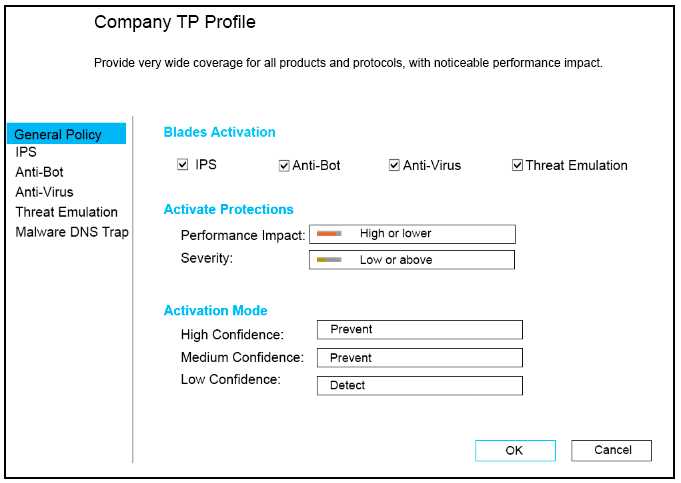
How could you tune the profile in order to lower the CPU load still maintaining security at good
level? Select the BEST
I think option C makes the most sense here. Turning off Antivirus and Anti-Bot reduces CPU strain a lot, while keeping IPS on still blocks many threats effectively.
Option C cuts CPU load by turning off Antivirus and Anti-Bot, which are known CPU hogs, but leaves IPS on. That keeps the threat detection decent while easing the system a lot.
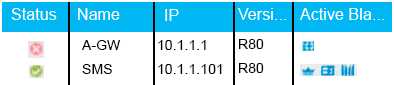
Choose the BEST
Option B makes sense since green checks usually mean everything’s good and connected.
The green check usually means everything’s connected and functioning. I’d drop options suggesting errors since those would use red or warning icons, not green. So B feels right because it matches a normal status.
questions, select the best
B sounds right since TLS is the official protocol mentioned for securing communication in R80, unlike vague terms in other options. It’s the standard way they ensure secure connections.
B seems solid since R80 specifically highlights TLS for securing components, making it clearer than just vague “internal encryption” in C. TLS is the standard protocol here.