Free CheckPoint 156-215.81 (R81.20) Actual Exam Questions - Question 13 Discussion
the problem might be the Threat Prevention settings.
The following Threat Prevention Profile has been created.
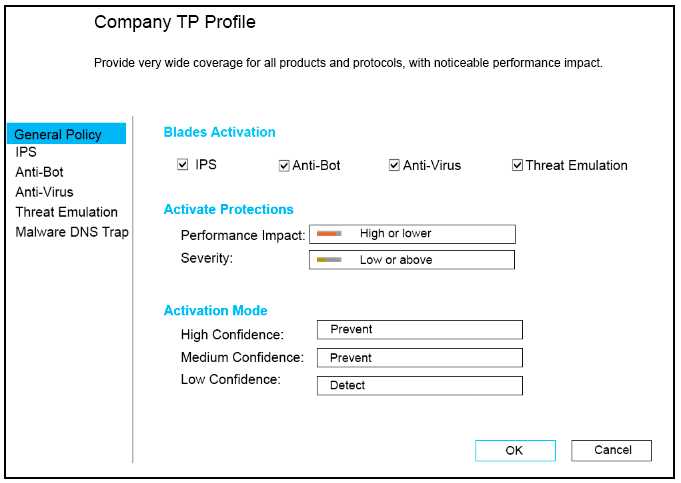
How could you tune the profile in order to lower the CPU load still maintaining security at good
level? Select the BEST
I think option C makes the most sense here. Turning off Antivirus and Anti-Bot reduces CPU strain a lot, while keeping IPS on still blocks many threats effectively.
Option C cuts CPU load by turning off Antivirus and Anti-Bot, which are known CPU hogs, but leaves IPS on. That keeps the threat detection decent while easing the system a lot.
Option C reduces CPU by disabling Antivirus and Anti-Bot, which are resource-heavy, but keeps IPS active for decent security. This seems like the best trade-off to me.
Disabling Antivirus and Anti-Bot in C definitely cuts CPU usage since those are heavy, plus C keeps IPS on for good security coverage. It’s a solid balance compared to A’s full-on scanning.
C seems safer; A might overload CPU with all options on.