Free CheckPoint 156-215.81 (R81.20) Actual Exam Questions - Question 14 Discussion
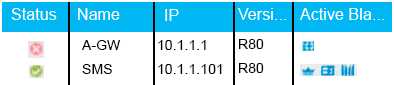
Choose the BEST
Option B makes sense since green checks usually mean everything’s good and connected.
The green check usually means everything’s connected and functioning. I’d drop options suggesting errors since those would use red or warning icons, not green. So B feels right because it matches a normal status.
I’d also say the green check mark likely means the gateway is up and running smoothly. Usually, these status icons are pretty straightforward—green for good, red for issues. The other options that suggest errors or downtime don’t match what the image shows. If it was something like a warning or error icon, it would be yellow or red, not green. So, the best pick should reflect that the gateway is operational and healthy based on that status symbol.
The icon looks like a green check, which generally means the gateway is active and working fine. So I’d rule out anything that suggests a problem or offline status.
Option B feels right since the icon looks like a solid green check, usually meaning everything’s connected without issues. The others don’t really fit what that symbol normally means.
I think it’s A because the gateway shows a successful connection symbol.
Not C for sure, that one’s a common trap. Going with B here.