Free VMware 2V0-41.24 Actual Exam Questions - Question 12 Discussion
Refer to the exhibit.
Which two items must be configured to enable OSPF for the Tler-0 Gateway in the Image? Mark your
answers by clicking twice on the image.
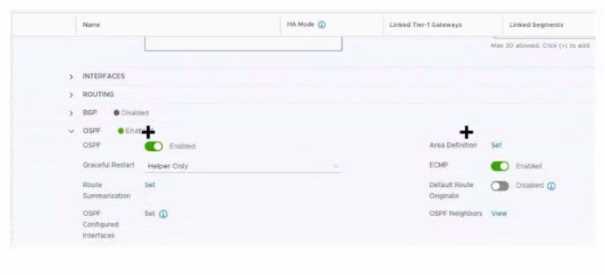
Besides the interface and area ID, don’t overlook that the OSPF process itself must be enabled with the correct process ID on the gateway. Without starting the OSPF process, no matter what interfaces you configure, OSPF won’t come up. Also, the interface must be explicitly included in the OSPF configuration under that process. So, configuring the OSPF process ID and the interface under that process are the two essentials here. The area ID is part of that step but not a separate config item on its own.
Besides the area ID and enabling OSPF on the interface, you also need to check if the router ID is set under OSPF. Without a router ID, the process won’t fully start, so that’s critical to configure too.
One thing to check is the router ID in OSPF settings, since that’s crucial for OSPF to run. Also, the interface needs to be included under the OSPF process with the correct area, not just IP assigned.
I think the two key things are enabling OSPF on the interface itself and making sure the area ID is set correctly. Even if the IP is already there, if OSPF isn’t activated on the right interface, it won’t join the process. So I'd pick the interface configuration and the area ID setup as essentials here. The network command usually ties into this, but it’s really about telling OSPF which interfaces to use and in which area.
Area ID and network command definitely, those are crucial for OSPF.
Area ID and Network type need setup for OSPF here.