Free VMware 2V0-41.24 Actual Exam Questions
Dumps Box (DumpsBox) offers up-to-date practice exam questions for 2V0-41.24 certification exam which are developed and validated by VMware subject domain experts certified in VMware 2V0-41.24 . These practice questions are update regularly as we keep an eye on any recent changes in 2V0-41.24 syllabus, and when there is update our team quickly adjusts the questions. This commitment to providing the best quality exam prep material to certification aspirants is what makes DumpsBox.com the best certification exam prep website. On top of that, our strong, yet strictly moderated, community based feedback keeps the content clean and current. Each question has helpful community discussion that provides it extra perspective and introduces helpful resources for better exam preparation. This also saves students from other outdated practice questions or illicit exam dumps that can have adverse affects on career. Browse through our VMware 2V0-41.24 exam questions and pass your exam on first try.
feature of NSX can be used to achieve this?
Makes sense that network segmentation is the key here because it actually isolates workloads to stop lateral moves, so I’d go with A. Virtual Security Zones seem more like organizing groups rather than enforcing strict traffic rules.
Not C, edge firewalling is more about controlling traffic at the perimeter rather than inside the network to stop lateral movement. Network segmentation (A) directly divides workloads to block internal threats.
support role-based access control? (Choose two.)
Option B makes sense since NSX Manager needs to be a Service Provider in VMware Identity Manager, and option C fits because NSX Manager has to get IdP metadata to establish trust.
B and D, looks like the key trust setup between NSX Manager and VMware Identity Manager.
successful?
It’s B. The CLI showing "Configured" means the integration isn’t just enabled but properly set up, which is a more solid check than just UI status or connection color.
Maybe C, since a green status in VMware Identity Manager means the connection is actually working.
A vs B? B is about automation workflows, so not really for spotting network issues. C is disaster recovery, and D is more about orchestration, not monitoring. A focuses on network operations and health, which fits best for identifying physical network problems. So yeah, A sounds like the only tool designed for that purpose here.
A vs C? C is mainly for disaster recovery, not troubleshooting. A is specifically tailored for operations and monitoring, which fits better for identifying network problems.
What is the minimum MTU size for the UPLINK profile?
C/D? I think 1550 (C) could also be valid since some setups recommend slightly above 1500 to handle overhead but not as high as 1650. Without exact overlay details, 1550 might be a safer middle ground.
B, standard 1500 MTU often works unless explicitly stated otherwise.
Option D seems right because L2VPNs usually rely on a virtual interface created by route-based IPSec VPNs. The other options, like policy-based or port-based, don’t typically provide the flexibility needed for L2VPN services. Also, SSL-based IPSec VPNs are more for remote access, so that one’s unlikely. So yeah, D fits the requirement for pre-configuring an L2VPN.
I’m thinking it might be A since policy-based VPNs let you define specific traffic selectors, which could be needed before setting up L2VPN. Anyone else see a case for that?
topology? (Choose two.)
A and B imo since ingress hits Tier-0 uplink and Tier-1 router port on Single Tier.
B and D, since ingress hits the Tier-0 uplink then passes to Tier-1 downlink.
A imo because esxcfg-nics -l clearly lists physical NICs and their link status, plus B since esxcli network nic list gives a straightforward overview of NICs, making both solid picks here.
C and D don’t show physical NIC link status, so probably not those.
NAT64 is stateless so B fits, and it’s on Tier-1 only so D works.
D imo, NAT64 is mostly linked to Tier-1 gateways only, so C can be dropped. Also, since it’s usually stateless, active-standby mode (E) fits better than active-active (A).
DRAG DROP Sort the rule processing steps of the Distributed Firewall. Order responses from left to right. 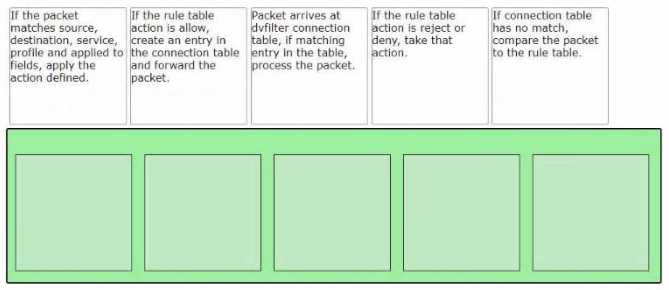
I’d rule out packet matching first since you can’t match anything without knowing the policy or rules. So policy lookup first makes sense, then rule lookup to narrow down conditions, and finally packet matching to enforce.
I’d say packet matching should be second because you need to check the packet details before confirming the exact rule. So maybe policy lookup, packet matching, then rule lookup? That order feels more logical to me.
DRAG DROP Match the NSX Intelligence recommendations with their correct purpose. 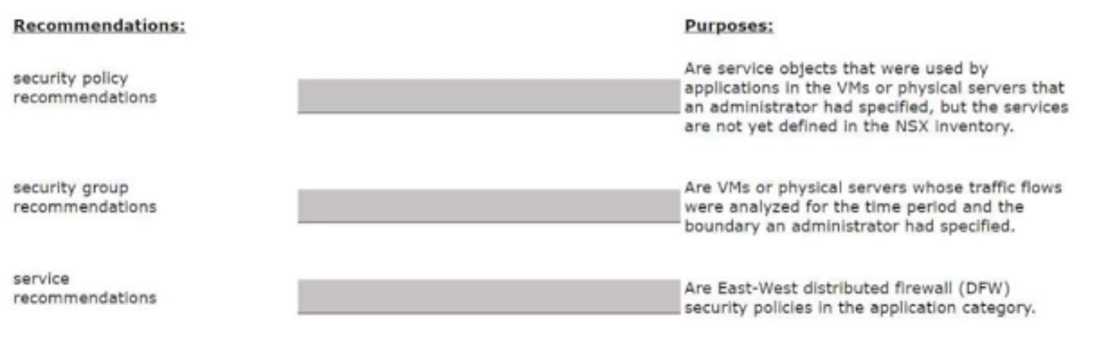
I think C matches well with isolating suspicious VMs since it talks about containment. Also, A looks like it fits for identifying threats because it's about visibility and detection, so B should be for automated actions.
Option B feels like it’s about automating responses, so definitely not alerts.
Refer to the exhibit.
Which two items must be configured to enable OSPF for the Tler-0 Gateway in the Image? Mark your
answers by clicking twice on the image.
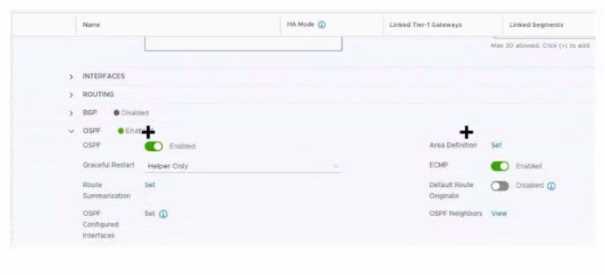
Besides the interface and area ID, don’t overlook that the OSPF process itself must be enabled with the correct process ID on the gateway. Without starting the OSPF process, no matter what interfaces you configure, OSPF won’t come up. Also, the interface must be explicitly included in the OSPF configuration under that process. So, configuring the OSPF process ID and the interface under that process are the two essentials here. The area ID is part of that step but not a separate config item on its own.
Besides the area ID and enabling OSPF on the interface, you also need to check if the router ID is set under OSPF. Without a router ID, the process won’t fully start, so that’s critical to configure too.
Refer to the exhibit.
An administrator configured NSX Advanced Load Balancer to load balance the production web server
traffic, but the end users are unable to access the production website by using the VIP address.
Which of the following Tier-1 gateway route advertisement settings needs to be enabled to resolve
the problem? Mark the correct answer by clicking on the image.
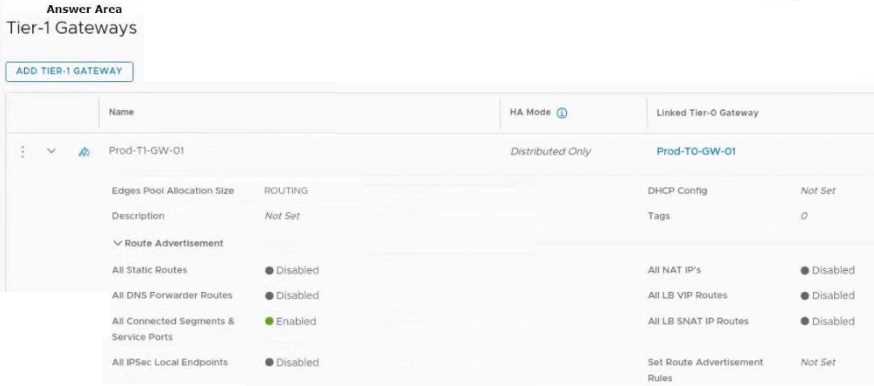
I’m thinking option D could be it, since enabling "VIP" route advertisement would specifically tell the Tier-1 to advertise the VIP’s route. Without that, traffic might not reach the load balancer at all.
If the VIP isn’t advertised, the upstream routers won’t know where to send traffic back. Enabling connected route advertisement (C) makes sure the Tier-0 gets the right routing info to reach the VIP subnet.
Refer to the exhibit.
An administrator configured NSX Advanced Load Balancer to redistribute the traffic between the web
servers. However, requests are sent to only one server
Which of the following pool configuration settings needs to be adjusted to resolve the problem?
Mark the correct answer by clicking on the image.
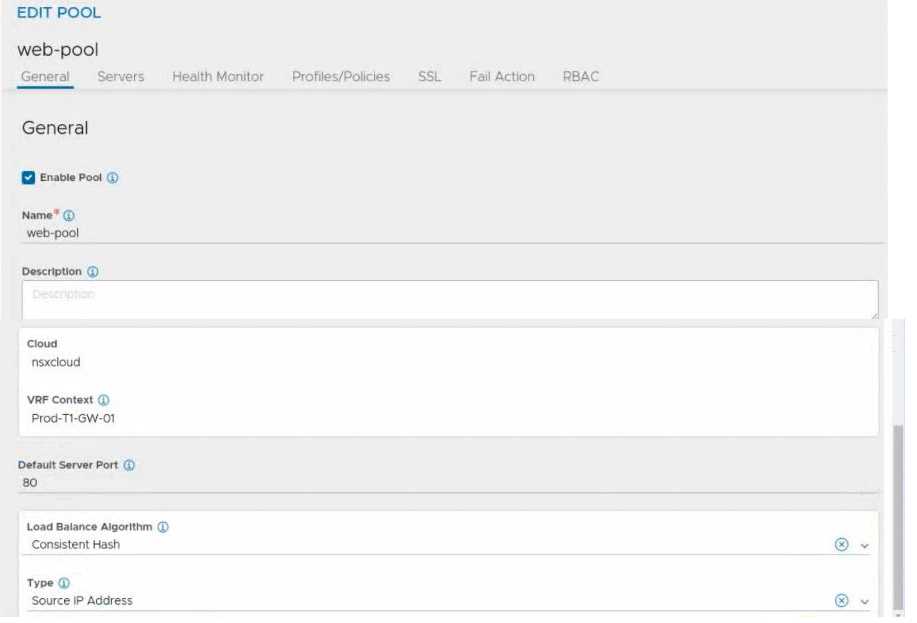
It’s worth noting the load balancing algorithm might default to round robin or least connections, but if persistence is on (like in B), it overrides those. So changing persistence is key to fix this.
I think option B is the culprit since session persistence usually causes the load balancer to stick to one server. Turning it off or adjusting it should spread traffic properly across the pool.
D for sure, VTIs are all about routing over the tunnel, no policies involved.
D imo, because VTIs create a virtual interface to handle routing directly over the VPN, which fits route-based VPNs perfectly. Policy-based VPNs don’t use interfaces like that, just defined policies.