Free Microsoft Power Platform PL-400 Actual Exam Questions - Question 7 Discussion
DRAG DROP You need to identify why employees are not receiving notification that nine customers are checked in and waiting in the repair area. Which components should you test for each step? To answer, drag the appropriate components to the correct steps. Each component may be used once, more than once, or not at all. You may need to drag the split bar between panes or scroll to view content. NOTE: Each correct selection is worth one point. 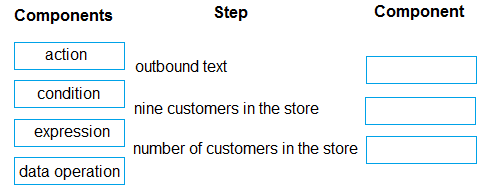
I think it makes sense to verify the data source that tracks customer check-ins first, then check the flow logic that triggers notifications. If the data isn’t capturing the nine customers correctly, notifications won’t send.
Also consider testing the filtering condition that checks if exactly nine customers are present.
I’d check the connector that links the repair area system with the notification service first, then test the condition in the flow that filters for nine customers specifically. If those aren’t set right, notifications won’t trigger.
I’d test the data connection for customer check-ins early on to rule out syncing issues, then move to the notification setup to see if alerts are properly linked to that data update.
I’d start with testing the trigger that detects customer check-ins since if that’s not firing, no notifications would send. Then check the notification action itself to confirm it’s configured properly to alert employees.
Try verifying the Power Automate flow triggers before checking notification rules.
I’d check the notification setup first to make sure alerts are actually enabled for new check-ins. Then, I’d look into the data source that tracks customer check-in status to confirm it’s updating correctly. If the data’s good and notifications are on but still no alerts, maybe there’s a problem in the integration layer or workflow that triggers the notification. So testing each component in that chain, from backend data to notification triggers, is key here.
Is the issue related to the notification system itself or could it be something with the customer check-in data syncing properly? Wondering what steps are involved exactly here.