Free Microsoft Power Platform PL-400 Actual Exam Questions - Question 11 Discussion
DRAG DROP You are creating an input control to format telephone numbers for a canvas app. The control must be reusable in other canvas apps inside your company. Any updates must be able to be applied without editing the control in each canvas app. You need to create the control. Which three actions should you perform in sequence? To answer, move the appropriate actions from the list of actions to the answer area and arrange them in the correct order. 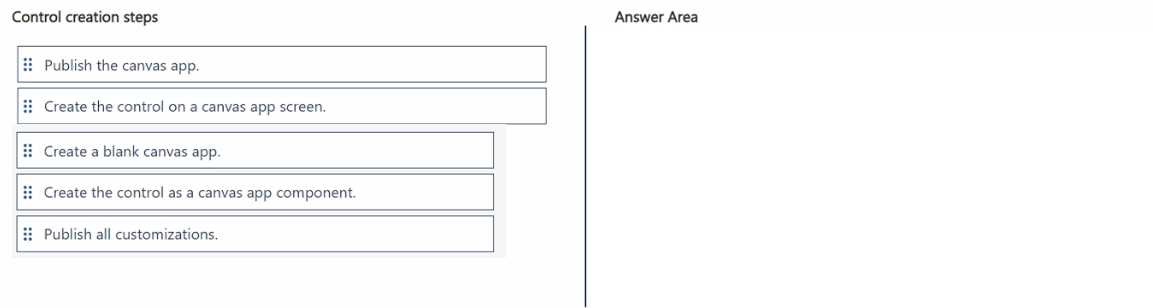
Start by creating a reusable component, then save it to the library.
Create the component, save to library, then use in apps for updates.
First, create a canvas component with the phone input. Then save it as a custom component to your company’s library. Finally, reference that component in your apps so updates apply everywhere automatically.
Start by creating a canvas component with the phone input and formatting logic inside. Next, save it to your company’s component library so it’s reusable. Finally, update the component there to apply changes across all apps automatically.
Is this about building the input control as a component and then saving it to your company's component library? Could it be something like: first, create the input component, then add custom formatting logic inside it, and finally publish it to the company’s component library for reuse? Just wanna make sure what options we have in that list exactly.