Free Microsoft Fundamentals MS-900 Actual Exam Questions - Question 8 Discussion
DRAG DROP You are investigating Microsoft 365 services and capabilities. Match each scenario to itsMicrosoft 365 service. To answer, drag the appropriate Microsoft 365 service from the column on the left to its scenario on the right. Each Microsoft 365 service may be used once, more than once, or not at all. 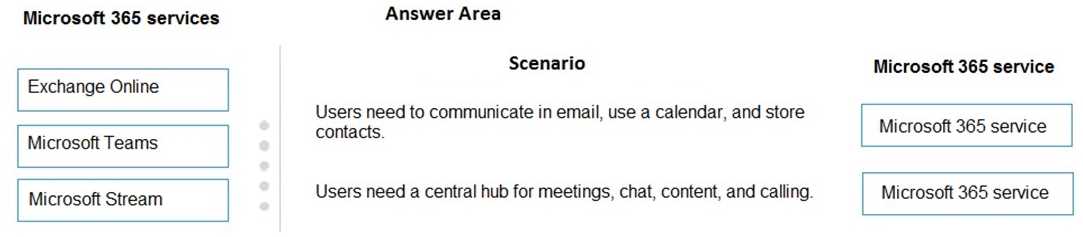
Some scenarios might mention collaboration, but if they don’t specify a team or group setting, OneDrive is safer for personal file storage. Also, if there’s anything about calendars or mailboxes, Exchange Online fits best. For cases focused on teamwork and shared document libraries, SharePoint stands out. I’d drop Teams only if the scenario talks about chat or meetings explicitly. So a quick check: no chat or meeting = probably not Teams; shared files for groups = SharePoint; single-user files = OneDrive; email and calendar = Exchange. That helps clear things up without overthinking it.
If a scenario involves email communication, Exchange Online is the obvious choice. For anything about document collaboration in a shared workspace, SharePoint fits better than OneDrive.
Matching based on ownership helps too—personal files with OneDrive, group docs to SharePoint.
I think one good way to check is by focusing on the core feature each service offers. For example, if a scenario mentions storing files only accessible to one user, that’s likely OneDrive. When it’s about team-wide document sharing and collaboration, SharePoint fits better. So if you spot anything about emails or calendars, Exchange Online should slot in there. This approach clears up overlaps by matching the main use case rather than guessing from general collaboration terms.
This one’s tricky without the image, but for MS-900, usually Teams fits collaboration, SharePoint for content management, and OneDrive for personal file storage. Exchange Online handles email scenarios. Hope this helps nail the matching!