Free Microsoft Fundamentals MS-900 Actual Exam Questions - Question 7 Discussion
DRAG DROP A company plans to implement Microsoft 365 Apps. The company has the following productivity requirements:
• Provide feedback on a presenter's body language.
• Provide recommendations on spelling and grammar
You need to recommend the Microsoft 365 feature for each requirement Which features should you recommend? To answer, drag the appropriate features to the correct requirements. Each feature may be used once, more than once, or not at all. You may need to drag the split bar between panes or scroll to view content. 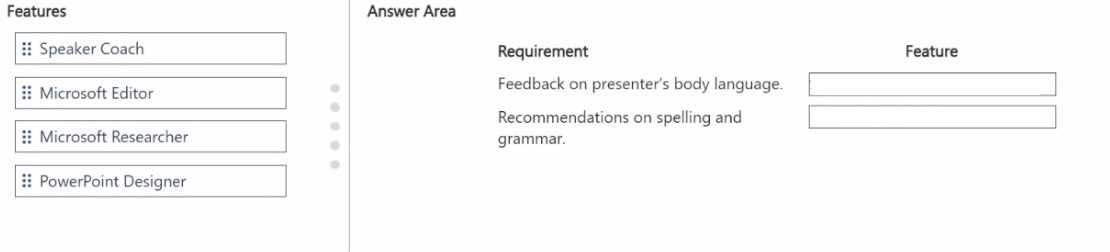
Definitely Presenter Coach for body language, Editor for spelling and grammar.
I'd say Presenter Coach is the go-to for body language feedback since it analyzes your delivery, while Editor nails spelling and grammar checks across apps. Ideas seems less focused on these specific needs.
I’m with the idea that Presenter Coach is the obvious match for body language feedback, since it’s specifically designed to help presenters improve that aspect. For spelling and grammar, Editor makes the most sense because it’s the dedicated tool for checking text errors. The other features don’t really fit these needs as directly. Even if Ideas or Designer offer some suggestions, they’re more about content layout or creativity than focused language feedback. So pairing Presenter Coach with body language and Editor with spelling/grammar seems clean and straightforward.
Presenter Coach is clearly for body language feedback, so that’s a no-brainer. Editor is designed for spelling and grammar checks, making it the best match there. Other features don’t fit these exact needs.
Presenter Coach fits perfectly for body language feedback, while Editor nails spelling and grammar checks. No need to overcomplicate with other features here.
Presenter Coach for body language, Editor for spelling and grammar, no doubt.
Presenter Coach fits the body language feedback since it analyzes delivery style, while Editor is the best fit for spelling and grammar corrections. Both tools directly address the specific needs here without overlap.
I agree with Presenter Coach for the body language part since it gives you real-time feedback during presentations. For spelling and grammar, Editor is the obvious choice because that’s its main function. The other options like PowerPoint Designer or Resume Assistant don’t quite match these needs. So Presenter Coach and Editor seem like the most straightforward fits to me.
For body language feedback, I'd go with Presenter Coach. Spelling and grammar recommendations are definitely covered by Editor. Both fit well here.