Free Microsoft Teams MS-700 Actual Exam Questions
Dumps Box (DumpsBox) offers up-to-date practice exam questions for MS-700 certification exam which are developed and validated by Microsoft subject domain experts certified in Microsoft Teams MS-700 . These practice questions are update regularly as we keep an eye on any recent changes in MS-700 syllabus, and when there is update our team quickly adjusts the questions. This commitment to providing the best quality exam prep material to certification aspirants is what makes DumpsBox.com the best certification exam prep website. On top of that, our strong, yet strictly moderated, community based feedback keeps the content clean and current. Each question has helpful community discussion that provides it extra perspective and introduces helpful resources for better exam preparation. This also saves students from other outdated practice questions or illicit exam dumps that can have adverse affects on career. Browse through our Microsoft Teams MS-700 exam questions and pass your exam on first try.
B, since messaging policies govern chat and notification behavior directly.
B, since messaging policies control chat notifications directly.
You discover that apps from a third-party publisher have security issues.
You need to block all apps from the publisher.
What should you use in the Microsoft Teams admin center?
Not B, because changing the Mode for IP video just controls video quality, not network prioritization or tagging for QoS. D is the only one that actually marks traffic for priority handling.
It’s D for sure. Adding QoS markers is the only option that actually tags the Teams media traffic so routers and switches can prioritize it. The other options tweak meeting settings but don’t affect network traffic priority. Just remember this works only if the network devices are set up to recognize those QoS tags, but turning it on in Teams admin center is the first essential step. Options A and B focus on video quality but don’t influence traffic priority at the network level, while C just opens up port usage without prioritization.
The company has a group named Sales.
You need to configure Microsoft Teams for the Sales group. The solution must meet the following
requirements:
Ensure that only the Activity, Shifts, Chat, and Calling apps are always visible in the app bar of the
Microsoft Teams client.
Prevent only the users in the company’s sales department from adding other apps to Microsoft
Teams.
Which two actions should you perform? Each correct answer presents part of the solution.
NOTE: Each correct selection is worth one point.
I’m going with A here. Configuration profiles are designed specifically to set up devices with the right settings, which seems to match the “device requirements” part. Calling or meeting policies control user capabilities, but they don’t handle the actual device setup in the Teams admin center. So A makes the most sense for configuring the environment for Teams phones directly.
B tbh, modifying Teams settings feels broader and could cover device-specific tweaks without jumping straight to profiles or policies. It’s a simpler step before diving into more complex configs.
All users can create private channels.
You need to prevent specific users from creating private channels.
What should you create from the Microsoft Teams admin center?
B, sensitivity labels directly handle confidentiality markings in Teams.
A imo, classification labels in Azure AD can be used for tagging teams with specific labels that show up in the Teams client. Sensitivity labels (B) usually handle data protection but might not always display the classification directly in Teams UI. Supervisor policies (C) are more about monitoring communication, and teams policies (D) are for controlling features and settings, not confidentiality tags. So using A to mark Team1 as Highly Confidential could be the straightforward way to identify it in the Teams client itself.
the series contains a unique solution that might meet the stated goals. Some question sets might
have more than one correct solution, while others might not have a correct solution.
After you answer a question in this section, you will NOT be able to return to it. As a result, these
questions will not appear in the review screen.
Your company has a Microsoft 365 subscription that uses an Azure Active Directory (Azure AD) tenant
named contoso.com.
You need to prevent guest users in the tenant from using cameras during Microsoft Teams meetings.
Solution: From the Azure Active Directory admin center, you modify the External collaboration
settings.
Does this meet the goal?
If it’s definitely Azure AD, option C usually works best since it directly targets the department attribute. Other options often add manual members or use different filters that include unwanted users.
If it's Azure AD, a dynamic group with a rule like department -eq "Sales" fits perfectly.
The pilot project will use a Microsoft Calling Plan.
You need to ensure that the users can establish calls to the PSTN.
Which cmdlets should you run?
I think the best choice here is B. A data loss prevention policy would directly control what can be shared during Teams chats, which fits the file sharing requirement. Retention policies (A, D, E) mostly deal with keeping or deleting content, not controlling sharing. Customer Lockbox (C) is more about access control for Microsoft engineers, so it doesn’t really help with file sharing rules in Teams.
Does the question specify what kind of files or security level the marketing team needs?
the series contains a unique solution that might meet the stated goals. Some question sets might
have more than one correct solution, while others might not have a correct solution.
After you answer a question in this section, you will NOT be able to return to it. As a result, these
questions will not appear in the review screen.
Your company has a Microsoft 365 subscription that uses an Azure Active Directory (Azure AD) tenant
named contoso.com.
You need to prevent guest users in the tenant from using cameras during Microsoft Teams meetings.
Solution: From Microsoft Teams admin center, you modify the External collaboration settings.
Does this meet the goal?
A imo, the problem seems tied to the source port range being too narrow for audio traffic. If the port range is limited, it can cause conflicts or dropped packets during calls, leading to poor quality. It’s less about the absolute port number (like above 50,000) and more about whether the range allows enough simultaneous streams. The trace hints at limited variability in ports used, which would support this. So, I'd rule out C and D since the issue looks more about port assignment than outright traffic limiting.
Makes sense that UDP traffic is getting throttled here; real-time audio needs that continuous stream. So, I’d go with C.
A user named User5 cannot establish call from Microsoft Teams.
You review the Microsoft Teams client for User5 and discover that the dial pad is unavailable.
Other users at the company can establish calls successfully.
You need to ensure that User5 can establish calls.
Which two actions should you perform? Each correct answer represents part of the solution.
NOTE: Each correct selection is worth one point.
Option A could be a solid choice since app permissions directly control what guests can access, which might be key if the question implies configuring guest capabilities beyond just enabling access.
Maybe A makes sense too since app permissions can affect what guests can do. If you don’t set the right app policies, guests might be restricted even if guest access is on.
The company's Microsoft Teams upgrade policy is set to Islands coexistence mode. The company
plans to maintain the coexistence mode for several months.
Several users report that they receive email messages about missed chat conversations.
You need to recommend a solution to ensure that all the users receive chat messages.
Which two actions should you recommend? Each correct answer presents part of the solution.
NOTE: Each correct selection is worth one point.
I’m going with D here because Teams Phone Admin is focused on phone-related settings and shouldn’t have permissions for teams or channels. Also, creating a Microsoft 365 group with this role fits the task better since option B’s role still allows some team management, which they want to avoid. So, D feels like the cleanest way to lock down just phone configurations without overlapping into team/channel control.
I’d rule out B because it’s mainly about Teams Communications Admin, which still lets you manage teams and channels. D looks better since the Teams Phone admin role specifically handles phone system features without broader team/channel rights. That separation is key here to avoid giving too much control over teams themselves. So D fits the requirement to manage phone settings only while keeping team/channel management off-limits.
An administrator reports that teams were deleted accidentally today.
You need to restore the teams as quickly as possible.
Which cmdlets should you run?
Agree that restoring needs PowerShell since it’s not in the Teams Admin Center.
Archiving a team fits best with the Teams Admin Center, since it manages teams directly. Restoring a deleted team needs PowerShell for more control, and permanent deletion is handled in the Microsoft 365 Admin Center.
the series contains a unique solution that might meet the stated goals. Some question sets might
have more than one correct solution, while others might not have a correct solution.
After you answer a question in this section, you will NOT be able to return to it. As a result, these
questions will not appear in the review screen.
You have a Microsoft 365 subscription that contains several Microsoft SharePoint Online sites.
You need to ensure that the content stored in a SharePoint modern team site named Sales is
available from Microsoft Teams. The solution must ensure that when a new channel is added to a
team, a folder for the channel is created in the Sales site.
Solution: From the Microsoft Teams client, you create a new team and select Create from an existing
Office 365 group or team.
Does this meet the goal?
I think blocking the Games for Work app is definitely through the app permission policy since it controls access. Showing Avatars and locking pins seem like app setup policies because they manage the app layout.
Agreed, app setup policies handle pins and visibility, so Avatars and pin control fit there.
the series contains a unique solution that might meet the stated goals. Some question sets might
have more than one correct solution, while others might not have a correct solution.
After you answer a question in this section, you will NOT be able to return to it. As a result, these
questions will not appear in the review screen.
Your company has a Microsoft 365 subscription that uses an Azure Active Directory (Azure AD) tenant
named contoso.com.
You need to prevent guest users in the tenant from using cameras during Microsoft Teams meetings.
Solution: From the Microsoft 365 admin center, you modify the Sharing settings.
Does this meet the goal?
C/B? If the problem is about permissions or access during meetings, creating a new meeting policy (C) would help tailor settings specifically for that group without affecting others. B seems less precise since just modifying existing meeting settings might not solve issues unique to that department. Also, D is easy but won’t fix policy-related problems. A feels too drastic unless nothing else works. So between C and B, I’d pick C for a more focused fix targeted at the project management team’s needs.
A/D? Uninstalling and reinstalling (A) feels like a last resort, but updating (D) is a quick, easy first step. If the issue’s technical, newer client versions might fix bugs without policy changes.
SIMULATION Task 9 You need to deploy the Microsoft Viva Connections app to Teams and install the app as the first item on the app bar of the Teams client for all users.
For preventing communication between Department! and Department, I’d say Sensitivity Labels make more sense than Communication Compliance since labels can control who accesses what, effectively isolating teams. Communication Compliance is more about monitoring and alerts, not blocking chats outright. For the offensive language alert, Communication Compliance fits perfectly because it’s designed to flag policy violations like bad language during chats. So, Sensitivity Labels for the blocking part and Communication Compliance for the alerting part seems like a solid fit based on their core funct
For blocking communication between Department! and Department, I’m thinking Teams policies or app permission policies outside Purview might work better since Purview focuses more on data governance, not chat restrictions. Sensitivity Labels mainly control access to content but don’t prevent chatting outright. On the offensive language part, Communication Compliance fits perfectly since it’s designed to monitor and alert on policy violations in messages. So for the two parts, definitely Communication Compliance for language monitoring, and maybe something outside Purview for preventing cross-te
HOTSPOT You have a Microsoft 365 subscription that contains an Azure Virtual Desktop deployment. The Azure Virtual Desktop deployment contains a session host named Host1. You install the Remote Desktop WebRTC Redirector Service and the Teams for virtual desktop infrastructure (VDI) client on Host1. You need to ensure that your webcam delivers the highest quality video for Teams calls. How should you complete the registry key? To answer, select the appropriate options in the answer area. NOTE: Each correct selection is worth one point. 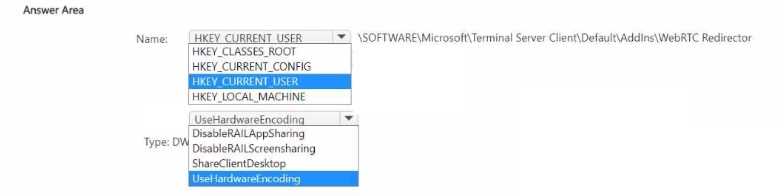
Another angle is to focus on who owns the team. Since User3 created Team1 and is a member, the group expiration policy will apply unless excluded. The setting specifically excludes groups with guests, but if the team doesn’t have any guests, it’s subject to expiration. User2 being a guest means their group isn’t affected because of that exclusion. So, it’s not just about user roles but whether the group itself contains guests that decides if expiration hits. This helps confirm which statements are true based on group membership and the policy exclusions.
I noticed the expiration policy is set to exclude guests specifically, so User2 as a guest won't be impacted by the expiration. Also, since User3 created the team, and the policy applies to all groups except those with owners in the excluded list, I’m guessing User3 isn’t excluded, so their groups will expire unless renewed. User1 is the admin setting this up and isn’t part of the team, so their status doesn’t affect expiration here. So any statement about guests expiring should be a no, while for internal members like User3, it’s yes.
SIMULATION Task 2 You need to ensure that only users from litwareinc.com can be added to Teams as guest users.
User3’s domain isn’t on the allowed list, so No for their access.
User3 can’t join because their domain isn’t on the allowed list in Azure AD.