Free Microsoft Dynamics MB-330 Actual Exam Questions - Question 13 Discussion
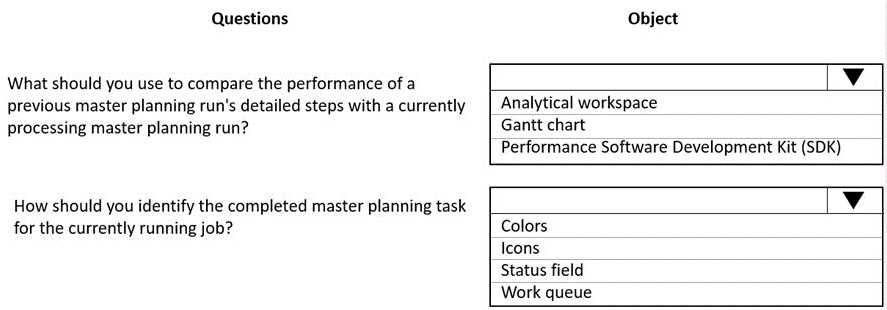
HOTSPOT A company uses Dynamics 365 Supply Chain Management for master planning in manufacturing processes. Master planning runs have increased in processing time over the past month. You need to identify the impact of configuration changes on performance from a single location. Which objects should you use? To answer, select the appropriate options in the answer area.
Besides what’s been said, I’d say focusing on system administration logs and batch job history still makes the most sense because they give you a clear timeline of what changed and when the master planning runtimes spiked. Performance analyzer is great for deep dives, but if you want to start with a single point of truth about config changes affecting performance, those two are your best bet. Database tables might hold data but won’t directly link changes to performance hits without extra work. Keeping it simple helps pinpoint the root cause faster.
I’d add that performance analyzer is key to pinpoint which config changes caused slowdowns, since it breaks down run-time stats. So system admin logs plus batch job history and performance analyzer covers all angles.
I think system administration logs are a must since they show config changes directly. Batch job history also makes sense because it tracks the actual master planning runs and their durations, which helps spot performance hits. Instead of performance analyzer, I’d consider database trace or SQL profiler objects if available, since they can show detailed query execution times and might reveal slow queries caused by recent changes. That way you get both config change info and concrete performance data from the DB side in one place.
Batch job history seems more relevant than database tables since we want to see run times and scheduling info, not raw data changes. So I’d pick system admin logs, performance analyzer, and batch job history.
I’d skip database tables here since they don’t show config changes directly. System admin logs track changes, performance analyzer checks impact, and batch job history reveals run times, so those three seem to cover it best.
System administration logs show config changes, batch job history tracks run times.
Performance analyzer and system administration logs make sense for tracking changes and timing. Batch job history also fits since master planning runs are batch jobs, so it can show when and how long they ran.
Performance analyzer and system administration logs seem key, third could be batch job history.
this question is kinda unclear, what options did everyone pick?