Free Microsoft GH-200 Actual Exam Questions
Dumps Box (DumpsBox) offers up-to-date practice exam questions for GH-200 certification exam which are developed and validated by Microsoft subject domain experts certified in Microsoft GH-200 . These practice questions are update regularly as we keep an eye on any recent changes in GH-200 syllabus, and when there is update our team quickly adjusts the questions. This commitment to providing the best quality exam prep material to certification aspirants is what makes DumpsBox.com the best certification exam prep website. On top of that, our strong, yet strictly moderated, community based feedback keeps the content clean and current. Each question has helpful community discussion that provides it extra perspective and introduces helpful resources for better exam preparation. This also saves students from other outdated practice questions or illicit exam dumps that can have adverse affects on career. Browse through our Microsoft GH-200 exam questions and pass your exam on first try.
D imo, since JavaScript actions are for custom logic but don’t natively bundle multiple run steps like composite actions do. This sets A apart as the clear choice for combining steps.
Probably A. Composite actions are designed to combine multiple steps into one reusable action without extra setup, unlike Docker or JavaScript which are more specialized.
Container Registry? (Choose three.)
B, C, D for sure, since pulling (E) isn’t about publishing but using the image.
C imo, because you obviously need to build the image before doing anything else. Then B is critical to authenticate, otherwise you can’t push the image anywhere. Pushing it (D) is obviously the final step to actually publish it. A and E are more about setup or later usage, not actually publishing. So B, C, and D cover all the necessary steps to get your image up on the registry.
It’s A for sure. Workflows have to be in .github/workflows/ because that’s where GitHub looks for them. B is for custom actions, which are different from workflows. C is wrong since you can’t just attach workflows in the UI – they need to be code files in a specific place. E isn’t an actual recognized folder, and D is definitely out since workflows won’t trigger if they’re scattered randomly. So, only A makes sense here.
B imo, since .github/actions/ is for custom actions, not workflows.
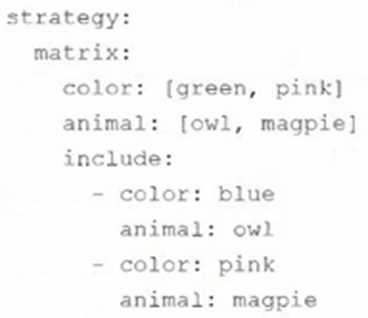
Could it be 4 jobs if one row’s a linear combo of others, not fully independent?
Looks like counting the number of linearly independent rows is key here. Since some rows seem to be multiples or combinations of others, the total jobs correspond to the matrix rank, which matches option C with 5 jobs. This fits better than just counting non-zero entries or rows, so C makes the most sense.
It’s D for me. GITHUB_BRANCH sounds like it would specifically indicate the branch name that triggered the workflow. Since the question mentions branches or tags, the variable should reflect that context, and GITHUB_BRANCH could be the one focusing solely on branches. The others either don’t fit as well or seem less specific. I’m skipping A and C too because those don’t match known default variables. So I’d go with D since it directly names the branch, which is usually important in workflows triggered by branches or tags.
B. GITHUB_REF is the one that holds the full ref path, like refs/heads/branch-name or refs/tags/tag-name, which fits the question about both branches and tags triggering a workflow. The others either don’t exist as standard vars or only refer to branches or tags separately. So B makes sense as the default environment variable for this.
underlying code?
Maybe C? Patch release tags usually indicate stable, tested versions and rarely get moved, so they offer a pretty safe reference without jumping straight to a commit hash.
A/C? Commit hashes (A) definitely point to a fixed state and can’t be altered, which seems safest. Patch release tags (C) also usually mark stable, minor updates without breaking changes, so they’re less likely to be modified once published. But tags can technically be moved, while commit hashes cannot. So overall, A still feels more solid if you want zero risk of code changes.
method for configuring a workflow job to provide access to an empty PostgreSQL database?
B vs A, B keeps things modular and doesn’t rely on Docker specifics.
Probably B since running a dedicated action in parallel keeps things modular without extra infra.
the file from the repo. In which scenarios would temporarily disabling a workflow be most useful?
(Choose two.)
Option A is solid because if the external service is down, there's no point in triggering the workflow and causing unnecessary failures. Option B also fits since a faulty workflow spamming requests can mess things up quickly, so pausing it avoids further damage. Options C, D, and E don’t really match because disabling a workflow isn’t about runner types, changing trigger types, or enabling logging; those require config changes rather than just disabling. So A and B make the most sense for temporary disabling purposes.
I think A and B fit best since disabling helps avoid running faulty workflows that cause errors or waste.
Good point, but A limits code changes, not necessarily workflow steps, so C feels closer here.
C imo, since required reviewers for environments explicitly trigger approval before deployment steps, which fits "workflow approval" better than general permissions.
D, C. The GITHUB_TOKEN is designed to automate tasks within the repo context, so creating issues (D) fits perfectly since it allows interaction with the repo’s API. Publishing to GitHub Packages (C) also makes sense because packages are tied to repositories. Options like adding members (F) or creating secrets (B) require higher privileges or manual setup, so they’re unlikely. Reading from the file system (E) isn’t related to token permissions but more about runner environment access. Leveraging self-hosted runners (A) is about infrastructure, not token usage.
C/D? The GITHUB_TOKEN is scoped to the repository, so it makes sense it can be used for publishing packages (C) and creating issues (D). Adding members (F) is definitely org-level, so that’s out. Creating secrets (B) usually requires manual setup, so it’s unlikely the token can do that. Reading from the file system (E) isn’t a token permission thing—it’s about runner access, so probably not right either. A is more about runner config than token use. So C and D feel like the solid picks here.
provided by your organization?
D imo, Actions is definitely where you start a new workflow from a template.
I think it’s definitely under Actions since that’s where you manage workflows for a repo. Between loading and new, selecting “New workflow” (D) makes sense because even if it’s a starter, you’re starting a new workflow from a template your org provides. Loading sounds more like importing a finished one, not picking a starter. So I’d go with D.
Maybe C, since GitHub Actions debug messages require the double colons exactly as shown. The others either miss colons or have extra characters that wouldn’t trigger debug output.
C The double colon syntax is the standard way to format debug messages in GitHub Actions, so this fits best. The others don’t use the right punctuation to trigger debug output.
considered a best practice?
I’m thinking B might actually be the better option here. Keeping custom actions in a separate branch within the main app repo still separates concerns but avoids the overhead of managing multiple repositories. It helps with version control and coordination since it’s linked directly to the app’s lifecycle, without fragmenting teams too much. Managing separate repos (A) could get complicated if actions rely on shared code or need to sync frequently. So B offers a middle ground between isolation and integration.
D imo, mixing custom actions directly with app code can cause messy dependencies and harder tracking. Keeping them separate helps maintain clearer boundaries and easier updates.
Pretty sure the runners do support Linux, Windows, and macOS, so C seems solid. Also, GitHub usually offers a range of Linux distros on runners, making D a good call too. C and D.
Makes sense to rule out B since caching isn't automatic. Also, E sounds off because GitHub offers free runners for public repos. C and D look solid as they cover OS support and distros well. C and D.
existing tools on a Linux VM, which has been configured as a self-hosted runner. They would like to
use the script as-is in an automated workflow. Which of the following should they do to invoke their
script within a workflow step?
It’s D because using shell: pwsh directly taps into the existing PowerShell Core on the Linux VM. No need to convert or add extra actions if the environment’s set up right.
If the Linux VM already has PowerShell installed, using shell: pwsh (D) seems like the cleanest approach since it runs the script natively. The actions/run-powershell (E) action might add unnecessary overhead or complexity. Also, option B looks like it’s geared more towards Windows runners, so probably not the best fit here. Does anyone know if the VM's PowerShell version fully supports all the script features? That could be the real deciding factor.