Free Microsoft Data Engineering DP-700 Actual Exam Questions - Question 15 Discussion
HOTSPOT You have a Fabric workspace that contains a warehouse named Warehouse!. Warehousel contains a table named DimCustomers. DimCustomers contains the following columns: • CustomerName • CustomerlD • BirthDate • Email You need to configure security to meet the following requirements: • BirthDate in DimCustomer must be masked and display 1900-01-01. • Email in DimCustomer must be masked and display only the first leading character and the last five characters. How should you complete the statement? To answer, select the appropriate options in the answer area. NOTE: Each correct selection is worth one point. 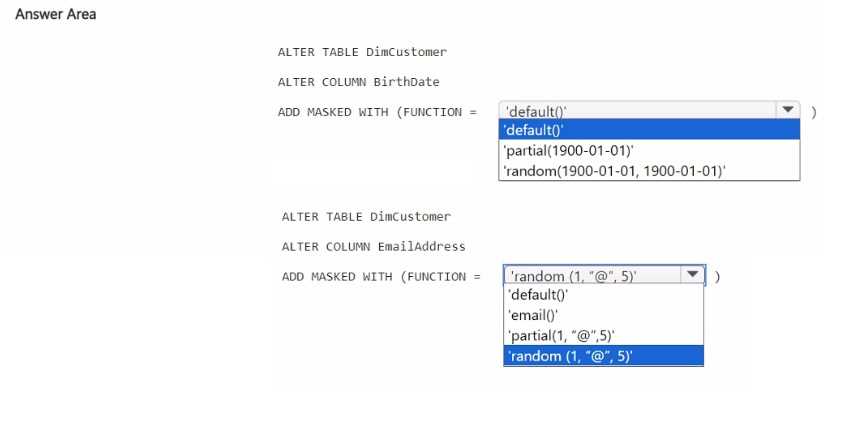
For BirthDate, Default mask is the go-to since it replaces the whole date with 1900-01-01. For Email, Partial mask works because it can reveal specific characters upfront and at the end, matching the requirement closely.
For BirthDate, the Default mask fits perfectly since it can replace the entire value with a fixed date like 1900-01-01, matching the requirement exactly. For Email, Partial mask seems right because it can reveal parts of the string, but I'm not sure if it allows showing exactly one leading and five trailing characters or if it’s more limited to something like first and last characters only. Still, other masking options don’t give that kind of partial reveal, so Partial is the best fit here despite the exact parameter question.
For BirthDate, Default mask is the easiest way to show a fixed date like 1900-01-01. Email needs Partial mask so it can reveal just the first and last characters as required, not fully masked or unmasked.
For BirthDate, Default masking makes sense since it replaces all data with a constant value. For Email, Partial masking is best because you can show specific leading and trailing characters while hiding the rest.
I agree with using Default mask for BirthDate since it’s straightforward to replace it with a fixed date like 1900-01-01, no need for complicated patterns there. For Email, the Partial mask seems like a better fit than the Email mask here because Email mask usually hides most of the string except maybe the first letter and domain, but this question wants first character plus last five characters specifically, which Partial masking can handle by setting the prefix and suffix characters visible. So I’d pick Default for BirthDate and Partial for Email.
BirthDate fits best with Default mask, Email clearly needs Email mask.
For BirthDate, Default masking is the easiest way to show a static date like 1900-01-01. Email requires a specific pattern so Email masking fits better than generic options like Text or Partial.
I’d go with Default masking for BirthDate since it’s just a fixed date, and for Email, the email masking option makes the most sense because it’s designed to show partial characters like the first and last few. The other options like Random or Custom don’t really fit the scenario since we need consistent masking, not random or fully custom logic. So, Default for BirthDate and Email mask for Email should cover the requirements neatly.
For BirthDate, Default masking works; Email needs Email masking option.
This one feels pretty straightforward. For BirthDate, the default masking with a fixed value like 1900-01-01 should work (option: Default). For Email, I think the email masking with partial show/hide fits best. So options would be Default for BirthDate and Email mask for Email.