Free Microsoft Azure DP-300 Actual Exam Questions - Question 10 Discussion
DRAG DROP You have an Azure SQL managed instance named SQLMI1 that has Resource Governor enabled and is used by two apps named App1 and App2. You need to configure SQLMI1 to limit the CPU and memory resources that can be allocated to App1. Which four actions should you perform in sequence? To answer, move the appropriate actions from the list of actions to the answer area and arrange them in the correct order. 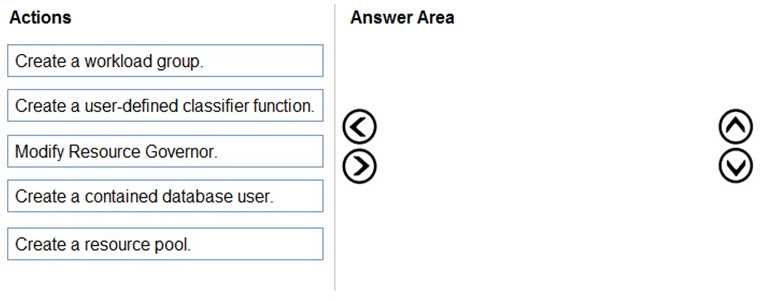
Start with creating the resource pool to set limits, then workload group, classifier function, and enable Resource Governor.
I think the key is recognizing that you first define the resource pool with the CPU and memory caps. Next, you create a workload group tied to that pool to manage session allocation. Then, the classifier function comes in, which checks incoming sessions (like from App1) and routes them to the right workload group based on conditions like app name. Finally, enabling Resource Governor applies all these settings. The step order matters because you can't classify sessions without having groups and pools set up first.
First you'd create a resource pool with limits, then create a workload group linked to that pool. After that, set up a classifier function to route App1’s sessions into that group, and finally enable the Resource Governor for it all to work.
Explanation is missing how to link app to workload groups properly.