Free Microsoft Azure AZ-900 Actual Exam Questions
Dumps Box (DumpsBox) offers up-to-date practice exam questions for AZ-900 certification exam which are developed and validated by Microsoft subject domain experts certified in Microsoft Azure AZ-900 . These practice questions are update regularly as we keep an eye on any recent changes in AZ-900 syllabus, and when there is update our team quickly adjusts the questions. This commitment to providing the best quality exam prep material to certification aspirants is what makes DumpsBox.com the best certification exam prep website. On top of that, our strong, yet strictly moderated, community based feedback keeps the content clean and current. Each question has helpful community discussion that provides it extra perspective and introduces helpful resources for better exam preparation. This also saves students from other outdated practice questions or illicit exam dumps that can have adverse affects on career. Browse through our Microsoft Azure AZ-900 exam questions and pass your exam on first try.
DRAG DROP Match the term to the correct definition. Instructions: To answer, drag the appropriate term from the column on the left to its description on the right. Each term may be used once, more than once, or not at all. NOTE: Each correct match is worth one point. 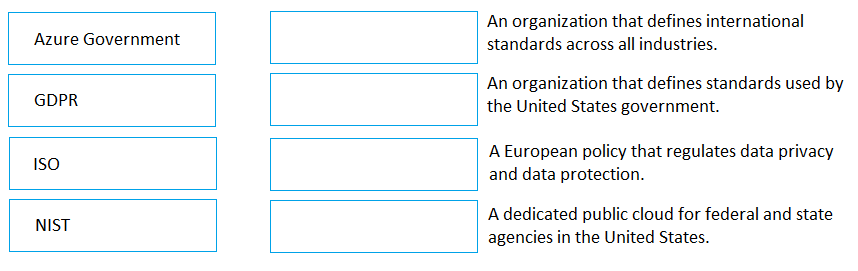
B is definitely auto-scaling since it involves dynamic resource changes automatically.
B looks like auto-scaling since it mentions automatic resource changes.
DRAG DROP Match the term to the appropriate description. To answer, drag the appropriate term from the column on the left to its description on the right. Each term may be used once, more than once, or not at all. NOTE: Each correct match is worth one point. 
For this one, I think Availability Zones match best with descriptions mentioning physically separate locations within a region because they’re literally different datacenters. Availability Sets, on the other hand, fit where the explanation is about grouping VMs to avoid downtime during maintenance by spreading across fault and update domains. Regions should be the broadest term tied to geographic locations since they cover multiple datacenters or zones. So, matching terms to physical isolation for Zones, VM grouping for Sets, and broad geographic areas for Regions feels right.
Another way to look at it: Availability Sets are more about spreading VMs across different fault and update domains within the same datacenter to reduce downtime during maintenance or failures. That’s different from Availability Zones, which are literally separate datacenters inside a region. Matching those terms based on whether they refer to physical separation or logical grouping seems key here. Regions cover the largest area, so that one’s easy to place too.
HOTSPOT For each of the following statements, select Yes if the statement is true. Otherwise, select No. NOTE: Each correct selection is worth one point. 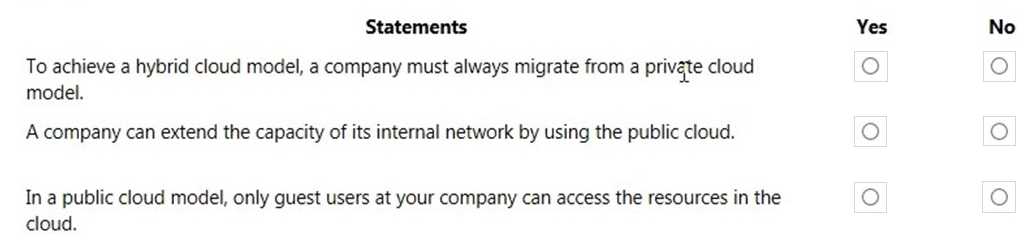
I’d go with yes on A and C too, but thinking about it another way—Azure Cognitive Services is designed to bring AI features easily to apps, so that’s a clear yes. Azure Monitor is all about tracking and diagnostics, so it fits perfectly there. Databricks (B) is more about big data processing and analytics, not directly AI services. As for D, Azure Advisor is about recommendations for cost and performance optimizations, not monitoring or AI, so no there. This perspective lines up with the main functions rather than just the names.
Also thinking yes for A and C because Azure Cognitive Services is all about AI capabilities, and Azure Monitor is clearly a monitoring tool. B doesn’t feel right since Databricks focuses more on data engineering, not really AI or monitoring by itself. D seems unrelated too; it’s not a monitoring or AI service, more like a general management tool. So best to keep it simple with just A and C as true here.
Each correct selection is worth one point.
It’s A and D. Rapid provisioning saves loads of time, and moving costs to OPEX means less money tied up upfront. B is clearly a con, and C isn’t accurate since cloud configs can be quite different from on-prem.
A/D? I get why A is a go-to since spinning up resources fast is a huge time-saver. D also makes sense because paying as you go usually helps with budgeting. B feels like a drawback, not a benefit, and C isn’t really true since cloud configs can be quite different from on-premises setups. So yeah, A and D fit best here for clear benefits.
HOTSPOT For each of the following statements, select Yes if the statement is true. Otherwise, select No. NOTE: Each correct selection is worth one point. 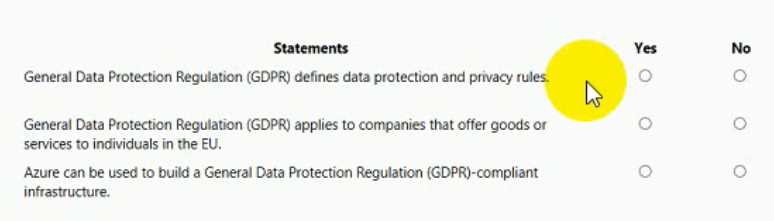
Yeah, B and D fit since billing and compliance don’t cross tenants.
I agree that B and D seem solid since billing and compliance are tied to subscriptions. For A, it says something about management groups across tenants, which doesn’t sound right because management groups are within a single tenant. C mentions subscriptions spanning multiple tenants, but I thought subscriptions belong to one tenant only. So, I’d say no on A and C based on those points. It feels like the question tests knowing how Azure structures tenants and subscriptions, not mixing them across boundaries.
Option C stands out because Azure Functions is designed specifically for serverless compute, where you just write code and Azure handles scaling and infrastructure completely. While Azure Container Instances (B) do remove some management overhead, they’re more of a container orchestration service than true serverless. The question focuses on serverless computing, which means running code without worrying about servers at all—Azure Functions nails that perfectly. The others either involve VM management or storage, so they don’t fit the bill.
C/B? Azure Functions is the classic serverless option, but Azure Container Instances also hide server management. Since Functions is more about code-triggered events, it fits the typical "serverless computing" definition better here.
DRAG DROP Match the Azure service to the correct description. Instructions: To answer, drag the appropriate Azure service from the column on the left to its description on the right. Each service may be used once, more than once, or not at all NOTE: Each correct match is worth one point. 
I think the event routing description fits best with Event Grid, since it’s designed specifically to route events between sources and handlers at scale. Logic Apps do handle workflows and automation, but they’re more about process orchestration rather than event distribution itself. Azure Functions are great for running code on triggers, but they don’t manage event routing like Event Grid does. So for the service that primarily routes events, Event Grid seems like the right match here.
I’d say for the service that focuses on running code in response to events, Azure Functions fits best. It’s more about lightweight compute triggered by events, unlike Logic Apps which handle bigger orchestration and workflows. Event Grid is really just about routing those events around, not processing them directly. So if the description mentions event-driven code execution, that’s Functions. For storage of unstructured data, Blob Storage is your go-to. It’s pretty straightforward, just store your files and blobs without worrying about workflows or event handling.
HOTSPOT For each of the following statements, select Yes if the statement is true. Otherwise, select No. NOTE: Each correct selection is worth one point. 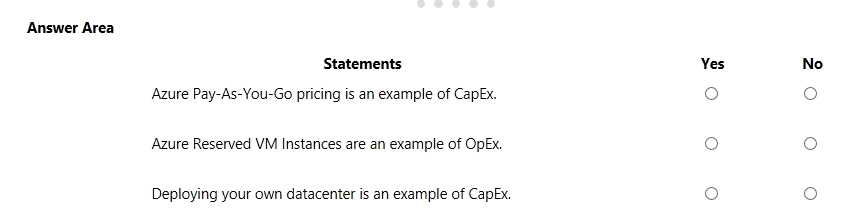
C seems off because not all Azure services strictly require multi-factor authentication by default. That’s usually optional or configurable, so I’d go with No for that one.
B is definitely No since Azure AD supports more than just SAML.
DRAG DROP Match the Azure Services service to the correct description. Instructions: To answer, drag the appropriate service from the column on the left to its description on the right. Each service may be used once, more than once, or not at all. NOTE: Each correct selection is worth one point. 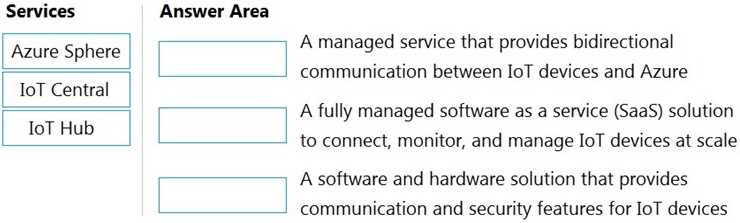
I’d focus on eliminating services that clearly don’t fit a description at all. For example, skip Azure Blob Storage if the description points to structured query capabilities—that’s definitely SQL Database territory.
If it’s about compute, Azure Functions fits better than VMs for event-driven tasks.
HOTSPOT For each of the following statements, select Yes if the statement is true. Otherwise, select No. NOTE: Each correct selection is worth one point. 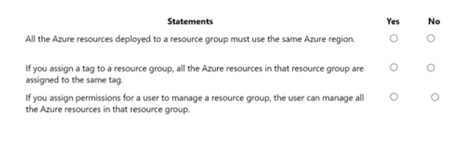
Also thinking D is No because billing access usually requires specific roles like Billing Admin, not all admins get it.
D feels like No since not all admins get billing access by default.
HOTSPOT For each of the following statements, select Yes if the statement is true. Otherwise, select No. NOTE: Each correct selection is worth one point. 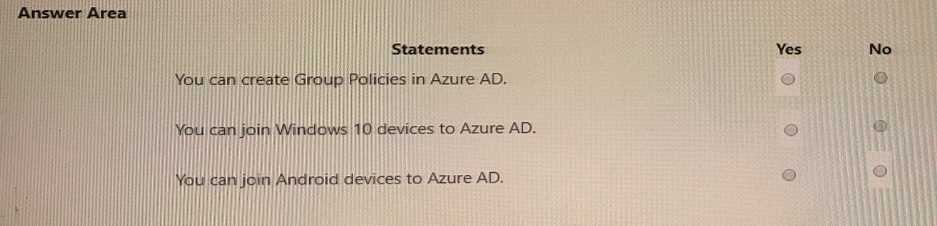
I agree it’s safest to just stick with what’s shown in the image since the question doesn’t clarify. Also, some statements mention features or names that have changed recently, so going by the image helps avoid confusion. Like for the one about Azure Sentinel being part of Azure Security Center — from what I see there, that’s a No because it’s listed separately. So double-check if the statement matches exactly what the image says rather than what we know from recent updates.
I went with Yes on the ones that match the image exactly, ignoring any recent rebranding. For example, the statement about Azure Defender fits because it’s shown as part of the same security suite there. The No selections are easier to spot because they contradict the image’s layout or naming directly. Trying to mix in newer updates just makes it more confusing since the question seems locked to that specific snapshot. So sticking strictly to what’s in the picture helped me avoid overthinking and was a clearer way to judge each statement independently.
HOTSPOT For each of the following statements, select Yes if the statement is true, Otherwise, select No. NOTE: Each correct match is worth one point. 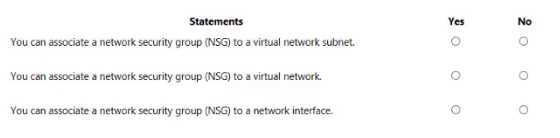
A conflicts with residency rules, so No for A.
A doesn’t fit because the scenario clearly says data must stay in the region, so storing it elsewhere isn’t allowed. B and D mention MFA and security controls, which are explicitly required, so those make sense.
You need to identify the amount of time it takes for web pages to load in a user's browser.
What should you use?
Maybe D if you think about it as a tool that can analyze logs from multiple sources, including client-side data sent from the app. But the problem is Log Analytics itself doesn’t capture page load times directly—it just processes logs. Application Insights (B) actually instruments the app to get real user monitoring data like page load times, so it feels like a more direct fit here. Still, D could be part of the solution if you’re pulling in detailed logs for deeper analysis.
Option B is best since Application Insights specifically tracks user interactions and page load times, unlike Log Analytics or Network Watcher which focus on backend metrics.
When you are implementing a software as a service (SaaS) solution, you are responsible for
configuring high availability.
Instructions: Review the underlined text. If it makes the statement correct, select “No change is
needed”. If the statement is incorrect, select the answer choice that makes the statement correct.
A/D? High availability is usually on the provider, not the user.
B imo, scalability rules impact availability more directly than just configuring.
HOTSPOT For each of the following statements, select Yes if the statement is true. Otherwise, select No. NOTE: Each correct selection is worth one point. 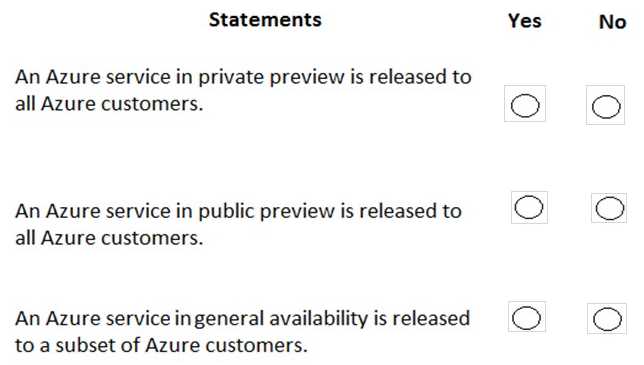
For statement 1, I’m also saying No because Azure Monitor doesn’t cover every diagnostic data type—mostly just the key performance metrics and logs. As for statement 2, it seems like a definite Yes since VM diagnostics can feed data into Azure Monitor directly, helping with centralized monitoring. The integration is pretty standard now, so that part makes sense as true.
Statement 1 seems off since Azure Monitor doesn’t collect all diagnostic data types, just performance metrics and logs. Statement 2 fits because VM diagnostics can send data directly to Azure Monitor, so that’s a Yes.