Free Google Professional Cloud Network Engineer Actual Exam Questions
Dumps Box (DumpsBox) offers up-to-date practice exam questions for Professional Cloud Network Engineer certification exam which are developed and validated by Google subject domain experts certified in Google Professional Cloud Network Engineer . These practice questions are update regularly as we keep an eye on any recent changes in Professional Cloud Network Engineer syllabus, and when there is update our team quickly adjusts the questions. This commitment to providing the best quality exam prep material to certification aspirants is what makes DumpsBox.com the best certification exam prep website. On top of that, our strong, yet strictly moderated, community based feedback keeps the content clean and current. Each question has helpful community discussion that provides it extra perspective and introduces helpful resources for better exam preparation. This also saves students from other outdated practice questions or illicit exam dumps that can have adverse affects on career. Browse through our Google Professional Cloud Network Engineer exam questions and pass your exam on first try.
on-premises to Google Cloud. While reviewing the deployed architecture, you noticed that DNS
resolution is failing when queries are being sent to the on-premises environment. You log in to a
Compute Engine instance, try to resolve an on-premises hostname, and the query fails. DNS queries
are not arriving at the on-premises DNS server. You need to use managed services to reconfigure
Cloud DNS to resolve the DNS error. What should you do?
C, since forwarding zones need correct routing to ensure queries reach on-prem DNS servers.
This one seems to point towards C for me. If DNS queries aren’t even hitting the on-prem DNS server, the problem could be missing or incorrect routes in the VPC directing traffic to on-prem IPs. Recreating forwarding zones won’t work if the network can’t actually reach the DNS server. So, making sure that routes exist and forwarding zones are correctly set up together makes sense here. Plus, C talks about reviewing existing zones and routes, which is a logical troubleshooting step before adding extra configs like in A.
You discover that Google Cloud Armor is incorrectly blocking some traffic to your application. You
need to identity the web application firewall (WAF) rule that is incorrectly blocking traffic. What
should you do?
Not D, audit logs only record changes, not live blocking info. A seems best because firewall logs pinpoint the exact WAF rule causing the block, which helps directly identify the issue.
A/B? A directly shows which WAF rule blocked traffic, but B’s load balancer logs can also help trace request paths. VPC Flow Logs in C don’t show WAF details, and D’s audit logs track config changes, not blocking events.
What should you do?
C/B? I’m ruling out A because you generally can’t just assign a public IPv6 directly to an instance in GCP. Between C and B, TCP Proxy does handle IPv6 but mostly for Layer 4 traffic and specific use cases, while global load balancers are more flexible and widely used for IPv6 external services. So C feels like the more straightforward choice, but B’s not totally off if you want TCP-level proxying specifically with IPv6 support.
IPv6 is mostly supported on global load balancers for external services, so C fits best. Internal load balancers (D) don’t really handle IPv6, and assigning IPv6 directly to instances isn’t typical here. C
These are the cloud requirements:
• An on-premises data center located in the United States in Oregon and New York with Dedicated
Interconnects connected to Cloud regions us-west1 (primary HQ) and us-east4 (backup)
• Multiple regional offices in Europe and APAC
• Regional data processing is required in europe-west1 and australia-southeast1
• Centralized Network Administration Team
Your security and compliance team requires a virtual inline security appliance to perform L7
inspection for URL filtering. You want to deploy the appliance in us-west1.
What should you do?
A imo. Using two VPCs in the Host Project fits the need to route traffic through the security appliance for proper inline inspection. Having NICs attached to separate VPCs gives clear traffic boundaries, which is crucial for L7 inspection. C and D with just one VPC and multiple subnets don’t provide that separation, so the appliance can’t effectively sit inline between different network segments. B’s setup places the instance in the Service Project, which could complicate centralized network management since the appliance is a critical security component. Overall, A seems cleaner for centraliz
B. The key difference here is that the 2-NIC instance is in the Service Project rather than the Host Project. Since the NICs still attach to the Host Project VPCs, this setup can help isolate management and security appliances from the central network while still permitting inline inspection between the two VPCs. This separation supports better admin control and could align with centralized network team needs. Options C and D fall short because they use just one VPC, which limits true inline inspection between VPC boundaries. Option A puts everything in the Host Project, which might reduce iso
objects have been successfully cached. Now you want to make sure that one of the two objects will
not be cached anymore, and will always be served to the internet directly from the origin.
What should you do?
Makes sense to use headers to control caching, so D sounds right.
A, because if the object isn't public, Cloud CDN won't cache or serve it.
address and that does not require a third-party service provider.
Which connection type should you choose?
Actually, Direct Peering (B) seems like the better fit here because it lets you connect directly to Google's network without involving third parties and supports access to public IP services like Cloud SQL. Dedicated Interconnect (C) is more geared towards private IP connections and usually needs setup through Google’s edge locations, which might not be what the question’s aiming for. Carrier Peering (A) and Partner Interconnect (D) both involve third parties, so they can be ruled out easily given the question’s requirements.
It’s C because Dedicated Interconnect gives you a private, high-bandwidth connection directly to Google, no third party involved, and you can still access public IP services like Cloud SQL. B and A usually involve some external networks.
gaming workload. Your Infrastructure is located in the us-west2 region and deployed across several
zones: us-west2-a. us-west2-b. and us-west2-c The Infrastructure Is running a web-based application
on TCP ports 80 and 443 with other game servers that utilize the UDP protocol. You need to deploy
packet mirroring policies and collector instances to monitor web application traffic while minimizing
inter-zonal network egress costs.
Following Google-recommended practices, how should you deploy the packet mirroring policies and
collector instances?
A is better to avoid cross-zone egress by keeping collectors local per zone.
Maybe D, since one collector group could simplify things while still having zone-specific policies.
is interconnected with your on-premises network using Cloud HA VPN and Cloud Router. The Cloud
Router is configured with the default settings. Your on-premises DNS server is located at
192.168.20.88 and is protected by a firewall, and your Compute Engine resources are located at
10.204.0.0/24. Your Compute Engine resources need to resolve on-premises private hostnames using
the domain corp.altostrat.com while still resolving Google Cloud hostnames. You want to follow
Google-recommended practices. What should you do?
Option D makes sense since DNS Server Policies handle selective forwarding properly.
Probably A, since the firewall should allow traffic from Compute Engine IPs, not Google DNS ranges.
need to monitor the usage of this VPN and set up alerts in case traffic exceeds the maximum
allowed. You need to be able to quickly decide whether to add extra links or move to a Dedicated
Interconnect. What should you do?
D seems easiest to check traffic fast, but I’m not sure it supports alerting directly. Could you really rely on just the VPN monitoring tab without custom alerts for when usage hits a limit?
Maybe B, since setting up custom alerts for bandwidth helps catch limits being exceeded early.
Virtual Private Cloud (VPC) and on-premises network. Traffic over the connection has recently
increased from 1 gigabit per second (Gbps) to 4 Gbps, and you notice that packets are being dropped.
You need to configure your VPN connection to Google Cloud to support 4 Gbps. What should you do?
B/D? Adding another Cloud Router (B) might help manage routing better and support more tunnels, but the real bottleneck is usually the tunnel bandwidth itself. Since each tunnel maxes out around 1.5-2 Gbps, just adding routers won’t solve packet drops at 4 Gbps. So setting up a second active/passive pair of tunnels (D) would let you split the traffic across multiple tunnels, effectively scaling the VPN capacity. The MTU change (C) won’t increase bandwidth, and ASN (A) seems unrelated to throughput limits.
Maybe B works too since adding another Cloud Router can balance the load better, but that alone might not fix the tunnel bandwidth limit. Still, it’s a solid way to handle more overall traffic from the VPC side.
addresses, and external access is granted through a global load balancer. You believe you have
identified a potential malicious actor, but aren't certain you have the correct client IP address. You
want to identify this actor while minimizing disruption to your legitimate users.
What should you do?
C/D but C is better since it avoids blocking any legit traffic before you’re certain.
C imo. Using VPC firewall logging without enforcement lets you gather evidence without blocking legit users, which fits the goal of minimal disruption better than immediate blocking options.
asia-southeast1 region cannot communicate with compute resources on-premises. What should you
do?
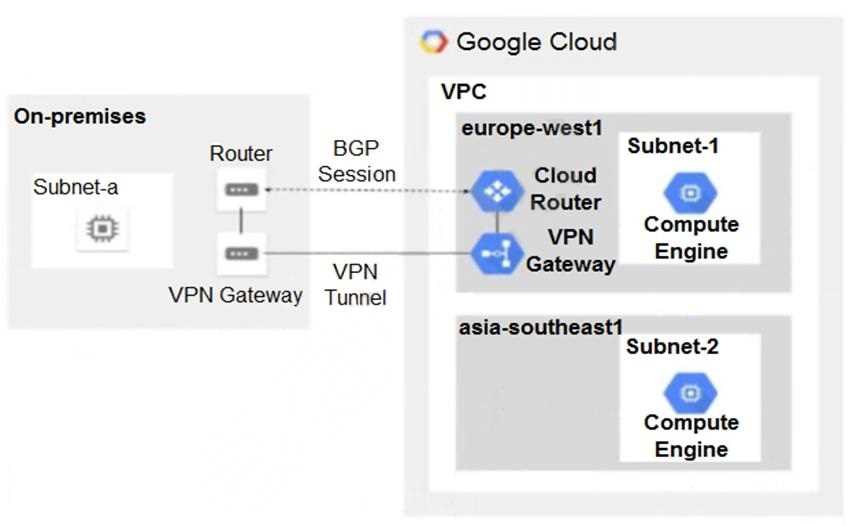
C, since regional routing blocks cross-region route sharing with on-premises.
Actually, D makes sense here too. Adding a second BGP session to the Cloud Router could help if the current session isn’t handling routes from asia-southeast1 properly, enabling proper route exchange with on-prem.
machine (VM) Instances What two prerequisite tasks must be completed before creating the load
balancer?
Choose 2 answers
B and C, firewall rules and static IP must be set before the load balancer works.
B imo, firewall rules are essential for health checks to pass. C also makes sense since a static IP is needed for consistent access. Region choice is usually tied to the backend, not strictly a prerequisite here.
Cloud This will be managed by a partner. You want to follow Google-recommended practices for
production-level applications. What should you do?
C/D? Global routing in C seems key for multi-region failover, unlike D’s regional routing.
I’m going with B here. Two Partner Interconnect connections in one metro with separate edge domains covers high availability within a single region, which is usually enough for most production setups unless multi-region redundancy is explicitly required. Plus, regional dynamic routing avoids complexity that global dynamic routing can add if you don’t need cross-region failover. Options C and D look more complex and are probably overkill unless the question states multiple data center locations or disaster recovery needs. A relies on VPN, which is less reliable than direct Partner Interconnect
need to control internet access from applications to URLs, including hostnames and paths. The
compute instances that run these applications have an associated secure tag. What should you do?
D imo, Cloud NAT doesn’t actually filter URLs or paths—it just manages IP translation. Plus, the secure tag is key here, not a service account, so option D seems off on both counts.
I’m thinking C here. Having a Secure Web Proxy in each region gives better control and likely reduces latency, plus it aligns well with the secure tag setup. C seems more robust than a single global proxy.