Free Cisco 350-701 Actual Exam Questions - Question 14 Discussion
DRAG DROP An engineer must configure AsyncOS for Cisco Secure Web Appliance to push log files to a syslog server using the SCP retrieval method. Drag and drop the steps from the left into the sequence on the right to complete the configuration. 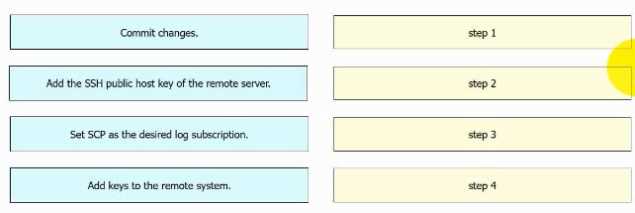
I think step 1 should be creating the SCP user account because without that, you can’t authenticate to the syslog server. After that, setting up the folder for the logs makes sense so the server knows where to place or get files. If you try to create the folder first without user permissions, it might cause errors or access issues. So, the sequence probably starts with user creation, then folder setup, then enabling SCP, and finally configuring the log push settings. This order avoids permission problems later on.
Creating the SCP user first makes sense since permissions are needed before folder setup.
I think you need to set up the destination folder first, or SCP won’t know where to send logs.
Creating the SCP user must be first, otherwise no permission for file transfer.
I’d start by creating the SCP user and setting up the destination folder before enabling SCP retrieval. Without that, you can’t push logs properly, so that order feels right to me.
Start by enabling SCP retrieval on the appliance before configuring the syslog server settings.
Option C seems right here. Automated static and dynamic analysis matching behavioral indicators sounds like sandboxing to me, since it isolates files and checks how they behave. The other options don’t really cover both static and dynamic parts together. Anyone chose something else? This one feels kinda tricky but C fits best.