Free Cisco 300-810 Actual Exam Questions - Question 6 Discussion
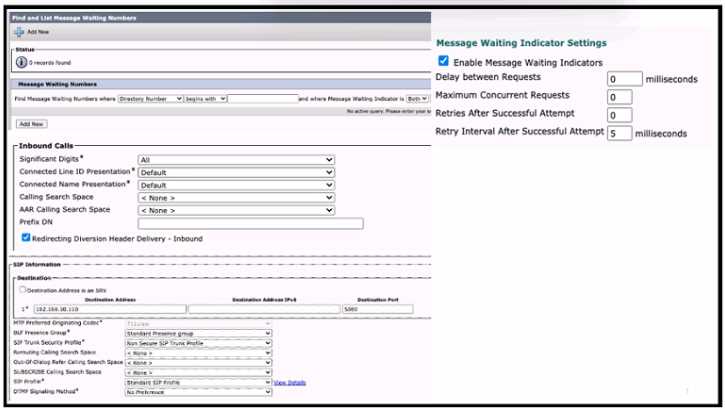
Refer to the exhibit A collaboration engineer is troubleshooting an issue with MWIs not working for
SIP-integrated Cisco Unity Connection users on Cisco UCM Calls to the Cisco Unity Connection work.
but MWIs do not light This problem affects all users on the system Which action resolves the issue?
The issue seems system-wide, so adjusting the Message Waiting Numbers (D) would fix the root cause instead of security or timers. D
Maybe C, since routing MWI might need proper calling search space on the SIP trunk.
If calls to Unity Connection are working fine, the SIP trunk security profile (A) might not be the problem since signaling’s partly okay. Could the issue be more about how MWI info is routed or recognized in UCM?
Probably A. Since calls go through but MWIs don't light, it might be a security profile issue blocking the MWI signaling on the SIP trunk. Adjusting that could fix the problem.
Yeah, I’m thinking C makes sense here. If the Calling Search Space isn’t assigned to the SIP trunk, the MWI signals might not be routed properly to the users. Since calls work but MWIs don’t, it points to a routing or permission issue, which CSS controls. Changing the CSS would allow the MWI messages through. D could be right if Message Waiting Numbers were totally missing, but the question says calls work fine and affects all users, so I’d try C first to fix the system-wide MWI signaling.
D imo, since it’s affecting everyone, missing or wrong Message Waiting Numbers on UCM would stop MWIs from triggering across the board. Fixing that should light up the MWIs properly.
If all users have MWI issues, the problem’s probably system-wide settings, so D feels right since the Message Waiting Numbers tell UCM how to trigger the lights. Go with D.
It’s A for me. Since calls to Unity Connection are going through, the SIP trunk itself is mostly set up right, but the security profile might be blocking the MWI signaling. Adjusting the SIP Trunk Security Profile can allow the MWI notifications to pass correctly. The other options like B and C don’t directly affect MWI signaling on a system-wide level as much as the security profile does. D makes sense too but if the problem is for all users, the trunk settings are a more likely culprit here than individual user configs.
Option D makes sense because if the Message Waiting Number isn’t set correctly on UCM, the MWI won’t trigger for anyone. It’s a common missed step when MWIs fail across all users.
It’s C for me. Since calls to Unity Connection are working fine, the SIP trunk security or delay timers seem less likely the problem. But if the calling search space isn’t set properly on the SIP trunk, MWI messages might not reach users. Ensuring the right calling search space allows the MWI notifications to get through correctly across the system. This fits with the issue affecting all users, so configuring the calling search space on the SIP trunk should resolve it.
It's D, configuring the Message Waiting Numbers usually fixes the MWI issue.