Free Cisco 300-415 Actual Exam Questions - Question 1 Discussion
Drag and drop the steps from the left Into the order on the right to delete a software image for a
WAN Edge router starting with Maintenance > Software Upgrade > Device list on vManage.
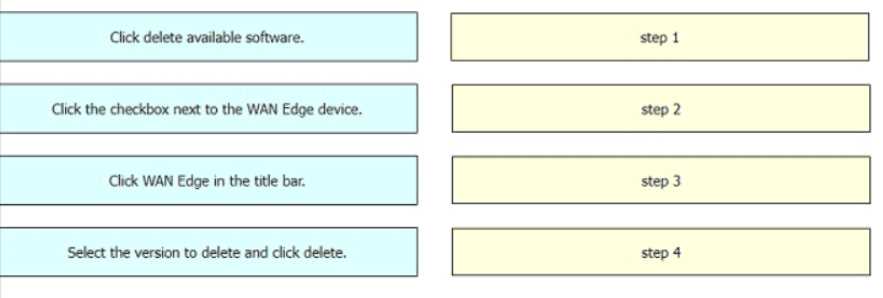
You can rule out any steps before Maintenance since question starts there. Also, deleting an image definitely needs the Software Images tab after selecting the device list, so the order should be Maintenance > Device list > Software Images > Delete > Confirm.
Definitely need Software Images tab after Device list, then confirm delete prompt last.
Agree, must select the Software Images tab after device list before deleting.
Also consider that you probably have to confirm the deletion with a prompt after choosing the image to delete. So the last step should be confirming, not just hitting delete.
I think you also need to hit the software image tab after selecting the device but before choosing the exact image to delete. It’s about narrowing down the right file first, so that step can’t be skipped.
I’d say after selecting the device, you need to click on the software image tab before you delete anything. Can’t delete what you don’t select first. So maybe the step to view or choose the image comes right after selecting the device.
I think the order should start with selecting the device under Maintenance > Software Upgrade > Device list, like you said. But before deleting the image, don’t forget to actually find and highlight the software image you want to remove. After that, you can delete it and then confirm the deletion. Skipping the image selection step would probably cause issues or confusion. So it’s definitely Select device, Select image, Delete image, Confirm deletion.
I’d put “Select the device” first, then “Delete image from device,” and finally “Confirm deletion.” Seems like the logical flow.