Free Microsoft SC-401 Actual Exam Questions - Question 9 Discussion
DRAG DROP You have a Microsoft 365 subscription that contains 20 data loss prevention (DLP) policies. You need to identify the following: ● Rules that are applied without triggering a policy alert ● The top 10 files that have matched DLP policies ● Alerts that are miscategorized Which report should you use for each requirement? To answer, drag the appropriate reports to the correct requirements. Each report may be used once, more than once, or not at all. You may need to drag the split bar between panes or scroll to view content. NOTE: Each correct selection is worth one point. 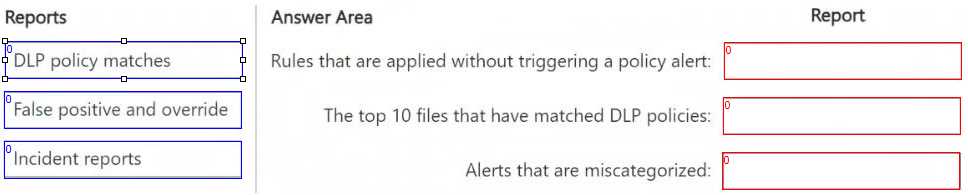
Policy Matches shows rules applied silently, so fits no alert requirement.
For rules without alerts, "Policy Matches" works since it shows matches ignored by alerts. The top 10 files need "File Matches" because it focuses on file-level hits. Miscategorized alerts fit "Alerts" report better.
Policy Matches for no alerts, File Matches for top 10 files, Alerts for miscategorized.
No alerts in a rule means that report checks inactive rules, so maybe “Policy Matches” for that?
The report for files matching DLP policies should highlight top 10 files, so “File Matches” fits best.
This one’s tricky without the image, but sounds like DLP reports stuff?