Free Microsoft SC-401 Actual Exam Questions - Question 1 Discussion
HOTSPOT You have a Microsoft 365 E5 subscription that has data loss prevention (DLP) implemented. You plan to export DLP activity by using Activity explorer. The exported file needs to display the sensitive info type detected for each DLP rule match. What should you do in Activity explorer before exporting the data, and in which file format is the file exported? To answer, select the appropriate options in the answer area. NOTE: Each correct selection is worth one point. 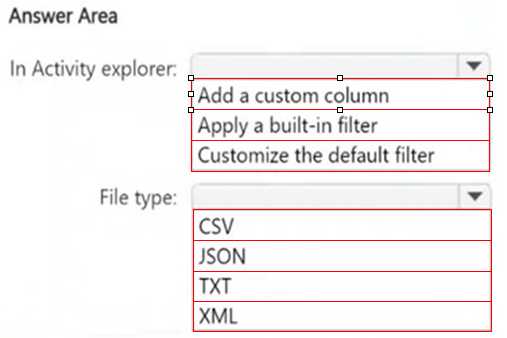
Adding the Sensitive info type column ensures it appears; export is CSV by default.
Adding the Sensitive info type column is essential to show that data in the export. The file format is CSV since Microsoft 365 exports usually default to that for compatibility.
You need to definitely add the Sensitive info type column before exporting so it shows up in the output. The export format is almost always CSV for this kind of data in Microsoft 365.
I agree you need to add the Sensitive info type column in the view first. Also, the export format is CSV because that’s standard for most activity exports in Microsoft 365 tools.
You gotta add the Sensitive info type column in Activity explorer before exporting. The exported file is typically in CSV format, which makes it easy to view and analyze in spreadsheets.
I think you need to add the sensitive info type column in Activity explorer before exporting to capture those details. The export is definitely a CSV file, since it’s the usual format for these reports.
Adding the sensitive info type column makes sense, and CSV is standard export format.
I’d go with adding the sensitive info type column first so you can see what triggered each rule. The export has to be CSV since that’s the typical format for these reports.
I’d pick the option to include sensitive info type columns before exporting, so you get that detail. And the file format is CSV, since it’s standard for data export and easy to analyze.
C and CSV