Free Microsoft SC-200 Security Operations Analyst Actual Exam Questions - Question 9 Discussion
DRAG DROP You create a new Azure subscription and start collecting logs for Azure Monitor. You need to validate that Microsoft Defender for Cloud will trigger an alert when a malicious file is present on an Azure virtual machine running Windows Server. Which three actions should you perform in a sequence? To answer, move the appropriate actions from the list of action to the answer area and arrange them in the correct order. NOTE: More than one order of answer choices is correct. You will receive credit for any of the correct orders you select. 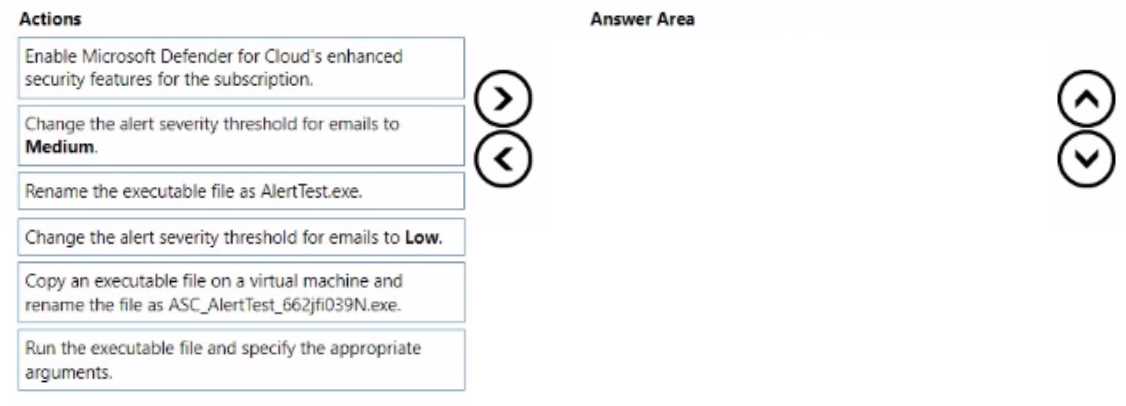
I'd say start by enabling Microsoft Defender for the subscription first, so protection is active. Then onboard the Azure VM to ensure it's monitored, and finally trigger the alert with the malicious file simulation.
You can also start by onboarding the VM (B) if Defender is already enabled by default, then simulate the malicious file (C), and finally check alerts. Skipping onboarding means no data to analyze even if Defender’s on.
You could also consider onboarding the VM (B) right after enabling Defender (D) to ensure monitoring before you simulate the attack (C). Skipping onboarding would mean no alert even if Defender’s on.
I’d say starting with enabling Defender (D) is a must so it can monitor anything. Next, onboarding the VM (B) makes sure Defender watches that machine, and lastly, simulating the malicious file (C) triggers the alert.
D, B, C fits because Defender needs activation before VM onboarding and test.
Agreed, enabling Defender (D) first is crucial before onboarding (B) and simulating (C).
I think starting with enabling Defender for Cloud (D) is key since without it, nothing else works. Then onboarding the VM (B) makes sense to get monitoring set up before finally simulating the attack (C).
Also, enabling Defender for Cloud first ensures the security policies are applied. Then onboarding the VM lets Defender monitor it properly before triggering any alerts with the malicious file simulation. So D, B, C feels right.
D, then B, then C works since Defender must be enabled before onboarding the VM.
D, B, then C makes sense since Defender must be active before testing alerts.
D, B, C makes sense since onboarding needs Defender enabled first.
I’d say start with enabling Defender for Cloud on the subscription to make sure it’s active, then onboard the VM so it’s covered by Defender, and finally simulate the malicious file to trigger the alert. Without onboarding the VM, Defender won’t monitor it correctly even if enabled on the subscription. So that sequence makes the most sense to me: enable Defender → onboard VM → simulate file.
I’d rule out simulating the malicious file before enabling Defender for Cloud since there’d be no protection active yet. So starting with enabling Defender (D), then onboarding the VM (B), and last simulating the file (C) feels right.
I’d say start by enabling Defender for Cloud on the subscription (D), then onboard the VM to Defender (B), and finally simulate the malicious file (C). The VM needs onboarding before it can send signals for alerts.
I think you gotta enable Defender for Cloud on the subscription first, then simulate the malicious file on the VM, and finally check if an alert fires. Without enabling Defender, no alerts will trigger.
I went with enabling Microsoft Defender for Cloud first, then configuring the VM to collect logs, and finally simulating a malicious file to check alerts. Makes sense that way to catch it end-to-end.