Free Microsoft SC-200 Security Operations Analyst Actual Exam Questions - Question 7 Discussion
DRAG DROP You are investigating an incident by using Microsoft 365 Defender. You need to create an advanced hunting query to detect failed sign-in authentications on three devices named CFOLaptop, CEOLaptop, and COOLaptop. How should you complete the query? To answer, select the appropriate options in the answer area. 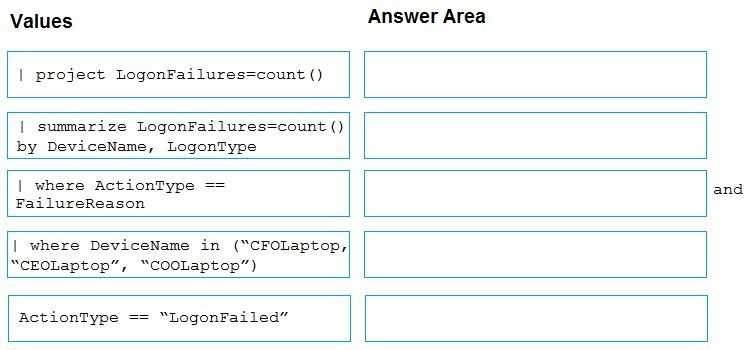
Using 'DeviceName_s in' with a list is cleaner than multiple OR conditions.
I’d go with filtering on the SigninLogs table since it tracks sign-in events and uses DeviceName_s for device names. For failed sign-ins, filtering on ResultType == 50074 or Status == "Failure" usually catches those failures cleanly. Then just use a where clause checking if DeviceName_s matches any of the three laptops. That way you avoid partial matches or case sensitivity issues. Also, it’s better to use an “in” statement for the device names rather than multiple ORs for cleaner code.
I’m thinking the key here is focusing on SigninLogs and using DeviceName_s, since that’s the consistent string field. Also, for failed sign-ins, filtering on ResultType or Status might work better than just FailureReason. So, picking DeviceName_s in the query and including a filter like ResultType != 0 to catch failures looks solid to me. It matches the schema and helps narrow down to failed attempts on those three specific devices.
DeviceName_s might be better since it’s a string field in SigninLogs.
SigninLogs table makes sense, and filtering DeviceName with in() covers all three laptops.
I think the main point is focusing on the SigninLogs table since it tracks sign-in attempts, unlike DeviceEvents which logs device events in a broader sense. For filtering failed authentications, filtering where FailureReason is not empty or null makes the most sense to catch failed sign-ins specifically. The part about the device names should be a simple "in" statement with the three laptop names to cover all those devices in one go. So basically, SigninLogs, FailureReason not null, and DeviceName in the list of laptops fits best here.
I’d go with the SigninLogs table since it’s directly related to sign-in events. Filtering on FailureReason not being null makes sense to catch failures, and using DeviceName for the device filter fits the question's device list perfectly.
I agree with using DeviceName for filtering since the question specifically lists those three device names. Also, for detecting failed sign-ins, focusing on the FailureReason or Status fields that indicate failure makes sense. So combining a filter where DeviceName is one of the three laptops and Status shows failure should catch what we need. Trying to use DeviceId here would be more complicated and unnecessary given the names are provided explicitly.
DeviceName for filtering; it matches the given device names exactly.
DeviceName works best here, as the question explicitly lists device names.
I went with filtering by DeviceName because the question specifically calls out the device names, not IDs. Using DeviceName makes the query more straightforward and readable. Also, for detecting failed sign-in attempts, you want to make sure you filter on the right event type or result field that indicates failure. Double-check what those values are named in the schema you're querying against, but DeviceName for the devices sounds like the safest bet here.
DeviceName is easier since the question lists names, not IDs.
Does anyone know if the query should filter by device name or device ID? The question mentions device names, but I’m not sure which field to use in the query.