Free Microsoft SC-200 Security Operations Analyst Actual Exam Questions - Question 4 Discussion
DRAG DROP Your network contains an on-premises Active Directory Domain Services (AD DS) domain that syncs with an Azure AD tenant. You have a Microsoft Sentinel workspace named Sentinel1. You need to enable User and Entity Behavior Analytics (UEBA) for Sentinel1 and collect security events from the AD DS domain. Which three actions should you perform in sequence? To answer, move the appropriate actions from the list of actions to the answer area and arrange them in the correct order. 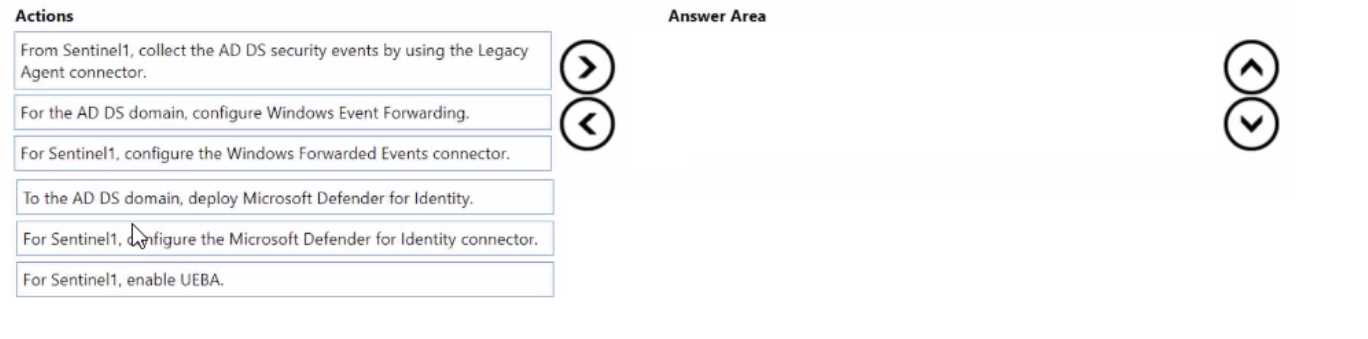
I’d start by enabling Defender for Identity since it focuses on AD DS security events, then set up the data connector in Sentinel to ingest those events, and lastly turn on UEBA to analyze the collected data.
Starting with enabling Defender for Identity makes sense since it directly monitors AD DS. After that, setting up event collection ensures data flows into Sentinel1, and finally turning on UEBA lets you analyze behaviors effectively.
I'd swap the order a bit: first enable UEBA on Sentinel1 to prepare for analytics, then set up event collection from AD DS, and finally enable Defender for Identity to boost detection capabilities.
I think another way to look at it is starting with setting up the Azure AD Connect Health since it bridges on-prem AD with Azure, making sure sync is stable and signals flow. Then you enable Defender for Identity because it’s the tool that detects risky behaviors in AD. Finally, you configure the data connectors in Sentinel to pull in those alerts and enable UEBA to analyze them. Skipping any of these feels like missing a piece of the pipeline for proper monitoring.
I agree with starting by enabling Defender for Identity since it’s designed to monitor AD DS activities directly. Without that, you won’t get the detailed security signals needed. Next, setting up event collection makes sure Sentinel actually receives those signals from on-prem. Finally, enabling UEBA is the last piece, so Sentinel can analyze user behavior based on all the collected data. Doing it in any other order wouldn’t make sense because UEBA depends on data coming through after Defender for Identity is in place and events are being collected.
Start with Defender for Identity, then configure event forwarding, finally enable UEBA.
Start with enabling Defender for Identity, then configure event collection, finally enable UEBA.
I’d say start with enabling Defender for Identity since it directly monitors AD DS activities. Then set up the event collection in Sentinel to bring the data in, and finally enable UEBA to analyze that data properly.
I think the key is enabling Defender for Identity before anything else since it collects the AD DS signals. Then you enable UEBA in Sentinel, and finally configure event collection to get the data flowing in.
Agree, starting with Defender for Identity makes sense before enabling UEBA.
I'd start by enabling Defender for Identity since it captures AD signals, then set up the workspace to collect those events, and finally turn on UEBA in Sentinel to analyze behaviors. Without Defender for Identity, UEBA won’t have much data.
I’d pick enabling Defender for Identity before turning on UEBA in Sentinel.
I think the key here is making sure you have Microsoft Defender for Identity onboarded first since it collects signals from AD DS essential for UEBA. After that, enabling UEBA in Sentinel should be straightforward. Syncing with Azure AD usually happens beforehand, so if it’s already synced, you can skip repeating that step. Setting up the Azure ATP sensor also comes after Defender for Identity is enabled because it’s what monitors domain controllers. So the order should start with enabling Defender for Identity, then deploying sensors, and finally turning on UEBA in Sentinel.
First, you need to onboard your AD DS domain to Azure AD Connect sync if it’s not already done, since syncing is crucial for UEBA to work. Then enable Microsoft Defender for Identity because it collects security events from on-prem AD DS. Finally, enable UEBA in the Sentinel workspace (Sentinel1) settings so it can analyze the behavior data collected. This sequence makes sense since you need the sync and data collection before turning on analytics in Sentinel. The main point is that syncing and enabling Defender for Identity come before activating UEBA in Sentinel.
This one’s tricky, kinda a multi-step process with syncing and setting up UEBA. The drag-drop format makes it harder to be sure about order without seeing the exact options laid out in text though.