Free Microsoft SC-200 Security Operations Analyst Actual Exam Questions - Question 15 Discussion
HOTSPOT You have the resources shown in the following table. 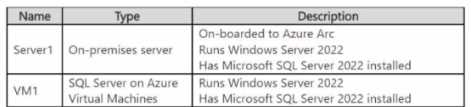 You have an Azure subscription that uses Mictosoft Defender for Cloud. You need to use Defender for Cloud to protect VM1 and Server1. The solution must meet the following requirements: • Support Advanced Threat Protection and vulnerability assessment • Register each SQL Server 2022 instance as a SQL virtual machine. • Minimize implementation and administrative effort What should you deploy to each server? To answer, select the appropriate options in the answer area.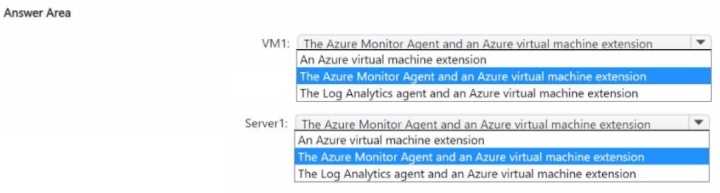
If Server1 isn't an Azure VM but on-prem, deploying the Defender for SQL Server extension there makes sense. VM1, as an Azure VM, should have the SQL IaaS Agent Extension to support advanced protection and vulnerability scans.
I agree with using the SQL IaaS Agent extension on VM1 since it’s an Azure VM and that extension handles both vulnerability assessment and advanced threat protection automatically. For Server1, if it’s on-premises or a non-Azure VM, the Defender for SQL Server extension is the way to go because it supports ATP and vulnerability scans but doesn’t require you to register it as a SQL virtual machine. This setup keeps admin effort low for both servers and meets all the requirements without extra manual steps.
Also thinking that since VM1 is an Azure VM, the SQL IaaS Agent extension makes sense to auto-register and enable vulnerability assessment. Server1, probably on-prem, would need the Defender extension for SQL Server to cover ATP without much admin overhead.
I’d say SQL IaaS Agent on VM1 because it’s an Azure VM and auto-registers SQL instances. For Server1, the Defender SQL Server extension fits best since it’s likely on-prem and still supports ATP with minimal setup.
Also thinking the SQL IaaS Agent for VM1 fits because it’s Azure VM and auto-registers it, while Server1 needs the Defender SQL Server extension since it’s not an Azure VM. Keeps admin work low and meets all needs.
I agree that VM1 definitely needs the SQL IaaS Agent Extension since it’s running in Azure and that helps with automatic registration and protection. For Server1, which is on-prem, installing the Defender SQL Server extension directly is the way to go because it adds Advanced Threat Protection and vulnerability scanning without much extra setup. This combo ticks all the boxes while keeping admin overhead low.
This one feels pretty clear. For VM1, go with SQL IaaS Agent Extension; for Server1, because it’s on-prem, the SQL Server extension for Defender makes sense. Covers protection and registration with less hassle.